Choose a compact 8–9-inch tablet if holding it in a crowded carriage matters most; choose a larger screen if you regularly enlarge text, read PDFs or work with notes. Before settling on either size, check that your exact language-reader app and book work on the tablet, and download what you need before travelling.
Who is this choice for?
Offline-first train readers
If your journey includes tunnels or weak reception, you need your language reader and its books available without a live connection. Google Play Help confirms that Google Play Books supports downloaded e-books for offline reading; check the download process for the service you actually use.
Vocabulary-focused language learners
If unfamiliar words interrupt your reading, the app’s text controls and vocabulary tools may matter as much as the tablet. Amazon describes visual reading adjustments in its Kindle apps, but available features can depend on the book and app.
Large-text and annotation readers
If you enlarge text, read fixed-layout PDFs or keep notes beside a reader, you may value more page area than the smallest tablet provides. Lenovo lists an 11-inch anti-glare display for its UK Tab M11 configuration.
What should you check first?
Confirm that you can access and download the required book in your chosen app, then decide how much screen space you need while travelling.
| Concern |
What to check |
Who this matters to |
| Offline books and app access |
Check the exact reader app, operating-system requirement, book availability for your account and offline-download steps. |
I need my book to open when train reception drops, without discovering too late that the app or title will not work. Around 42% of consumers put offline access and content compatibility first. |
| Readable text and vocabulary tools |
Try a representative book with your preferred font size, spacing, contrast and dictionary or vocabulary controls. |
When I meet unfamiliar words, I want to adjust the page and look them up without losing my place. Roughly 33% of consumers prioritise readable text and vocabulary support. |
| Space for PDFs and notes |
Open the page format you use and check whether there is enough room for enlarged text or notes; confirm any required pen or stand separately. |
My course materials include detailed pages or annotations, so I am willing to carry a larger tablet for more working room. About 25% of consumers place screen space for text and notes first. |
Mistakes to avoid
-
Choosing the screen before checking the reader
A display that suits you will not help if your required app, book or account cannot be used on the tablet. Rakuten Kobo lists minimum operating-system versions for its mobile app.
Check the exact app and title, then confirm sign-in and offline reading with a representative book before relying on the tablet for a journey.
-
Relying on train connectivity
Google Play Help says its e-books can be downloaded for offline reading, so a live connection need not be part of every reading session.
Download the book and any linked study files before departure, and open them while you are still online to check that they are ready.
-
Treating a regional variant as the same configuration
One Joybuy Galaxy Tab A9+ listing identifies its tablet as an HK Version. A regional label makes the exact model, supplied items and terms worth checking rather than assuming they match a UK configuration.
Confirm the full model number, charging arrangement, relevant cellular bands, warranty terms and applicable UK product information for the particular item.
-
Assuming pictured accessories are included
Accessories recommended alongside a tablet are not necessarily part of its box contents. Apple’s UK iPad mini specification lists a USB-C charge cable, while a Joybuy iPad mini listing separately recommends other accessories.
Read the in-box list for the exact variant and check whether the case, stand, pen or charging adapter you intend to use is included.
Relevant brands for reference
Apple
The iPad mini is a compact option to examine if your required language reader works on iOS. Apple UK lists an 8.3-inch display, a 293 g weight for the Wi-Fi model and an anti-reflective coating.
- Its stated size and Wi-Fi weight are relevant when you expect to hold the tablet through a journey.
- Check your reader app’s current iOS requirement and the availability of your book; the tablet specification alone cannot establish either.
Samsung
Samsung’s Galaxy Tab A9 and A9+ provide smaller and larger Android formats. Samsung UK lists an 8.7-inch screen for the A9; its published A9/A9+ information describes microSD expansion of up to 1 TB on supported variants.
- The choice of screen formats lets you weigh handheld reading against room for larger pages.
- A microSD slot does not establish that your particular reader app can store protected book downloads on a card.
Lenovo
The UK Tab M11 configuration is a larger-screen Android option for readers assessing PDFs, enlarged text or notes. Lenovo UK lists an 11-inch, 1920 × 1200 anti-glare display and 128 GB of storage.
- The specified display gives you a concrete page size and finish to compare with compact tablets.
- Lenovo’s up-to-10-hour figure is for video playback, not a promise of reading time with your app, brightness settings and journey conditions.
Joybuy tablets to consider
These tablets cover compact handheld formats and larger screens for study pages. Whichever size appeals, check your reader, book and offline access for the exact device before choosing.
 No image available
Apple iPad mini 7 (A17 Pro), 128GB, Space Grey
Consider this compact format if you expect to hold your language reader in a crowded carriage.
The listed variant has 128GB of storage. Apple UK specifies an 8.3-inch display for the iPad mini (A17 Pro); confirm that your chosen app and title work on the device.
View on Joybuy
 No image available
Samsung Galaxy Tab A11+, 8GB RAM, 256GB, Wi-Fi, Grey
Consider this Wi-Fi model if you want a tablet for reading material downloaded before your journey.
Its listed configuration has 8GB RAM and 256GB of storage. Check the screen dimensions and finish against the pages and carriage lighting you expect, as well as access to your exact reader.
View on Joybuy
 No image available
Xiaomi Pad 8, 8GB RAM, 128GB, Wi-Fi, Grey
This Wi-Fi tablet is an option to assess if you prepare your language books and documents before boarding.
The named variant has 8GB RAM and 128GB of storage. Check its display size and finish for your preferred page layout, and confirm that your reader supports offline use with your title.
View on Joybuy
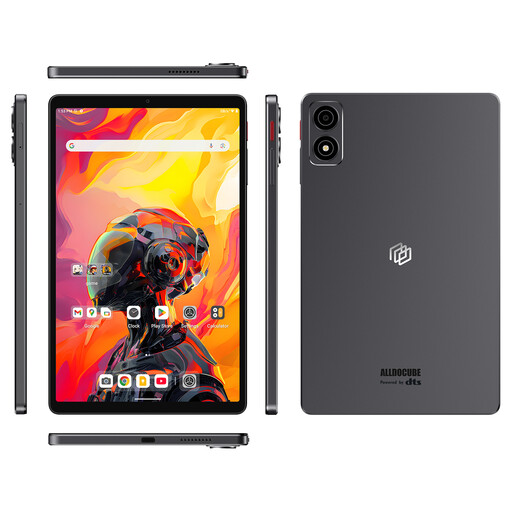 No image available
ALLDOCUBE iPlay 70 Mini Ultra, 8.8-inch, 12GB RAM, 256GB
The 8.8-inch format is worth considering if a smaller tablet is easier for you to handle on the train.
The named variant runs Android 14 and has 12GB RAM, 256GB of storage and a 7,300 mAh battery. Its title states that no charger is included; check your charging arrangement and the compatibility of your reader app.
View on Joybuy
 No image available
TECLAST ArtPad Pro 2025 Edition, 12.7-inch 2K, 256GB, with stylus
Consider the larger display if detailed study pages and notes matter more to you than compact handling.
The named variant runs Android 15 and includes a stylus; it lists 8GB RAM plus 12GB virtual RAM and 256GB of storage. Check whether your reading app accepts the annotations you intend to make, and whether this size works in your usual train seat.
View on Joybuy
Frequently asked questions
Is a Wi-Fi-only tablet enough for reading on trains?
A Wi-Fi-only tablet can be enough if your required books are downloaded and available offline before you travel. Google Play Help confirms offline e-book downloads for Google Play Books; check the equivalent steps for your own service rather than relying on train reception.
How can I make a language reader easier to read?
Open a representative book in the intended app and try its font size, spacing, page colour and vocabulary controls. Amazon describes visual adjustments for supported reading in its Kindle apps, but the controls you can use may vary by book and app.
Will any tablet run my Kobo or Kindle books?
No: check the app’s current operating-system requirement and whether your particular book is available to your account. Rakuten Kobo lists Android 10 and above and iOS 18 and above for its mobile app; a compatible operating system alone does not confirm access to every title or feature.


