For staff-supervised event notes, start with a tablet whose screen makes the actual notes readable in the library and whose content staff can update easily. If visitors will operate the display unattended, choose the tablet and management service together: a screen shortcut is not a substitute for a tested single-app setup. Plan for a secure stand and power arrangement, and assess the accessibility of any public-facing notes website or app separately from the hardware.
Who is the display for?
Libraries with an unattended public display
Visitors need to see the approved event notes without being able to move freely into other apps or settings. Choose a tablet only after checking a compatible managed single-app or kiosk workflow; Apple and Samsung document such controls for devices that meet their respective management requirements.
Staff who update notes during the day
Staff need to correct times and replace notices between sessions. Test the publishing app and the actual note layout together: an approximately 11-inch screen provides space for text, but viewing distance, lighting and the update process still matter.
Branches planning a simple supervised display
A tablet showing mostly static notes may not need the same management setup as an unattended interactive kiosk. Include its stand or enclosure, charging arrangement and staff update routine when deciding whether the setup is practical.
What matters when choosing?
Decide whether staff will supervise the screen before choosing a tablet. That determines how important managed access is; the notes themselves, their viewing position and the update routine then need testing in the library.
| Concern |
What to check |
Who this matters to |
| Keeping notes on screen |
For unattended use, confirm the exact tablet and management service can restrict access to approved content, recover after a restart and let authorised staff exit. |
If visitors can touch an unattended screen, I need the event notes to stay open rather than exposing other apps. Around 31% of consumers put that control first. |
| Readable, usable notes |
Test the real layout at its intended viewing distance and in the library’s lighting, including text size, contrast and any relevant assistive workflow. |
I need visitors to read the schedule without struggling with small text or reflections. Readability and accessibility are the primary concern for around 25% of consumers. |
| Reliable updates |
Choose the notes format, then test staff sign-in, publishing, connectivity and what happens when an update or restart fails. |
When an event time changes, I need staff to publish the correction without a complicated handover. Around 25% of consumers make the update process their main priority. |
| Complete setup |
Account for the stand or enclosure, cable routing, charging, any management service and ongoing support alongside the exact tablet configuration. |
For a straightforward supervised display, I need the installed setup to remain manageable, not just the tablet on its own. That is the leading concern for around 19% of consumers. |
Mistakes to avoid
-
Choosing by screen size alone
An 11-inch screen does not guarantee that event notes will be legible from their intended viewing position. Font size, contrast, reflections and the content format all affect the result; GOV.UK also identifies poor colour contrast and inaccessible PDFs as common accessibility problems.
Display representative notes in the proposed position before equipping multiple locations. Check portrait and landscape layouts, larger text and any assistive workflow visitors need.
-
Assuming a consumer tablet is already a kiosk
Apple documents App Lock for devices enrolled in management, while Samsung documents ProKiosk configuration for supported Galaxy devices. Neither should be assumed to work on a particular purchase without checking the device and service together.
Confirm compatibility, staff exit procedures, restart behaviour and how notes can be changed while access remains restricted.
Management may also involve enrolment, setup work and a licence.
-
Planning around the tablet alone
A tablet used as a public display also needs a suitable position, a safe charging arrangement and a way for staff to maintain its content. Lenovo’s UK Tab M11 listing presents several accessories separately from the tablet.
Plan the installed arrangement for the exact device, including physical security, cable management and responsibility for updates.
Brands to consider
These examples illustrate different display and management considerations; the cited features apply to the named models and services, not automatically to every tablet from each brand.
Apple
An option for libraries already using iPad-compatible publishing software or Apple device management. Apple lists an 11-inch display for the iPad (A16).
- Apple specifies a 2360 × 1640 display rated at 500 nits for the iPad (A16).
- Apple’s persistent App Lock configuration requires enrolment in a compatible device-management service; it is not established simply by buying an iPad.
Samsung
Relevant where a library is considering a managed Galaxy display. Samsung lists an 11-inch Galaxy Tab A9+, while its Knox Configure documentation describes kiosk workflows for supported devices.
- Samsung Knox Configure describes single-app and multi-app ProKiosk profiles, including options for approved web bookmarks and local content on supported devices.
- Check the exact Galaxy model, Knox product and any required management licence before planning an unattended installation.
Lenovo
Relevant to a simple or staff-supervised display where screen reflections are a concern. Lenovo lists an anti-glare 11-inch Tab M11 configuration in the UK.
- Lenovo specifies a 1920 × 1200 IPS anti-glare screen rated at 400 nits for its listed Tab M11 configuration.
- For unattended use, confirm compatibility between the exact tablet, notes software and proposed management service before deployment.
Tablets to consider on Joybuy
These tablets are options to assess for displaying library notes, particularly where staff supervise the screen. Before using any one of them unattended, confirm its compatibility with the chosen notes app and management service, then test the complete display in place.
 No image available
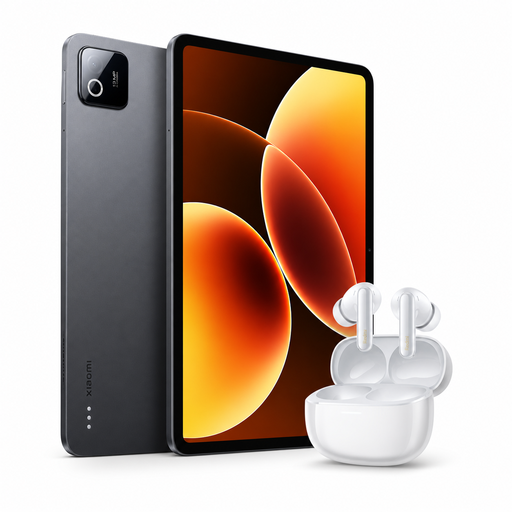
Xiaomi Pad 8, 8GB RAM, 128GB Wi-Fi, Gray, with Redmi Buds 6 Pro Glacier White
Consider this bundle for staff-supervised notes if the included earbuds also serve a purpose. Test the notes layout on site, and confirm the stand, power arrangement and management compatibility before using the tablet as an unattended display.
View on Joybuy
 No image available
Samsung Galaxy Tab A11+, 8GB RAM, 256GB Wi-Fi, Gray
This is a candidate for staff-supervised event notes if the publishing app works on the exact model. Samsung’s documented kiosk workflows must not be assumed to apply to this Galaxy Tab A11+; check device and service compatibility before unattended use.
View on Joybuy
 No image available
TABWEE W90 11-inch 4G tablet, 24GB (8+16) RAM, 256GB
For supervised notes, test whether the screen presents the intended text clearly and whether staff can update the chosen content format. Confirm the operating-system version and app compatibility for this exact configuration before purchase, especially if management software is required.
Purchase link unavailable
 No image available
DOOGEE U11 PRO 11-inch tablet, 30GB advertised RAM, 256GB, Black
Consider it for supervised notes only after testing the actual text layout at the intended viewing distance. The title lists a 90Hz IPS screen; confirm the installation and any required kiosk-management compatibility separately.
View on Joybuy
 No image available
Apple iPad Pro 11-inch (M5), 256GB Wi-Fi, standard glass, Silver
This model is worth assessing if staff already use an iPad-compatible notes workflow. For an unattended display, confirm enrolment, the management service and the exact notes app rather than assuming that features documented for another iPad model apply to this one.
View on Joybuy
Common questions
Does a larger tablet screen make event notes accessible?
No. Screen size may help with layout, but the content and its interaction design still matter. GOV.UK identifies poor colour contrast and inaccessible PDFs as common problems for public-sector digital services; test the actual notes and any assistive workflow visitors need.
Do public-sector accessibility requirements apply to notes shown on a tablet?
They may apply when the library is a public-sector body and the notes are provided through an in-scope website or mobile app. GOV.UK describes accessibility requirements for those digital services; establish the organisation’s status and the scope of the particular notes service rather than treating the tablet itself as proof of compliance.
How can an unattended tablet stay on the event notes?
Use a management setup confirmed for the exact tablet and notes format. Apple documents App Lock for enrolled devices, while Samsung documents ProKiosk profiles for supported Galaxy devices; test restrictions, restarts, staff access and content updates before leaving a display unattended.


