What to check before buying
Start with the reading service and files you need offline, then check how those documents look on screen and whether the tablet is comfortable to hold and prepare for the flight.
| Concern |
What to check |
Who this matters to |
| Offline access and apps |
Check that your reading app runs on the tablet and that a representative ebook and PDF open after download. Amazon says Google Play is not supported on Fire tablets. |
If I rely on a library app and saved archive files, I need to open them without aircraft Wi-Fi; around 42% of consumers would put offline access and app compatibility first. |
| Maps, scans and notes |
Open a sample map or two-page scan at a comfortable zoom level; check annotation support if you need to mark documents. |
When fine print or historical maps are central to my reading, I would rather have usable page detail than the smallest screen; roughly 33% of consumers would prioritise document legibility and annotation. |
| Handling and power |
Compare the weight of the exact model and test downloaded reading at your usual brightness. Check the in-box charging equipment and your carrier's power-bank instructions. |
For hours of reading in a confined seat, I want a device I can hold comfortably and a charging plan I have prepared; about 25% of consumers would make carrying and power their primary concern. |
Relevant brands to consider
These examples illustrate different reading workflows; the specifications and restrictions below apply to the named product lines, not every tablet from each brand.
Apple
The 11-inch iPad Air suits readers who already use Apple Books and want space for colour pages and PDFs.
- Apple lists the 11-inch Wi-Fi iPad Air at 464 g, with a 2360 × 1640 display and capacities from 128GB to 1TB.
- Choose enough internal storage for your offline library and confirm that your required archive apps and files work on iPadOS.
Samsung
The 10.9-inch Galaxy Tab S10 FE is worth considering when expandable storage and handwritten notes matter to your reading workflow.
- Samsung states that this model supports microSD cards up to 2TB and S Pen note-taking.
- Samsung's UK purchase information says the Tab S10 FE range does not include a travel adapter; check the exact bundle and prepare a compatible one if needed.
Amazon
Fire HD 10 is an option for colour reading and entertainment when the apps needed for your archive are available in its ecosystem.
- Amazon's Fire HD 10 listing specifies a 10.1-inch 1080p display, 32GB or 64GB internal storage and microSD expansion up to 1TB.
- Amazon says Google Play is not supported on Fire tablets. Confirm your reading apps before choosing this route, and do not treat its up-to-13-hour battery claim as your flight runtime.
Joybuy tablets for this journey
These tablets cover compact handheld reading, larger displays and an E Ink note-taking option. Choose around the files, apps and handling conditions that matter on your flight rather than assuming that every tablet will suit the same archive.
 No image available
Apple 11-inch iPad Air (2026, M4), Wi-Fi, 512GB, Space Grey
Consider this 11-inch option if you use Apple Books and want room for downloaded documents without moving to a 13-inch tablet.
Its listed configuration has 512GB of internal storage. Confirm that your other reading apps and archive files work offline, and test your usual reading brightness before travel.
View on Joybuy
 No image available
Apple iPad Mini 7 (A17 Pro), 512GB, Space Grey
Consider the smaller iPad Mini if holding and packing a compact device takes priority over viewing a large map or two-page scan at once.
This variant lists 512GB of storage. Try your most detailed PDF at your preferred reading size and confirm its offline app workflow.
View on Joybuy
 No image available
iFLYTEK AINOTE 2, 10.65-inch E Ink tablet with protective case
This E Ink model is a different approach if document reading and handwritten notes matter more to you than choosing a conventional tablet display.
The product name lists a 10.65-inch screen and protective case. Check how your maps and image-heavy files appear on it, whether your files are available offline and what lighting you will have in your seat.
View on Joybuy
 No image available
Xiaomi Pad 8, 8G RAM, 128GB, Wi-Fi, Grey
Consider this tablet if you want to assess a larger screen for maps and scanned documents alongside your offline storage needs.
The listed variant has 8G RAM, 128GB storage and Wi-Fi connectivity. Check your reading apps with representative downloaded files, and confirm the in-box charging equipment.
View on Joybuy
 No image available
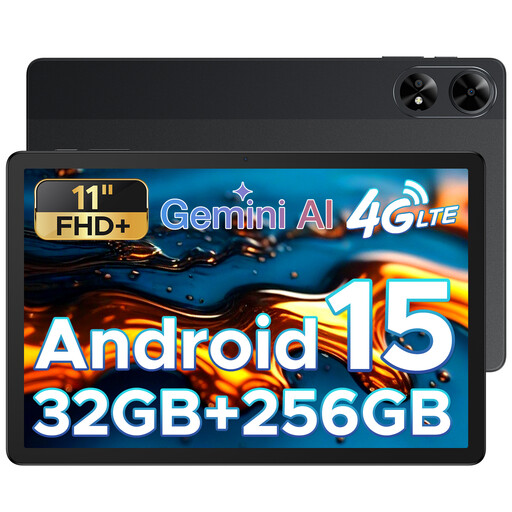
DOOGEE Tab G6 Plus, 11-inch, 32GB RAM, 256GB ROM, Black
This 11-inch Android tablet is a candidate if you want space for downloaded reading while staying near the suggested screen-size range.
Its product name lists a 1920 × 1200 display, 256GB ROM, expansion up to 2TB and an 8000mAh battery. Battery capacity alone does not tell you how long your files will remain readable at your chosen brightness; test the workflow before flying.
View on Joybuy
Frequently asked questions
Is a Wi-Fi-only tablet enough for reading on a long flight?
A Wi-Fi-only tablet can work for this journey if you download and open every required ebook, PDF, map and app resource before departure. Google Play Help says downloaded Google Play Books ebooks can be read without an internet connection; Apple Support explains how to re-download previous Apple Books purchases.
How much storage do local-history files need?
Measure the collection you intend to carry, especially scanned PDFs and images, before choosing a capacity. Samsung states that the Galaxy Tab S10 FE supports microSD cards up to 2TB, while Amazon lists expansion up to 1TB for Fire HD 10; for an iPad Air, select the internal capacity you need when buying.
Will an advertised battery figure cover the whole flight?
An advertised maximum does not guarantee runtime for your reading session. Test downloaded files at your usual brightness, charge before leaving and pack suitable charging equipment; Amazon's up-to-13-hour Fire HD 10 figure is a listing claim, not a reading-time promise.
How should I prepare a power bank for the flight?
Carry a power bank in cabin baggage and protect it individually when it is not in use, as the UK Civil Aviation Authority instructs. Check the operating airline's current conditions for your particular power bank before departure.


