If your minutes depend on desktop-style workplace software, consider a Windows detachable after checking the required applications. An iPad or Android tablet can suit Word-based editing if the necessary features, Microsoft 365 account and storage workflow work on the exact device. For library use, assess the complete keyboard-and-stand setup and follow your organisation’s rules for handling confidential files.
Who needs which setup?
Frequent minute-takers working in Word
If you regularly type, format and circulate minutes, check keyboard comfort alongside the Word features, templates and storage your organisation requires. Microsoft Support describes mobile Word features, but access to particular editing functions depends on the account and device.
Writers carrying a setup to the library
A tablet alone is not the whole writing kit. Consider how its keyboard and stand fit on a library desk and how much space the assembled kit takes in your bag.
Editors handling confidential minutes
Check that the tablet works with your organisation’s approved sign-in, connection and document-storage arrangements. The National Cyber Security Centre warns that data on insecure public networks can be intercepted or modified.
What matters when choosing?
Choose an operating-system route that supports your organisation’s document workflow, then compare the complete writing setup rather than the tablet alone. Microsoft Support says mobile editing and some Word functions depend on the Microsoft 365 plan and device screen size.
Windows detachable
Consider it when: Your minutes rely on desktop-style workplace applications or extensive file-management steps.
Bear in mind: Microsoft describes the Surface Pro keyboard as optional, so check the complete typing setup.
iPad with keyboard
Consider it when: Your approved Word, review and storage workflow works on iPad and you want a compact writing kit.
Bear in mind: Apple sells the Magic Keyboard for iPad Air separately; check Microsoft 365 access for the screen size and features you need.
Android tablet with keyboard
Consider it when: Your approved apps work on Android and you want to choose between a compact screen and more document space.
Bear in mind: Check keyboard compatibility for the exact model and the Microsoft 365 conditions for your intended editing tasks.
| Concern | What to check | Who this matters to |
|---|
| Typing and navigation |
Check the exact keyboard’s compatibility, layout and desk angle, plus how you will position the cursor in a long document. |
If I draft and revise minutes for extended periods, I need a stable keyboard and a practical way to select text. Around 50% of consumers put typing and navigation first. |
| Portable screen space |
Compare the assembled kit’s size and weight, and try the document zoom or side-by-side view you expect to use. |
When I take agenda papers and a draft to the library, I want enough room to read without making the kit awkward to carry; portability and screen space come first for around 30% of consumers. |
| Confidential files |
Confirm approved sign-in, storage and connectivity with your organisation; check the library’s own Wi-Fi terms. |
If the minutes contain restricted information, I need an approved way to access and share them away from the office. Secure handling is the primary concern for around 20% of consumers. |
Mistakes to avoid
-
Assuming a Word file opening means every editing task will work
Microsoft Support sets plan and screen-size conditions for mobile editing and lists some review functions among features requiring a qualifying plan. Opening a template does not establish that your account supports the full minutes workflow.
Before buying, check a representative template, the required review features and your organisation’s approved storage location against the intended device and Microsoft 365 account.
Your planned workflow may require a qualifying Microsoft 365 subscription.
-
Choosing the tablet without planning the typing kit
Long-form minutes editing calls for a workable desk arrangement, not just a touchscreen. Apple’s Magic Keyboard for iPad Air is separate, and Microsoft describes the Surface Pro keyboard as optional.
Check the exact keyboard and stand arrangement, key layout, pointing method and combined carry size before choosing a tablet.
-
Treating library Wi-Fi as private
The National Cyber Security Centre warns of interception or modification risks on insecure public networks. Islington Council’s library policy also identifies risks with open, unencrypted Wi-Fi; rules and facilities vary by library.
Use your organisation’s approved connection and storage method for confidential minutes, and check the library’s current conditions before working there.
-
Choosing a larger screen without checking the assembled kit
More display area can help when reading a source document beside a draft, but it changes what you carry. Apple lists its 11-inch iPad Air Wi-Fi model at 464 g and its 13-inch model at 616 g, before adding a keyboard.
Compare screen space against the tablet-and-keyboard kit you would actually take to the library.
Relevant brands to consider
Microsoft Surface
Surface Pro is a Windows detachable to consider when document work calls for a laptop-style setup.
- Microsoft describes Surface Pro laptop and tablet modes, an adjustable kickstand and an optional keyboard with a haptic touchpad.
- Check whether the keyboard is part of the configuration you choose; a video-playback battery figure does not establish runtime for document editing and syncing.
Apple
iPad Air offers 11-inch and 13-inch iPadOS options for a minutes workflow that your organisation has confirmed works on iPad.
- Apple offers a separate Magic Keyboard for iPad Air with a trackpad, function row and adjustable viewing angles.
- Check the keyboard for the exact iPad and confirm the Microsoft 365 plan and Word functions your work requires.
Samsung
Galaxy Tab S10 FE models offer an Android choice between a smaller tablet and a larger document workspace.
- Samsung specifies a 10.9-inch screen for the Tab S10 FE and a 13.1-inch screen for the FE+.
- Check keyboard compatibility for the exact tablet model, as well as the account and features needed for Word editing.
Lenovo
Lenovo lists Android tablet bundles for buyers considering a tablet and keyboard together.
- Lenovo’s UK Tab M11 bundle listings include a UK-English wireless keyboard.
- Check the particular bundle and try your organisation’s apps and document sizes before relying on it for regular minutes work.
Joybuy product choices
These choices include compact Android tablets for a keyboard-based kit and Windows convertibles for those considering a laptop-style writing setup. The convertibles fold into tablet mode but are not detachable tablets; compare their form factor with how you plan to work at the library.
 No image available
TABWEE T20 10.1-inch tablet with keyboard and mouse, 256 GB
Consider this Android tablet if you want a compact typing kit rather than a tablet alone. Its name specifies a 10.1-inch display, keyboard, mouse and 256 GB storage; check the exact Android version, keyboard layout and Word workflow before choosing it.
View on Joybuy
 No image available
HP OmniBook Ultra Flip 14-fh0006na 2-in-1, 16 GB RAM, 1 TB SSD
Consider this Windows 11 Home convertible if you want a built-in laptop-style keyboard as well as a folding 2-in-1 format. It is not a detachable tablet; check its carry size and your organisation’s Word and storage requirements.
View on Joybuy
 No image available
TABWEE T80 10-inch Android tablet with keyboard, 128 GB
This is another compact tablet-and-keyboard option for typing minutes. Its name specifies a 10-inch screen and 128 GB storage; confirm the exact memory configuration, keyboard layout and a suitable desk stand before choosing it.
View on Joybuy
 No image available
HP OmniBook X Flip 16-as0004na 16-inch touchscreen 2-in-1
Consider this Windows 11 Home convertible if you expect to edit at a desk and want a larger screen and built-in keyboard. Its name specifies 16 GB RAM and a 512 GB SSD; compare its carrying requirements with a smaller kit and check your organisation’s document workflow.
View on Joybuy
 No image available
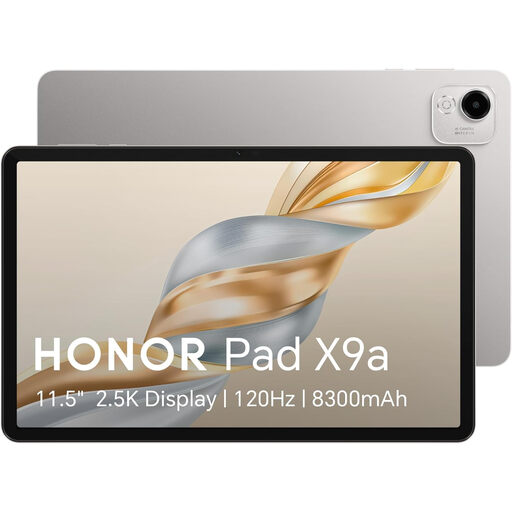
HONOR Pad X9a 11.45-inch Wi-Fi 128 GB Grey
Consider this Android tablet if its 11.45-inch screen suits the way you read and edit documents. Plan the keyboard and stand you would use with it, and check the Microsoft 365 features and connectivity your minutes workflow requires.
View on Joybuy
Questions about library-based editing
Can I edit Word meeting minutes on an iPad or Android tablet?
Yes, Microsoft Support describes core Word editing on iPads and Android tablets. Check the exact features your minutes require, especially review functions, templates and organisation-controlled storage, against the intended device and Microsoft 365 account.
Will I need a Microsoft 365 subscription?
You may need a qualifying subscription, depending on the device size, storage location and Word features involved. Microsoft Support identifies conditions for larger mobile devices, certain business-storage editing and advanced functions such as tracking and reviewing changes; check your account against your intended workflow before buying.
Can I use library Wi-Fi for confidential minutes?
Do not assume open library Wi-Fi is suitable for confidential files. The National Cyber Security Centre warns of risks on insecure public networks, so follow your organisation’s approved connection, sign-in and storage arrangements and check the particular library’s Wi-Fi terms.


