Choose a compact 8-inch tablet if you mainly read text, or consider a larger screen if photographs, album artwork and illustrated pages are central to the biographies you read. Check your reading apps before settling on Fire OS, Android or iPad, and consider how you will keep notifications and audio quiet. For bedtime use, NHS Every Mind Matters advises avoiding tablets during the hour before sleep; display settings do not replace that screen-free time.
Who is this for?
Shared-bedroom evening readers
You want to read without disturbing someone nearby and can make room for a screen-free period before sleep. NHS Every Mind Matters advises trying not to use tablets for an hour before bed, so the timing of your reading matters alongside brightness and sound.
Readers of illustrated biographies
Photographs, album covers, captions and timelines make page layout important to you. Compare how your own ebook or PDF looks at a comfortable text size, rather than choosing by screen size alone.
Library-app and download organisers
You rely on particular ebook, public-library or audiobook apps, or keep books and media available offline. App access and the way each tablet handles storage need checking before you choose a platform.
What matters when choosing?
Start with the page size and app access you need, then check whether the tablet fits your shared-bedroom routine. An 8-inch Fire tablet, a larger Android tablet and an iPad offer different combinations of size, storage and app environment.
Compact Fire tablet
Consider it when: You mainly want an 8-inch device for reading and downloaded media.
Trade-off: Illustrated layouts have less room, and Amazon says Fire tablets do not support Google Play.
Larger Android tablet
Consider it when: You want more space for photographs and reference pages, with expandable media storage on a model such as the 11-inch Samsung Galaxy Tab A9+.
Trade-off: A larger device is less compact to hold; Samsung says the Galaxy Tab A9+ uses its microSD card for media, not apps.
11-inch iPad
Consider it when: You prefer Apple apps and want the 11-inch display specified for the iPad (A16).
Trade-off: Apple specifies a 477g weight for the cited Wi-Fi model; check whether its size and internal capacity suit reading in bed and offline downloads.
| Concern |
What to check |
Who this matters to |
| Quiet reading and sleep routine |
Try the lowest usable brightness and check how easily you can silence notifications. Plan screen reading outside the hour before sleep advised by NHS Every Mind Matters. |
If I share a bedroom, I need to read without light or sounds disturbing the other person, while keeping a sensible bedtime routine. Around 31% of consumers put quiet, sleep-aware reading first. |
| Illustrated-page comfort |
Open a sample illustrated ebook or PDF at your usual text size; compare page area with the tablet’s weight and handling. |
Photographs and captions matter as much as the chapters I read, so I want pages I can follow without constant zooming. For around 25% of consumers, page viewing is the primary concern. |
| Apps and downloads |
Check your exact ebook, library and audiobook apps on the intended platform, then check internal capacity and what removable storage can hold. |
I borrow books or keep reading material offline, and the tablet needs to work with those services and files. App access and downloads come first for around 25% of consumers. |
| Compact handling |
Compare an 8-inch model with larger alternatives in a reading position, and check the exact storage and bundle configuration. |
I mainly read straightforward text and would rather hold a smaller device than gain space for elaborate page layouts. Around 19% of consumers prioritise compact handling. |
Buying pitfalls
-
Assuming a warm display setting settles the sleep question
A warmer-looking or dimmer screen may feel more comfortable, but NHS Every Mind Matters still advises trying not to use tablets during the hour before bed.
Use display controls for comfort and consideration of your room-mate; move tablet reading earlier if protecting that screen-free period is important to you.
-
Choosing a Fire tablet before checking apps
Amazon states that Google Play is not supported on Fire tablets. An app you use on another Android device cannot therefore be assumed to be available through Amazon’s Appstore.
Find each required ebook, library and audiobook app in the relevant store, and check your library service’s device requirements before ordering.
-
Treating a tablet family name as a complete specification
Amazon lists Fire HD 8 storage variants, while Samsung lists different Galaxy Tab A9+ storage configurations. The family name alone does not identify the version or bundle you would receive.
Check the exact release, storage, memory, lock-screen ad status and included accessories on the listing you intend to buy.
-
Choosing an 11-inch screen without considering how you hold it
More page area can help with illustrated biographies, but size alone does not establish bed-reading comfort. Apple specifies that the cited 11-inch iPad (A16) Wi-Fi model weighs 477g.
Check the exact model’s weight and, where possible, try an illustrated page in your usual reading position. Review the seller’s applicable return terms before relying on a home trial.
Brands to consider for these tablet routes
Amazon Fire
The Fire HD 8 (2024 release) is an 8-inch option for readers who favour a compact tablet.
- Amazon lists 32GB and 64GB configurations and microSD expansion up to 1TB for the cited Fire HD 8 models.
- Amazon says Fire tablets do not support Google Play. Confirm your reading and library apps in Amazon’s Appstore.
Samsung
The Galaxy Tab A9+ is an 11-inch Android option for readers who want more page area and expandable media storage.
- Samsung lists 64GB and 128GB storage configurations and microSD support up to 1TB for the Galaxy Tab A9+.
- Samsung says external storage is for media rather than apps; available internal space also varies with pre-installed software.
Apple
The iPad (A16) is an 11-inch option for readers who want to use the Apple tablet ecosystem.
- Apple specifies a 2360-by-1640 Liquid Retina display at 264 ppi and capacities of 128GB, 256GB and 512GB for the cited model.
- Apple lists the cited Wi-Fi model at 477g. Consider its handling alongside the space it gives illustrated pages.
Tablet choices on Joybuy
These tablets offer 10.1-inch to 12-inch screens for readers considering more page area for illustrated music biographies. They include Android models and an iPad Air; check the exact listing, your reading apps and shared-bedroom controls before choosing. The iPad Air shown here is not the iPad (A16) discussed above.
 No image available
DOOGEE U11 PRO 11-inch tablet, 256GB, black
Consider its 11-inch display if you want more room for photographs and captions. The listing names a 90Hz IPS screen, 256GB storage and a 3.5mm headphone jack; check your required reading apps, low-light settings and notification controls.
View on Joybuy
 No image available
TECLAST P50T 11-inch Android 16 tablet, 128GB
This 11-inch option may suit readers who want a larger view of illustrated pages and a wired-audio option. Its title lists 4GB RAM, 128GB storage and a 3.5mm audio jack; check app compatibility and how its display and notifications work in a dark room.
View on Joybuy
 No image available
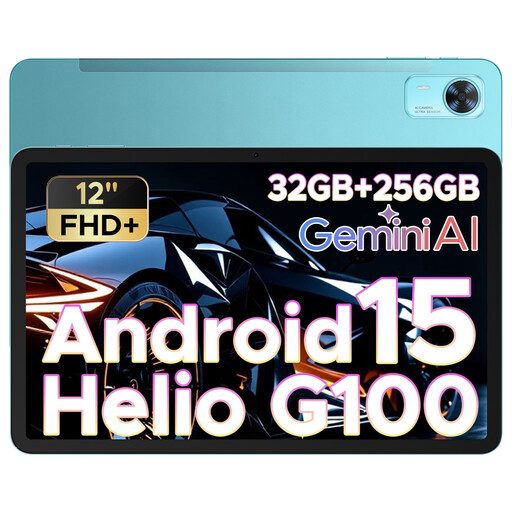
DOOGEE Tab E3+ 12-inch Android 15 tablet, 256GB, blue
Its 12-inch FHD+ display offers a larger viewing area for image-rich pages. The title also lists 256GB storage; before choosing it for bed reading, check the weight, low-light and notification controls, private-audio options and your reading apps.
View on Joybuy
 No image available
TABWEE T20 10.1-inch tablet, 256GB, with keyboard, mouse and stylus
The 10.1-inch screen is a middle-size option to assess for reading illustrated pages. The title lists 256GB storage, TF-card support up to 2TB and a keyboard, mouse and stylus bundle; decide whether those accessories suit your reading use, and check app compatibility and bedroom controls.
View on Joybuy
 No image available
Apple 11-inch iPad Air (2026, M4) Wi-Fi, 128GB, Starlight
Consider this iPad Air if you want an 11-inch Apple tablet for text and illustrated biographies. The listing identifies a Liquid Retina display and 128GB capacity; check that capacity, your required apps, handling and quiet-use controls against your plans.
View on Joybuy
Frequently asked questions
Is a tablet a sensible choice during the hour before sleep?
Not if you want to follow the screen-free period advised by NHS Every Mind Matters. It recommends trying not to use phones, tablets or computers for an hour before bed because blue light from screens can make falling asleep harder; plan tablet reading earlier if that routine matters to you.
Should I choose an 8-inch or 11-inch tablet for music biographies?
An 8-inch tablet suits a preference for compact handling, while an 11-inch screen gives illustrated pages more room. Amazon lists an 8-inch display for the Fire HD 8 (2024 release); Samsung and Apple list 11-inch displays for the cited Galaxy Tab A9+ and iPad (A16). Try your usual ebook or PDF layout and consider the device’s weight before deciding.
Will my library or ebook app work on a Fire tablet?
Check the exact app before buying rather than assuming it will work. Amazon states that Fire tablets do not support Google Play, so look in Amazon’s Appstore and confirm your library service’s sign-in and ebook requirements.
Is a microSD card necessary for downloaded biographies?
It depends on how much you intend to keep offline and what the tablet permits you to store on a card. Amazon lists microSD expansion up to 1TB for the cited Fire HD 8, and Samsung lists up to 1TB for the Galaxy Tab A9+ while specifying that its external storage is for media, not apps. Check your chosen variant’s internal capacity before deciding whether you need a card.


