What to check before buying
Start with your course software and study locations, then decide whether a primary laptop and any supporting accessories solve a specific practical need.
| Priority |
What to check |
Your needs and respondent concerns |
| Suitable primary device |
Check that the device can run required course software, create documents and join online teaching. For general coursework, university guidance commonly identifies 8GB RAM and 256GB SSD as a workable baseline, subject to course requirements. |
I need dependable access to a computer for assignments and online learning. In Jisc’s survey of 15,398 higher-education students across 30 UK providers between October 2024 and April 2025, 37% reported lacking access to a suitable device at some point. |
| Flexible study locations |
Look for a portable laptop, webcam, microphone and suitable audio for seminars and group work. A headset can be useful in shared or noisy spaces; check its connector or Bluetooth compatibility. |
I want the same setup to work in lectures, accommodation and at home. Jisc reported Wi-Fi connectivity issues for 60% of surveyed students, so plan for reliable access and avoid assuming an accessory can solve a connection problem. |
| Course compatibility |
Confirm every required application, operating system, processor architecture, graphics requirement and hardware connection. Check whether the course needs Windows-only software or drivers before choosing macOS, ChromeOS or ARM-based Windows hardware. |
I need to know whether specialist software or external hardware must work locally. In the same Jisc survey, 24% identified specialist course software as a future investment priority; this does not mean every student needs a high-specification laptop. |
| Support and resilience |
Assess an existing reliable laptop before replacing it. Check warranty length, repair arrangements, software licence eligibility and whether university cloud storage or applications cover your personal device. |
I want to avoid replacing a serviceable device while keeping access to the software and support I need throughout my course. |
Relevant brand references
No content to display in this section.
Joybuy product options
Joybuy options for a laptop-led university study setup, plus an external storage option for students who need an additional local copy or file-transfer workflow.
 No image available
Lenovo IdeaPad Slim 3 83K7009MUK, Ryzen 5, 24GB RAM, 512GB SSD
A Windows laptop for coursework, multitasking and routine online study between campus and accommodation.
Windows 11 Home, AMD Ryzen 5 7535HS, 24GB DDR5 RAM, 512GB PCIe SSD, 15.3-inch WUXGA display, Wi-Fi 6 and 1.59kg weight.
Check that its integrated graphics, ports and AMD platform meet course-specific software or hardware requirements. The listed warranty is one year.
Joybuy
 No image available
ASUS Vivobook 15 X1504VA, Core 5, 24GB RAM, 1TB SSD
A Windows laptop with substantial stated memory and storage for regular coursework and larger file collections.
Windows 11 Home, Intel Core 5 120U, 24GB DDR5 memory, 1TB SSD, 15.6-inch FHD IPS display, Wi-Fi 6, HDMI, USB-A and USB-C.
Integrated graphics are listed, so confirm suitability for CAD, rendering, simulation or other graphics-intensive course work. The stated battery figure is standby time, not a study-workload runtime.
Joybuy
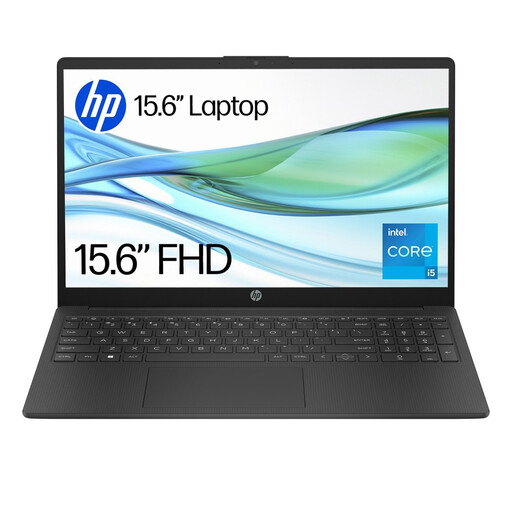 No image available
HP 15-fd0064na, Core i5, 8GB RAM, 256GB SSD
A portable Windows option for general writing, research, university platforms and online seminars.
Windows 11 Home, Intel Core i5-1334U, 8GB RAM, 256GB NVMe SSD, 15.6-inch FHD display, Wi-Fi 6, HD camera and microphone; listed weight is 1.59kg.
The stated memory and storage align with a general-course baseline but may not suit demanding programming, media, CAD or engineering workloads. Confirm required ports and warranty cover.
Joybuy
 No image available
ASUS Vivobook 14 X1407QA-LY003W, Snapdragon X, 16GB RAM, 512GB SSD
A compact Windows laptop for portable general study, online teaching and USB-C peripheral use.
Snapdragon X platform, Windows 11 Home, 16GB memory, 512GB SSD, 14-inch WUXGA anti-glare display, Wi-Fi 6E, USB4 Type-C, HDMI and 1.49kg weight.
Get confirmation that required course software, drivers and external hardware support ARM-based Windows. Memory is onboard and capped at 16GB, and the display is non-touch.
Joybuy
 No image available
Samsung MU-PE1T0S 1TB USB Type-C External SSD
An external storage option for carrying large files, transferring work between compatible devices or keeping an additional local copy.
1TB capacity, USB 3.2 Gen 2 Type-C connection, stated read speeds up to 1,050MB/s, write speeds up to 1,000MB/s, IP65 resistance and 98g weight.
It does not replace a compatible laptop for assignments or specialist software. Check host-device USB-C data support and keep important coursework in more than one location.
Joybuy
Frequently asked questions
Should I buy a laptop, or can a tablet be my only university device?
A laptop or regular access to a desktop-class computer is the safer primary arrangement. UCL says students will not be able to learn effectively with a mobile device alone, while Loughborough says tablets are useful for notes and online resources but have a more limited software range. Use a keyboard tablet as a companion unless your course confirms that every required application works on it.
How do I check whether macOS, Windows, ChromeOS or ARM hardware will work for my course?
Start with the software list from your programme or department, then check the operating-system and hardware requirements for every required application. UWE Bristol says course software determines device type and describes Windows as the most compatible option; guidance from Bath and Nottingham also shows that some engineering software and hardware interfaces can have Windows-specific or ARM-related limits.
What specification is sensible for a general university laptop?
There is no UK-wide universal minimum because requirements vary by course. Current university guidance commonly identifies 8GB RAM and a 256GB SSD as a workable general baseline, while 16GB RAM and 512GB SSD can provide more headroom for heavier multitasking. Do not treat those figures as sufficient for CAD, rendering, advanced programming, video production or other specialist work without departmental confirmation.
Do I need to buy Microsoft 365 or specialist software separately?
Check your university and course licences before purchasing. Some institutions provide Microsoft 365, cloud storage or specialist software to enrolled students, but the entitlement and coverage for personal devices vary by university and course. The University of Hertfordshire notes that not all software licences cover students’ own devices.
When is a headset worth buying?
A headset is useful if you regularly join online sessions, particularly in shared accommodation or noisy spaces. UCL says built-in microphones and speakers may be usable, but a headset can improve listening and how clearly others hear you. Check that the connector or Bluetooth connection works with your chosen device.


