Who these options can suit

Desktop-PC users who want a familiar portable setup

For relatives who already browse, email, stream or communicate online from a desktop and may benefit from a physical keyboard, conventional pointer input and an operating system that preserves familiar habits.

Browser-first streamers and video callers

For people whose essential activities are web browsing, webmail, streaming and video calls rather than specialist desktop programs. A Chromebook or tablet may work when the exact services and sign-in process are tested first.

Buyers considering refurbished devices

For buyers considering a professionally sold used device with a warranty, who are prepared to check safety, update support, battery information, condition, instructions and the seller’s written remedy process.

Buying priorities

Tablet with keyboard and mouse

Choose it when: Streaming, browsing, video calls and simple email are the main jobs, and touch controls or tested external input feel comfortable.

Check first: A tablet does not automatically reproduce a desktop-PC workflow, so test the required websites, communication services and exact keyboard fit.

Chromebook

Choose it when: Essential tasks genuinely happen in the browser, with a laptop keyboard, touchpad and larger built-in display preferred over touch-first use.

Check first: Confirm that required services work in ChromeOS and check the exact model’s automatic-update end date.

Lightweight Windows laptop

Choose it when: Familiar Windows behaviour, file handling, physical typing, a mouse or particular Windows software matter more than tablet simplicity.

Check first: Weight, screen size, ports and battery claims vary by configuration; refurbished hardware should be supported for its intended Windows version.

Priority What to check Your needs
Familiar input and workflow Try the physical keyboard, touchpad or mouse; confirm browser services, file handling and any required software on the intended operating system. I want familiar typing and navigation rather than having to relearn every interaction.
Readable display and navigation Adjust text size, display scaling, contrast and pointer visibility on the actual device. Test touch controls, keyboard response and pointer settings where relevant. I need web pages, email and controls to remain comfortable to read and operate, not simply a larger screen.
Setup and continuing support Set up Wi-Fi, account recovery, streaming, video calls, updates and charging before handover. For Chromebooks, check the model-specific automatic-update date. I want a clear recovery and support plan if passwords, services or settings change. Lloyds Banking Group and Ipsos reported in 2025 that 15% of UK adults aged 18+ could not complete all fundamental tasks required to get online and navigate the digital landscape; this is a digital-skills measure, not a device preference rate.
Refurbished condition and protection Check the exact model, update eligibility, charger, instructions, battery evidence where available, written warranty terms, recalls and safety information. If I choose refurbished, I need clear information about condition, ongoing support and what happens if a fault develops.

Common buying pitfalls

  • Buying by screen size alone

    A larger display does not automatically solve small text, low contrast, difficult touch gestures or unfamiliar pointer behaviour. The operating system and input method still need to fit established habits.

    Try a familiar task at the intended text size using the planned keyboard, mouse, trackpad or touch controls before purchase where possible.

  • Assuming every Chromebook has the same support life

    ChromeOS support depends on the model’s platform release date, so an older refurbished Chromebook may have less remaining update support than expected.

    Record the full model number and check Google’s automatic-update schedule for that exact device before committing.

  • Treating a refurbished warranty as the whole protection package

    Warranty coverage varies, while legal rights continue to apply. Used electrical products can also have wear, modifications or missing instructions that are not obvious in a listing.

    Compare the written warranty terms, retain the invoice, confirm the charger and instructions, and check product recalls and safety information.

  • Expecting a claimed battery figure to match every day of use

    Battery life varies with configuration, settings, applications and operating conditions, especially during streaming and video calls away from a charger.

    Use a stated battery figure as a starting point only; ask about the exact refurbished unit’s condition, test charging where possible and plan to take the charger.

Relevant brand references

Apple

iPad and its accessory ecosystem are relevant for buyers considering a touch-first portable device that can be paired with external keyboards, mice, trackpads or assistive input devices.

  • Apple’s UK support documentation describes external-keyboard adjustments and wired or Bluetooth pointer-device connections for iPad.
  • Battery capacity, health, cycle count and related details are available only on supported iPad models, so confirm what the exact refurbished device can show.

Microsoft

Windows is relevant when a lightweight laptop needs to retain a conventional PC interface, physical keyboard and broad Windows compatibility.

  • Microsoft documents built-in Windows controls for text size, display scaling, contrast themes, pointer visibility and magnifier.
  • Screen size, weight, ports and battery performance remain model- and configuration-specific checks.

Acer

Acer is relevant to browser-led buyers considering a conventional Chromebook format, including 14-inch Chromebook 314 variants.

  • Acer describes a UK Chromebook 314 variant with a 14-inch FHD display, an HD camera and Wi-Fi.
  • Specifications and battery performance vary by model, configuration, settings, applications and conditions; verify the exact model and automatic-update date.

Joybuy product options

Joybuy options for familiar Windows laptop use and browser-led Chromebook use, with physical keyboards and built-in displays for portable browsing, streaming and communication.

Lenovo IdeaPad Slim 3 15.3-inch WUXGA laptop

Lenovo IdeaPad Slim 3 15.3-inch WUXGA, Ryzen 5 7535HS, 24GB/512GB

A Windows option for desktop-style browsing, email and streaming with a full-size keyboard, numeric keypad and precision touchpad.

15.3-inch WUXGA anti-glare display, 24GB DDR5 RAM, 512GB PCIe SSD, Windows 11 Home, Wi-Fi 6; stated weight 1.59kg.

Check required desktop programs, password recovery and expected streaming or video-call use away from a charger before handover.

Joybuy
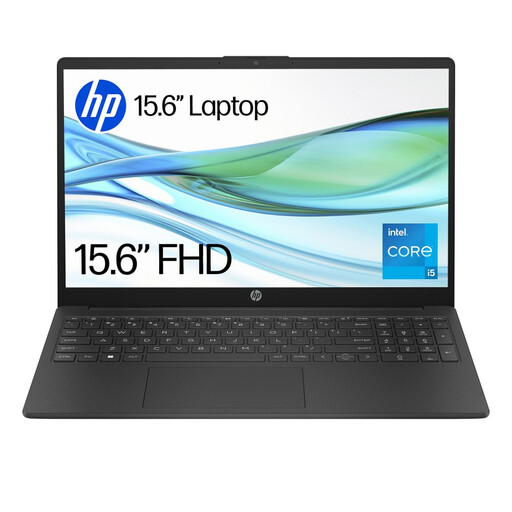
HP 15-fd0064na 15.6-inch Windows laptop

HP 15-fd0064na 15.6-inch, Core i5-1334U, 8GB/256GB

A conventional Windows laptop route for browser, email, file tasks, streaming and video communication.

15.6-inch FHD display, Intel Core i5-1334U, 8GB RAM, 256GB SSD, Windows 11 Home, HD camera with privacy door and Wi-Fi 6; stated weight 1.59kg.

Try the keyboard layout, key feel and touchpad with familiar tasks, and check expected battery use away from mains power.

Joybuy

ASUS Vivobook 14 X1407QA-LY003W laptop

ASUS Vivobook 14 X1407QA-LY003W, Snapdragon X, 16GB/512GB

A compact Windows option with external-display and accessory connections for portable browsing and video calls.

14-inch WUXGA anti-glare display, 16GB memory, 512GB SSD, Windows 11 Home, USB4, HDMI 2.1, Wi-Fi 6E, Bluetooth 5.3 and FHD IR camera; stated weight 1.49kg.

This Windows on Snapdragon model may need native ARM versions for some professional software or games. Check every required application and peripheral; the display is non-touch.

Joybuy

Acer Chromebook Plus 514 CB514-5H 14-inch Chromebook

Acer Chromebook Plus 514 CB514-5H, Core 5 120U, 8GB/512GB

A browser-led laptop option for webmail, streaming and video calls with a full-size backlit keyboard.

14-inch WUXGA IPS display, Intel Core 5 120U, 8GB RAM, 512GB SSD, ChromeOS, QHD camera, Wi-Fi 6E and 65W USB-C adapter; stated weight 1.49kg.

Windows and macOS desktop-native software is not compatible. Confirm essential services work in ChromeOS and check the device-specific automatic-update date.

Joybuy

Acer Chromebook Plus 514 CB514-5H 14-inch Core i3 Chromebook

Acer Chromebook Plus 514 CB514-5H, Core i3-1315U, 8GB/256GB

A Chromebook route for browser-based activity with physical typing, video calls and a conventional laptop layout.

14-inch WUXGA anti-glare IPS display, Intel Core i3-1315U, 8GB RAM, 256GB SSD, ChromeOS, backlit keyboard, FHD webcam with privacy shutter, Wi-Fi 6 and Bluetooth 5.2; stated weight 1.41kg.

Check the automatic-update date for model NX.J5XEK.004 and confirm websites, account recovery and any software needs work in the intended ChromeOS workflow.

Joybuy

Frequently asked questions

Should I buy a tablet or a laptop for someone who already uses a desktop PC?

Choose the device that most closely preserves the tasks and controls they already use. A lightweight Windows laptop is the lower-change route when Windows software, conventional keyboard typing, a mouse or file handling matter. A tablet can suit streaming, browser use and video calls when touch use, or a tested keyboard and mouse setup, is comfortable; a Chromebook suits tasks that genuinely work in a browser and has adequate remaining update support.

What should be set up before giving the device to a relative?

Set up Wi-Fi, the preferred browser, email, streaming and video-call accounts, password recovery, software updates, charging, text size, contrast and pointer or keyboard settings. Then ask the person to complete familiar tasks, such as opening a regular website, signing in, sending an email, starting a video call and adjusting volume.

What should I check before buying a refurbished Chromebook?

Check the full model identifier and Google’s device-specific automatic-update date, not just the Chromebook’s age. Google states that ChromeOS devices receive 10 years of updates from the platform release date and advises buyers to check the date for the specific device.

What should I check before buying a refurbished Windows laptop?

Confirm the exact hardware can run a supported Windows version, then check the charger, keyboard, ports, screen, webcam and battery condition. Obtain the seller’s written warranty and return terms; Microsoft does not recommend installing Windows 11 on hardware that does not meet its requirements.

Do warranty terms replace UK consumer rights when buying refurbished?

No. Citizens Advice states that warranties and guarantees add to legal rights. Keep proof of purchase and the written warranty details, including its duration, remedy and claim process. GOV.UK states that used products sold commercially must be safe, so check instructions, recalls and safety information as well.