What should you check before choosing?
Start with the work you cannot move to another device, particularly assessments and sustained typing. Then compare the complete note-taking setup with the screen and carrying needs of your usual study locations.
| Priority | What to check | Your needs |
|---|
| Assessment access |
Check the exact assessment mode, operating system and any locked-browser requirements with your course. Inspera specifies Windows and macOS for Integrity Browser and Proctoring; your institution may set further requirements. |
I can use a tablet for routine study, but I need access to a suitable computer if my assessments require one. |
| Handwritten notes |
Match the pen to the exact tablet model and generation. Confirm whether it is included and whether its stated functions meet your note-taking needs. |
When I annotate PDFs or write by hand, a compatible pen matters more to me than a general claim of stylus support. |
| Typed work |
Check the model-specific keyboard, its layout and whether a trackpad or stand matters for your documents. Confirm what comes with the tablet. |
For regular coursework drafts, I want to know whether the tablet-and-keyboard arrangement works for the documents I actually write. |
| Reading on the move |
Compare screen size, readability in your usual lighting and carrying size. Use comparable battery-endurance tests where available rather than treating battery capacity as runtime; Which? includes screen and battery performance in its tablet assessments. |
A larger page view would help with course materials, but I still need a device I am comfortable carrying between study locations. |
Tablets for different study setups
These Joybuy tablets cover several ways to combine portable reading, notes and typing: some list a pen in the bundle, one lists typing accessories, and others call for a separate keyboard. Check accessories and course software requirements for the exact model before deciding whether a tablet can be your main study device.
 No image available
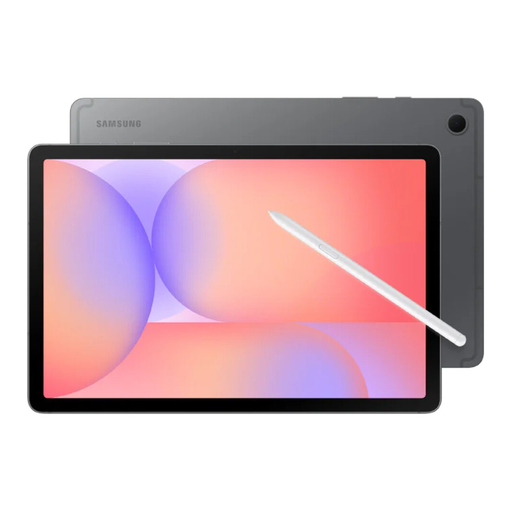
Samsung Galaxy Tab S10 Lite X400 128GB Grey
Consider this configuration if handwritten notes are central to your mobile study routine: the product information identifies an included S Pen.
The Tab S10 Lite has a 10.9-inch, 90Hz display, according to Samsung. Check the exact compatible keyboard separately if you will type coursework, and confirm any locked-assessment requirements with your course.
View on Joybuy
 No image available
TABWEE T20 10.1-inch tablet with keyboard, mouse and stylus
This bundle is worth checking if you want typing accessories alongside a smaller tablet for coursework.
The product name lists a 10.1-inch display, 256GB storage, keyboard, mouse and stylus. Confirm the stylus functions you need for handwriting and the delivered Android version, as the product information gives conflicting versions. Check course assessment requirements separately.
View on Joybuy
 No image available
Apple 11-inch iPad Air M4 Wi-Fi 128GB Space Grey
This iPadOS option suits a study plan that pairs an 11-inch tablet with separately chosen accessories for handwriting and typing.
Apple identifies Apple Pencil Pro compatibility for iPad Air M4 and provides guidance on compatible keyboards; confirm the exact models before ordering. If your course requires Inspera Integrity Browser or Proctoring, retain access to a supported Windows or macOS computer.
View on Joybuy
 No image available
TECLAST ArtPad Pro 12.7-inch 2K tablet with T-Pen, 256GB, 2025 Edition
The larger screen and listed included pen make this a configuration to consider for reading course pages and writing notes.
The product name specifies a 12.7-inch 2K display, 256GB storage and T-Pen support with 4096 pressure levels. Check how the larger format fits your carrying routine, and confirm a suitable keyboard arrangement if regular typed coursework is part of your plan.
View on Joybuy
 No image available
Xiaomi Pad 7 Grey 8GB RAM 128GB with Focus Pen
The listed Focus Pen makes this a tablet to investigate if you want to read and take notes on one device.
The product name identifies the 8GB RAM and 128GB storage variant. Confirm the exact pen model and its note-taking functions, as well as a compatible keyboard arrangement if you expect to type regularly. Check your course's assessment requirements before relying on it alone.
View on Joybuy
Study tablet questions
Can a tablet replace my laptop for university study?
A tablet may cover reading, notes, video calls and some typed work, but it cannot be assumed to cover every assessment. Inspera specifies Windows and macOS for Integrity Browser and Proctoring, and Leeds Beckett University says its Inspera lockdown setup does not run on iPads or Chromebooks. Check your own course's assessment and software requirements before replacing laptop access.
Should I get a keyboard with my study tablet?
A keyboard is worth considering if you regularly draft coursework or long documents on the tablet. Match it to the exact model: Apple provides iPad keyboard compatibility guidance, Samsung identifies a Book Cover Keyboard Slim compatible with Galaxy Tab S10 Lite, and Lenovo lists a separate Idea Tab Pro Gen 2 keyboard pack.
Does an included stylus settle the tablet choice?
No. An included pen removes a separate accessory choice, but you still need to check its functions and the rest of your workflow. Samsung identifies an included S Pen for the Galaxy Tab S10 Lite; Apple lists Apple Pencil Pro compatibility for iPad Air M4, so check the specific configuration and accessories you intend to use.
How do I check exam compatibility before buying?
Ask your course or assessment team for the current requirements for the exact exam mode, including the operating system, browser, any locked client and equipment needed for proctoring. Inspera's Windows and macOS requirement for Integrity Browser and Proctoring is a starting point, not confirmation that a particular device meets your institution's setup.


