What matters when choosing?
A tablet, phone and console answer different needs. Ofcom’s 2026 research identifies watching video and online gaming as common activities among UK children aged 8–17; it does not make one device type the right purchase for every family.
Tablet
Consider it when: the child mainly needs a portable device for video and app-based games, particularly for supervised use at home.
Trade-off: its apps and family controls depend on the operating system, and it does not replace console-specific game-network settings.
Smartphone
Consider it when: the child needs a personal mobile device for contact or use away from home, not just a screen for video.
Trade-off: its personal, portable use makes account permissions and household rules especially important before handover.
Games console
Consider it when: games are the main activity and the family needs to manage game content, multiplayer play and communication.
Trade-off: platform controls differ, and a console is not a substitute for a personal mobile device.
| Concern |
What to check |
Who this matters to |
| Child account and controls |
Check how to create the child’s own account and whether a parent can manage the intended settings from their device. |
I need to set limits through my child’s account rather than hand over an adult profile. Roughly 33% of consumers would put workable account supervision first. |
| Video and app-based games |
Check the child’s intended apps, available storage and whether the tablet will be shared or used mainly on Wi-Fi. |
If video and app games are the main uses, I want one portable screen that fits both. Around 27% of consumers would make that flexibility their primary concern. |
| Gaming-specific settings |
Check the intended games’ PEGI ratings and the platform’s multiplayer, chat, playtime and spending settings. |
My child wants to play online with others, so I need to understand who they can communicate with and what they can access. About 27% of consumers would prioritise gaming-specific supervision. |
| Shared daily use |
Check case fit for the exact device model, charging compatibility and how each child will access their account. |
When a device passes between family members, I need its physical setup and handover routine to work day after day. Roughly 13% of consumers would put manageable shared use first. |
Tablets for video and app-based games
These tablets relate to the portable video-and-app-games route. Choose between them by checking the child-account setup you need, the intended apps and the practicalities of shared use; a tablet listing alone does not establish that its controls fit your household.
 No image available
HONOR X8A Kids 11-inch Wi-Fi tablet, 128GB, Space Grey
Consider this Wi-Fi tablet for supervised video and app-game use. Its listed configuration has an 11-inch screen and 128GB of storage.
Before relying on parental controls, confirm the child-account setup and whether it works with the household’s preferred management method. If physical protection matters, check the case and protection details for this model.
View on Joybuy
 No image available
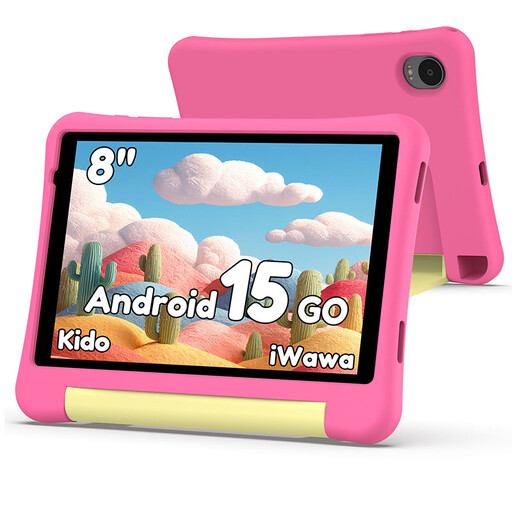
Alldocube Kido 8-inch tablet with pink case, 3GB + 32GB
Consider this Android 15 tablet for a child using apps, video and games where an included protective case is useful. The name lists an 8-inch screen, 3GB of RAM, 32GB of storage and Child Lock.
Check how Child Lock is managed through the child’s account before relying on it for supervision. The listed bundle has no adapter, so confirm a compatible one is available.
Purchase link unavailable
 No image available
TABWEE K8 Kids’ 7-inch tablet, 2GB + 32GB
Consider this smaller Wi-Fi tablet for portable video and app-game use. Its listed configuration includes a 7-inch screen, 2GB of RAM, 32GB of storage and 2.4GHz Wi-Fi.
Confirm the available child-account and parental-control settings if account-level supervision is essential. The product information says it is unsuitable for children under three and calls for adult supervision.
View on Joybuy
Frequently asked questions
Do parental controls make online video and gaming completely safe?
No. UK government online-safety guidance says parental controls are helpful but cannot fix everything. Set up an age-appropriate account and household rules, and keep talking with the child about what they watch and play.
Does a child need a separate account on an iPad or iPhone?
For a parent to manage Apple device settings from their own device through Family Sharing, Apple says the child needs their own Child Account in the group. In the UK, a child under 13 needs parent or guardian help and consent to create an Apple Account and must join Family Sharing.
What should I check before allowing multiplayer games or chat?
Check the game’s PEGI content rating, the child account’s communication permissions and the particular feature’s requirements. Nintendo says Switch 2 GameChat requires persistent internet access and Nintendo Switch Online membership; users under 16 also need Parental Controls set through the companion app before using it.
Can I manage a child’s spending on a console?
Console family settings provide spending controls, but their operation differs by platform. Xbox says adult approval is required for child-account purchases by default, though available account or gift-card funds may be usable depending on settings; PlayStation offers monthly spending limits. Check the child’s store settings before giving access.
What does a PEGI age rating tell me?
A PEGI age rating indicates the age for which a game’s content is considered suitable. Use it when selecting games, then separately check online communication and account settings; the rating does not mean supervision is unnecessary.


