Choose a tablet that fits your desk while leaving enough screen room to review photos comfortably, then decide where imports and working copies will live. An 8.3-inch iPad mini suits a tighter space; the 10.9-inch Galaxy Tab S10 FE offers microSD expansion and an in-box S Pen, while a larger tablet with a stand may suit longer sorting sessions if you have room for it. Check the import route, backup plan and accessory bundle before relying on any tablet for your archive.
Who is this for?
Small-desk photo sorters
If reviewing, deleting and grouping photos has to happen in a cramped workspace, the tablet’s width and height matter alongside its screen size. Allow room for a stand if the device cannot hold a useful viewing angle on its own.
Large-library organisers
If you are importing many originals, decide whether the tablet will hold working files or another copy of the archive. Internal capacity, a supported microSD card, compatible external storage and a separate backup plan serve different purposes.
Annotation and labelling users
If you mark up scans or add dates and album names as you sort, check whether the exact tablet bundle includes a compatible pen or keyboard. Support for an accessory does not mean it comes in the box.
What matters when choosing?
Start with the space available for the tablet and any import accessories, then work out where photos will be stored and how you prefer to sort them.
| Concern | What to check | Who this matters to |
|---|
| Desk space and viewing |
Compare device width and height, not just screen diagonal; allow space for the viewing position and cables. |
I need to sort photos without crowding the rest of my desk, but still want to see what I am selecting. Around 27% of consumers put compact placement first. |
| Storage, imports and backup |
Size your library, check the intended card or drive connection, and plan a separate copy of important files. |
If I am bringing in a growing library, I need to know where originals and working files will go before choosing capacity. For around 33% of consumers, that storage workflow is the primary concern. |
| Sorting and annotation |
Check whether the exact bundle includes a compatible pen or keyboard for the notes and labels you expect to add. |
When I have scans to mark up or many names to enter, touch input alone may not suit my routine. Roughly 20% of consumers prioritise the input workflow. |
| Complete setup |
Account for any stand, charger, card reader, adapter, storage media or input accessory your workflow requires. |
I want the tablet ready for my intended imports and sorting, rather than discovering that a necessary accessory is separate. Around 20% of consumers make setup completeness their main concern. |
Mistakes to avoid
-
Assuming that Google Photos Archive frees storage
Google Photos Help says archived photos still count towards the account’s storage quota. Moving images to Archive changes how they appear in your photo collection; it does not create a backup.
Check available account storage before a large import and keep a separate backup of photos you cannot replace.
-
Buying the tablet without checking the import setup
A tablet may need a compatible card reader, adapter or powered drive for your chosen import route. Pens, keyboards and chargers also vary by model and bundle.
Check the exact package and the connections your camera card or drive needs before ordering accessories.
-
Choosing by screen diagonal alone
A screen measurement does not tell you how much desk surface the tablet occupies or whether a stand will take additional space.
Mark out the published device width and height on your desk, leaving room for a charging cable and any card reader or keyboard.
-
Keeping the only copy on a removable card
MicroSD expansion adds local space on supported tablets, but a card containing the only copy of your photos is not a backup. Google account backup is a separate workflow.
Keep another recoverable copy in a separate location or account, and check that you can open files from it.
Relevant brands to consider
Apple
Apple’s iPad mini is a compact route; its 11-inch iPad offers a larger review surface. Both call for checking the intended storage and accessory workflow.
- Apple lists an 8.3-inch display and a 293 g Wi-Fi weight for the current iPad mini. Apple Support says compatible USB drives and SD cards can be accessed on iPad through suitable connections.
- External storage has format, partition, adapter and power requirements. Apple lists Pencil choices separately on its UK iPad mini ordering page; check compatibility and the selected bundle.
Samsung
The Galaxy Tab S10 FE is relevant if removable storage and pen input matter more to you than the smallest tablet footprint.
- Samsung lists a 10.9-inch display, microSD support up to 2TB and an in-box S Pen for the Galaxy Tab S10 FE.
- Samsung lists the cited Wi-Fi model at 254.3 × 165.8 mm and 497 g; measure the available desk space before choosing it for a compact setup.
Lenovo
The Tab Plus is a larger-screen option for desk sessions where a built-in viewing position would be useful.
- Lenovo’s UK Tab Plus listing specifies an 11.5-inch, 2000 × 1200 display and a 175-degree kickstand.
- On the cited 128GB configuration, Lenovo lists the Tab Pen Plus and a UK-English wireless keyboard as optional add-ons. Check the exact bundle if either is needed.
Tablet choices on Joybuy
These tablets offer different screen sizes and stated storage capacities for photo sorting. Match the selected device and any accessories to your desk, import method and backup plan.
 No image available
TABWEE T20 10.1-inch tablet, 256GB, with keyboard, mouse and stylus
Consider this bundle if you plan to type labels or use a stylus while sorting photos. The product title lists a 10.1-inch display and 256GB storage; check its physical dimensions and whether a TF card is included if you need expansion immediately.
View on Joybuy
 No image available
Xiaomi Pad 7 Grey, 8GB RAM, 128GB, with Focus Pen
This is worth checking if pen-based notes are part of your sorting routine. The title lists 8GB RAM and 128GB storage and says a Focus Pen is included; confirm the accessory bundle and the tablet’s dimensions before ordering.
View on Joybuy
 No image available
Xiaomi Pad 8 Wi-Fi Grey, 8G RAM, 128GB
Consider this tablet for on-device photo sorting if its size and import options suit your desk setup. The title lists Wi-Fi, 8G RAM and 128GB storage; check the dimensions, intended card-reader or drive connection, and pen bundle if you need one.
View on Joybuy
 No image available
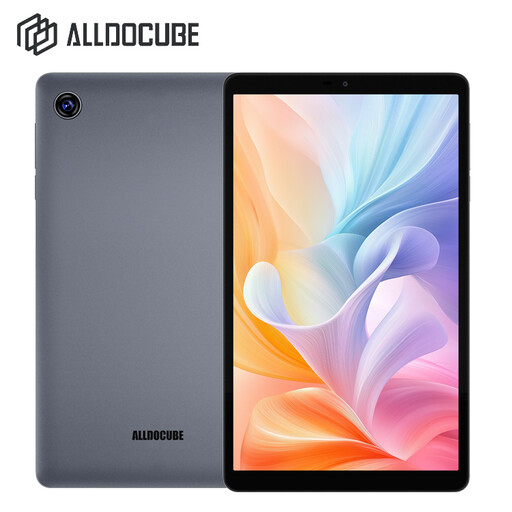
ALLDOCUBE iPLAY60 Mini 8.68-inch, 4GB/64GB
The 8.68-inch screen may appeal if you want a smaller tablet for sorting, but check the body dimensions rather than relying on the diagonal. The title lists 64GB storage and says no charger is included; confirm expansion or external-import compatibility if your library needs it.
View on Joybuy
 No image available
DOOGEE Tab G6 Plus 11-inch, 256GB, Grey
Consider the larger screen if you have enough desk room for photo review. The title lists an 11-inch display, 256GB storage and a SIM card slot; check the device dimensions and your intended card or drive import route before choosing it.
View on Joybuy
Frequently asked questions
Does Google Photos Archive free up storage?
No. Google Photos Help says archived images still count towards your storage quota. Archive can tidy your photo view, but it does not replace a separate backup.
Can an iPad import photos from an SD card or external drive?
Yes, with compatible equipment and storage. Apple Support says supported apps can access USB drives and SD cards through a suitable connector or adapter; check the drive’s format and partition, and whether it needs external power.
Will a pen, keyboard or charger come with the tablet?
Inclusion depends on the exact model and bundle. Samsung lists an in-box S Pen but no travel adapter for the cited Galaxy Tab S10 FE package; Apple presents Pencils as optional additions for the cited iPad mini, while Lenovo lists pen and keyboard add-ons separately for the cited Tab Plus configuration.


