Start with a tablet you can hold or support comfortably in bed, then check that your exact reading app, book format and language tools work on it. A compact iPad suits readers who need iPad apps and a small display; a Galaxy Tab A9 offers expandable media storage, while a Fire HD 8 makes sense only if the required apps are available through Amazon’s Appstore. A larger screen may give a fixed-layout page more room but changes how you support the device.
Who this choice matters to
Handheld bedtime readers
If you read while reclining, the tablet’s size and weight matter alongside whether you can adjust its appearance for a dim room. Apple documents brightness, Dark Mode and colour controls for iPad, but you still need to account for the case or stand you intend to use.
Language learners using reader tools
Your choice depends on the apps and books you use for definitions, notes or spoken reading. Google Play Books supports uploaded PDF and EPUB files on iPad, while Google says Read Aloud availability depends on the book and publisher.
Offline-library readers
If you download books before bed or keep personal files locally, check offline access and where the reader stores downloads. Google supports offline reading for downloaded Play Books ebooks; Samsung and Amazon specify expandable storage for the tablet lines discussed here, subject to how each app uses it.
What to check before buying
iPad mini
Consider it when: You want a compact iPad for your preferred reading apps and permitted PDF or EPUB files.
Trade-off: Its 8.3-inch display gives a fixed-layout textbook page less room than a larger screen.
Galaxy Tab A9
Consider it when: An 8.7-inch Android tablet with expandable storage for media suits your reading collection.
Trade-off: Samsung says its microSD storage is for media, not applications; check the exact storage variant and reader app.
Fire HD 8
Consider it when: Amazon-supported reading services or apps in Amazon’s Appstore cover your books and language tools.
Trade-off: Amazon says Fire tablets do not support Google Play, so a Google Play-only reading workflow needs another route.
| Concern |
What to check |
Who this matters to |
| Handling in bed |
Compare screen size and device weight with your intended case or stand; consider whether you read reflowable books or full-page PDFs. |
If I read while reclining, I need a tablet I can hold or prop up without struggling to position it. Around 31% of consumers make handling their primary concern. |
| Low-light setup |
Check brightness, dark appearance and colour controls in both the tablet and your reader app. |
I want to adjust the page for a dim bedroom without disturbing someone beside me. For around 25% of consumers, low-light setup comes first. |
| Language tools |
Find the exact app in the device’s app store, then check your language, book format and title for the tools you need. |
Definitions or spoken reading are central to how I study, so the feature must work with my actual book. App and tool compatibility is the main concern for around 25% of consumers. |
| Offline books and files |
Check download eligibility, usable storage and whether your reader can store downloads on a microSD card. |
I keep books ready to read without relying on a connection and need room for my permitted files. Around 19% of consumers put offline and local-library flexibility first. |
Buying mistakes to avoid
-
Assuming every tablet can run your Google Play apps
Amazon says Google Play is not supported on Fire tablets. A reading routine built around Google Play Books or another Google Play-only app may therefore need a different device or workflow.
List your reader, dictionary, translation and audio apps, then check each one in the tablet’s official app store before ordering.
-
Choosing by screen size alone
A larger screen gives a fixed-layout page more area, but screen size alone cannot tell you how manageable the tablet will feel while reclining.
Compare weight with the case you plan to use, and decide whether you will hold the tablet or place it on a stable support.
A larger tablet may also call for a stand or other support at bedtime.
-
Expecting read-aloud on every book
Google says publishers choose whether Read Aloud is available for their books; the tablet alone does not determine access to that feature.
Check the exact title, language and format in your chosen reader, using a preview where available.
-
Overlooking storage use and box contents
Samsung says Galaxy Tab A9 microSD storage is for media rather than apps, and its usable built-in storage is lower than the nominal capacity.
Check how your reader stores downloads and inspect the contents of the exact tablet listing.
Amazon’s cited 32 GB Fire HD 8 listing does not include a power adaptor; a suitable adaptor or a microSD card may be a separate item to arrange.
Relevant brands to consider
Apple
The iPad mini represents a compact iPad option for readers who need compatible iPad apps.
- Apple specifies an 8.3-inch display and a 293 g weight for the Wi-Fi iPad mini; it also lists True Tone and an anti-reflective coating.
- The compact display leaves less page area for a full fixed-layout PDF than a larger tablet. Check how your particular book appears before choosing by size alone.
Samsung
The Galaxy Tab A9 represents an 8.7-inch Android option for readers who want expandable media storage.
- Samsung specifies 64 GB and 128 GB variants and microSD support up to 1 TB for the Galaxy Tab A9 family.
- Samsung says usable storage varies and microSD storage is for media, not apps. Confirm the exact configuration and where your reader saves books.
Amazon
The Fire HD 8 is an 8-inch option when Amazon-supported services and Appstore apps meet your reading needs.
- Amazon specifies 32 GB and 64 GB options with microSD expansion up to 1 TB for the Fire HD 8 line.
- Amazon says Google Play is not supported on Fire tablets. Check each required reading and language app in Amazon’s Appstore before choosing one.
Joybuy products for bedside reading
These tablets offer different screen sizes for bedside reading: consider how you will support the device and check your exact language-reading apps before choosing either one.
 No image available
iFLYTEK AINOTE 2, 10.65-inch E Ink tablet with protective case
Consider its 10.65-inch E Ink display if you want more page area for language materials and can support the tablet while reading in bed.
Check that your exact reader, dictionary and audio apps work on this model, and arrange a separate light if you read in a dark room.
View on Joybuy
 No image available
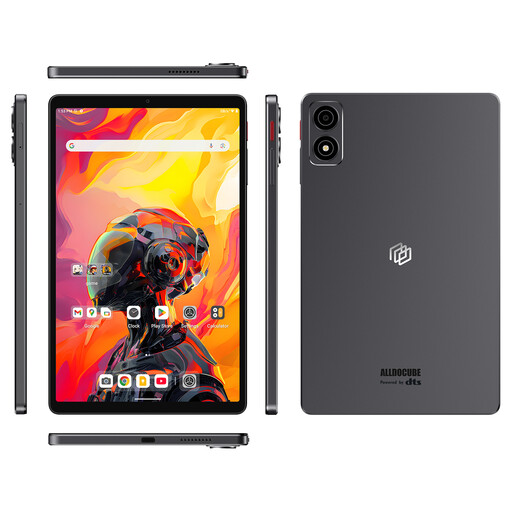
ALLDOCUBE iPlay 70 Mini Ultra, 8.8-inch, 12GB+256GB, Android 14
Its 8.8-inch format is worth considering if you prefer a smaller screen to reposition while reading in bed.
The listed configuration is 12GB+256GB with Android 14; a charger is not included. Check the device weight, dim-room controls and compatibility with your exact reading and language apps.
View on Joybuy
Common questions
Can I read a downloaded language book without Wi-Fi?
Yes, for Google Play Books ebooks that can be downloaded to a mobile device, according to Google. Download your particular title before you need it and check its offline availability; Google notes that manga chapters are not currently available for offline reading.
Can I read my own language PDFs or EPUBs on an iPad?
Yes, Google says Play Books on iPhone and iPad can open uploaded PDF and EPUB documents. Use files you are permitted to upload, and check the page view before relying on a fixed-layout PDF to behave like a reflowable ebook.
Will every language book offer read-aloud and word tools?
No; those tools depend on the reader and the particular book. Google says Read Aloud requires a book in flowing-text mode and that publishers choose whether it is available, so check a sample or the exact title before buying a tablet for that feature.
How can I set up an iPad for reading in a dim bedroom?
Adjust its brightness and try Dark Mode or Night Shift to find a display setting that suits you. Apple documents these controls, but your preferred reader app’s own page and text settings also matter.


