What matters when choosing?
Decide how much screen space you need while travelling, then check handling, offline access and the exact configuration you would use for notes.
| Concern |
What to check |
Who this matters to |
| Carrying and handling |
Compare the stated weight of the exact variant and consider the added bulk of a case. |
If I hold a tablet for much of the journey or stow it between connections, I want it to feel manageable. Around 36% of consumers put carrying and handling first. |
| Reading workspace |
Compare screen sizes and check whether your article and notes apps work together on screen. |
For dense criticism and film stills, I would rather have room for the page and my references than the smallest device. Around 29% of consumers prioritise reading workspace. |
| Offline access |
Check how you save articles and PDFs; if considering cellular, confirm the exact variant and coverage on your route. |
I need my reading material to remain available when a train connection drops. Roughly 21% of consumers make offline access their primary concern. |
| Storage and notes |
Confirm internal storage and whether a compatible pen is included with the exact bundle. |
If I keep documents on the device and annotate criticism, I want the storage and writing setup to match those habits. About 14% of consumers put storage and notes first. |
Joybuy products for reading and notes
These choices include an E Ink note-taking device, a compact iPad and tablets with configurations to consider for reading or notes. Compare their exact screens, bundles and carrying requirements against your train routine.
 No image available
iFLYTEK AINOTE 2 10.65-inch E Ink tablet with protective case
Consider this E Ink device if document reading and handwritten notes are central to your journey. Its name specifies a 10.65-inch screen and a protective-case bundle; check whether its display suits the film stills and web pages you normally read, as well as your lighting conditions.
View on Joybuy
 No image available
Apple iPad mini 7 (A17 Pro), 512GB, Space Grey
The compact iPad mini route suits reading one article at a time when bag space matters more than a broad workspace. This is the 512GB Space Grey variant; Apple specifies an 8.3-inch display for iPad mini (A17 Pro). Confirm whether this listing is Wi-Fi or cellular and whether your preferred accessories are included.
View on Joybuy
 No image available
Samsung Tab A11+ SM-X230, 6GB/128GB, Silver
Consider this configuration if you want to keep reading material on the tablet and are comparing larger-screen options. Its name specifies 6GB memory and 128GB storage; check the screen dimensions and handling weight of this exact Tab A11+ rather than applying Galaxy Tab A9+ specifications to it.
View on Joybuy
 No image available
Xiaomi Pad 7, Grey, 8GB/128GB, with Focus Pen
The included Focus Pen makes this variant worth considering if you annotate criticism as well as read it. Its name specifies 8GB memory and 128GB storage; check its carrying weight and whether your note-taking app supports the writing features you need.
View on Joybuy
 No image available
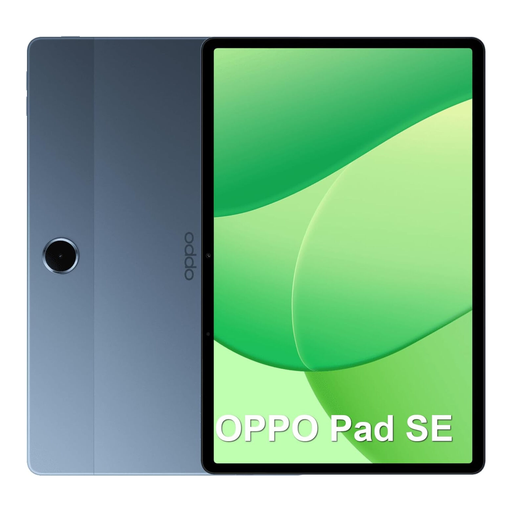
OPPO Pad SE OPD2419 EUN, 4GB/128GB, Twilight Blue, Wi-Fi
Consider this Wi-Fi configuration if you plan to save reading material before your journey. Its name specifies 4GB memory and 128GB storage; check its screen dimensions, display finish and weight if page space, glare or handheld comfort will decide your choice.
View on Joybuy
Questions about reading on trains
Do I need a cellular tablet to read on trains?
No: downloaded articles and PDFs can keep your reading available without a live connection. Cellular provides another connection option where you have service, but the Department for Transport reports that mobile and train Wi-Fi connectivity can be poor for many passengers. Check coverage on your regular route if you expect to use mobile data.
Is a compact or 11-inch screen more useful for film criticism?
A compact screen suits readers who put easy carrying and holding first; an 11-inch screen gives you more page area when articles, stills and notes compete for space. Apple lists the iPad mini at 8.3 inches, while Samsung lists the Galaxy Tab A9+ and Lenovo lists the Tab M11 at 11 inches. Check how your usual articles appear at a comfortable text size.
Should I assume a stylus and cover are included?
No; check the contents of the exact bundle. Lenovo describes a Tab Pen with its cited Tab M11 configuration, whereas Apple lists the Pencil and Smart Folio separately for iPad mini. Confirm that any pen also works with the note-taking app you intend to use.
What should I confirm before ordering a tablet online in the UK?
Confirm the model number, connectivity variant, memory, storage and included accessories against the individual listing. For UK distance sales, GOV.UK guidance says traders must tell customers they can cancel an order up to 14 days after delivery without giving a reason; check the information supplied for your particular order.


