Choose the operating system around your recipe-editing workflow before comparing screens. If an essential program requires desktop Windows, investigate a Windows 2-in-1; for app-based edits, image review and annotations between visits, an 11-inch iPad or an Android tablet may suit a smaller carry setup. Check your exact apps, file exports and offline access before committing to any route.
Who these tablets suit
Mobile recipe editors
If you revise ingredients, methods or image selections in short gaps between appointments, consider what you can comfortably carry and whether your documents remain accessible. As a portable reference point, Apple lists its 11-inch iPad Air Wi-Fi model at 464 g.
Editors with a desktop workflow
If your collection depends on Windows software, complex browser tools or sustained keyboard editing, start with software compatibility rather than tablet size. Microsoft describes the 12-inch Surface Pro as a Windows 11 device that can be used in a laptop-style setup.
Visual and annotated-draft editors
If you mark up proofs, make handwritten corrections or keep reference images, check pen support and storage alongside your editing apps. Samsung lists S Pen use and support for microSD cards of up to 2 TB for the Galaxy Tab S10 FE line.
What matters when choosing
Windows 2-in-1
Choose when: An essential recipe, publishing or client application requires desktop Windows, or longer edits call for a laptop-style setup.
Check: Microsoft describes the 12-inch Surface Pro as running full Windows 11, but specialist software still needs checking against its exact Snapdragon configuration; confirm the keyboard and pen needed for your setup.
11-inch iPad
Choose when: Your recipe files, photos and annotations can be handled through iPadOS apps and you want a compact tablet between visits.
Check: Apple lists the 11-inch iPad Air Wi-Fi model at 464 g and supports Apple Pencil, but iPadOS does not replace a required Windows desktop program.
Android tablet
Choose when: Your editing and sharing apps run on Android and your work centres on review, notes or image files.
Check: Pen support, storage expansion and keyboards vary by model; confirm the exact app, accessory and export workflow.
For consumers choosing a device to edit a recipe collection between client visits, the deciding need may be software, carrying convenience, visual work or a complete editing setup.
| Concern | What to check | Who this matters to |
|---|
| Software and typing |
Confirm your essential apps, file exports and offline access; decide whether longer edits require a physical keyboard. |
When recipes need extensive rewriting or a particular desktop program, I cannot choose by screen alone. Roughly 36% of consumers put software and typing compatibility first. |
| Carrying and access |
Compare device weight and screen size, then check whether files are available at visits without dependable Wi-Fi. |
I need enough room to review text and images without adding an awkward device to my bag; around 29% of consumers prioritise carrying convenience and between-visit access. |
| Images and annotations |
Check pen support, storage and whether your chosen apps can annotate and save drafts in the required format. |
Photographs and marked-up proofs are central to my collection, so I need to keep corrections and references organised. About 21% of consumers place visual and annotation work first. |
| Work-ready setup |
Check the exact variant and which keyboard, pen, cover or storage accessories come with it. |
I want to start editing between appointments without discovering that a needed input accessory is missing; roughly 14% of consumers make setup completeness their primary concern. |
Buying pitfalls
-
Assuming the tablet alone completes the editing setup
Typing longer recipes or marking up drafts may call for a keyboard or pen. Microsoft lists the Surface keyboard and Slim Pen as separate accessories, while Samsung lists its Book Cover Keyboard separately.
Decide which tasks require physical input, then check the accessories supplied with the exact configuration.
A keyboard, cover or storage card can also change what you need to carry between visits.
-
Choosing a screen before checking the workflow
A larger display cannot make an iPadOS or Android tablet run a required Windows desktop application. Even with a Windows device, a specialist app must work on the configuration you choose.
List your essential recipe, cloud, photo and client tools, then check operating-system support, export formats and offline access.
-
Treating water resistance as kitchen-proofing
Samsung lists IP68-rated water and dust resistance for the Galaxy Tab S10 FE range, but that rating is not a general assurance for heat, food preparation or every liquid exposure.
Follow the chosen model’s care guidance and keep it away from food-preparation hazards.
-
Assuming a similarly named listing is the right variant
Storage, connectivity and colour can distinguish otherwise similar tablet listings, while availability can change.
Check the exact variant, current availability and supplied accessories on the product page before ordering.
Brands to consider
Apple
The 11-inch iPad Air is an iPadOS option for app-based recipe edits, image review and pen annotation.
- Apple lists a 464 g Wi-Fi model and support for Apple Pencil on the 11-inch iPad Air.
- Check that your publishing tools and exports work on iPadOS, and confirm the keyboard and Pencil required for your setup.
Samsung
The Galaxy Tab S10 FE line offers an Android route for handwritten corrections and locally stored reference files.
- Samsung lists S Pen use, microSD support of up to 2 TB and IP68-rated water and dust resistance for the FE line.
- Check your Android apps and file types, as well as the keyboard and storage card required for the chosen model.
Microsoft
The 12-inch Surface Pro is a Windows 2-in-1 route for editors who need desktop software or a laptop-style working position.
- Microsoft describes the 12-inch Surface Pro as offering full Windows 11 performance.
- Check specialist software against the exact Snapdragon configuration and confirm the keyboard and Slim Pen needed for your tasks.
Lenovo
The Tab Plus is an Android option to investigate for lighter browser, document and reference-viewing work.
- Lenovo lists an 11.5-inch display and a built-in kickstand for the Tab Plus.
- Check the intended editing apps and whether its typing setup meets your needs before using it in place of a laptop.
Joybuy products for these workflows
These choices cover a Windows convertible for longer typing and several iPadOS and Android tablets for app-based edits, review and notes. Match the device and its accessories to your own recipe files and client workflow.
 No image available
HP OmniBook Ultra Flip 14-fh0006na, 16GB RAM, 1TB SSD
Consider this 2-in-1 if longer recipe edits call for a Windows keyboard setup. The named configuration has Windows 11 Home, 16GB RAM and a 1TB SSD. Its stated 1.34 kg weight is worth weighing against how often you carry it; check your essential apps and the supplied accessories.
View on Joybuy
 No image available
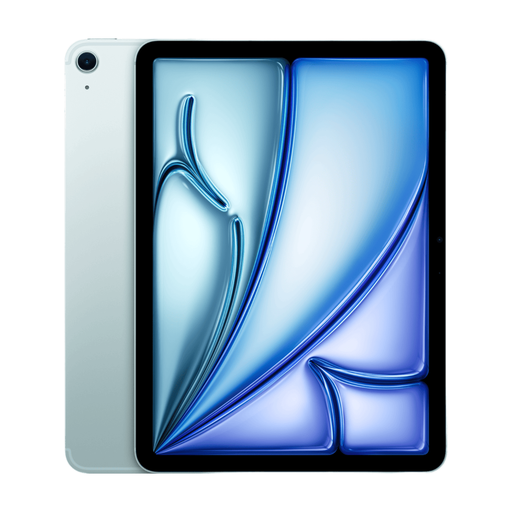
Apple iPad Air 11-inch (2026, M4), Wi-Fi 256GB, Blue
This 11-inch Wi-Fi variant suits recipe edits made in compatible iPadOS apps between visits. It has 256GB storage; Apple lists Pencil support for the 11-inch iPad Air. Check your file exports and whether your typing or annotation routine needs an additional accessory.
View on Joybuy
 No image available
TABWEE T20 10.1-inch, 256GB, keyboard, mouse and stylus bundle
This Android tablet bundle is an option to check if you want physical typing and handwritten notes alongside app-based recipe work. Its name lists 256GB storage, a keyboard, a mouse and a stylus. Confirm the supplied bundle contents and Android version, then check your editing apps and exports.
View on Joybuy
 No image available
TECLAST ArtPad Pro 2025 Edition, 12.7-inch, 256GB
Consider this Android tablet if a larger screen and pen input matter for reviewing or marking up recipe drafts. Its name lists a 12.7-inch 2K display, 256GB storage, Android 15, 4G LTE and an included stylus. Check its carrying weight, your app compatibility and any keyboard you need for longer edits.
View on Joybuy
 No image available
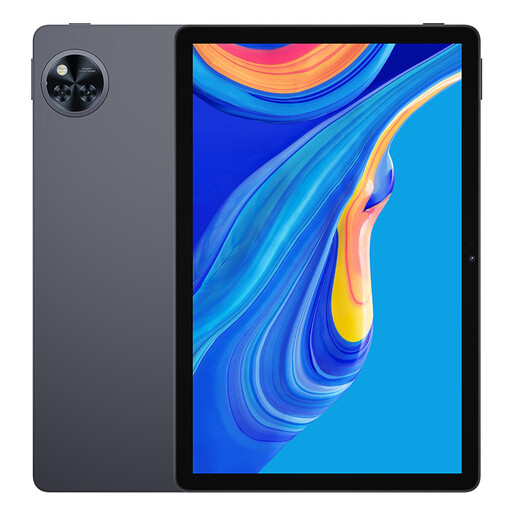
DOOGEE U11 11-inch, 128GB, Grey
This 11-inch tablet is an app-based option for reviewing and editing recipe files between visits. Its name lists 128GB storage and Wi-Fi connectivity; the accompanying product information states a 1.18 lb device weight. Check your Android apps and whether a keyboard or stylus works with the setup you want.
View on Joybuy
Common questions
Do I need a keyboard to edit recipes on a tablet?
A keyboard is worth considering if you regularly rewrite methods, enter substantial text or send detailed client updates. For occasional corrections, check whether touch or pen input works comfortably in your actual editing app; confirm the accessories supplied with the tablet you choose.
Can an iPad or Android tablet replace Windows for this work?
Yes, if every essential task runs in the chosen apps and your files export correctly for clients. If a required program runs only on desktop Windows, investigate a Windows 2-in-1 instead; Microsoft describes its 12-inch Surface Pro as running full Windows 11, though specialist software still needs checking against the exact configuration.
What should I do with an old tablet when replacing it?
Use an appropriate electrical-waste collection or retailer take-back route rather than household rubbish. UK Government guidance says that when you buy a new electrical product, the retailer must accept an equivalent old item free on a like-for-like basis; remove your personal files and account access before handing over the old device.


