For reading, comments and occasional edits on a train, consider an 11-inch iPad Air or 10.9-inch Galaxy Tab S10 FE if your Microsoft 365 plan permits the Word features you need. A Surface Pro is the more relevant route when the report requires desktop Office or Windows tools, but check whether carrying its optional keyboard works for your journey.
Who each approach suits
Reviewers who carry their tablet throughout the day
If you mostly read long drafts and add comments between meetings or journeys, a screen around 11 inches may matter more than desktop software. Apple specifies its 11-inch Wi-Fi iPad Air at 464 g; consider the weight of any cover you would carry with it.
Reviewers who mark up pages by hand
If highlighting passages or adding visual notes is central to your review, check the pen supplied with the exact configuration and whether your document workflow accepts that form of annotation. A pen does not, by itself, establish that Word comments and tracked changes will work as required.
Reviewers who need desktop Office
If your organisation relies on desktop tools or conventional Windows file handling, assess a Windows 2-in-1 rather than assuming a mobile Word app will reproduce the workflow. Microsoft says Office can be installed on Surface Pro as it would be on a desktop computer.
What matters when choosing
Decide which document tasks must work before choosing a screen size. For train use, the choice then comes down to how you will hold, annotate and carry the device.
11-inch iPad Air
Choose it when: You want a compact touchscreen and can review the report in Word for iPad; Microsoft documents tracked-change and comment controls in that app.
Bear in mind: Confirm your Microsoft 365 entitlement, and plan to carry a separate keyboard if you expect substantial typing.
10.9-inch Galaxy Tab S10 FE
Choose it when: You prefer an Android tablet and want to check an S Pen configuration for handwritten notes alongside document reading.
Bear in mind: Check the exact pen bundle and your Microsoft 365 entitlement before relying on a Word review workflow.
Surface Pro
Choose it when: The report depends on desktop Office or Windows file handling rather than mobile apps.
Bear in mind: Microsoft describes the keyboard as optional, so assess the complete setup you would need to carry.
| Concern |
What to check |
Who this matters to |
| Handheld portability |
Compare device dimensions and weight, including the cover or keyboard you intend to carry. Check whether you can hold the screen comfortably without a tray table. |
If I often read while holding the tablet, extra bulk would make a long draft harder to handle. Around 29% of consumers put handheld portability first. |
| Readable pages and markup |
Try a representative document at your usual zoom level; check comments, tracked changes and the input method you intend to use. |
When I need to inspect comments and mark passages precisely, I want the page and controls to remain easy to follow. Readability and markup are the primary need for around 28% of consumers. |
| Workplace compatibility |
Confirm your Microsoft 365 plan, required Word features, business-file access and any device-management rules before choosing a mobile app or Windows device. |
If the report sits in an organisation-managed workflow, opening the file alone is not enough for me to complete the review. Around 36% of consumers place workflow compatibility first. |
| Complete working setup |
Check which keyboard, pen, charger and Microsoft 365 access your intended workflow requires, and what is supplied with the exact configuration. |
For occasional reviews, I would rather carry only the accessories the task actually calls for. Around 7% of consumers prioritise keeping the setup straightforward. |
Mistakes to avoid
-
Assuming Word installation guarantees the required editing workflow
Microsoft distinguishes mobile core editing from features and device sizes that require a qualifying Microsoft 365 subscription. A file opening successfully does not establish that you can complete every required review step.
Confirm your plan and test the specific tasks you need, including comments, Track Changes and access to organisation-managed files, before relying on an iPad or Android tablet.
-
Choosing the tablet without considering how you will type
Short comments may be manageable on a touchscreen, while extensive corrections can call for a physical keyboard and more space in your bag.
Decide whether you need a keyboard, trackpad or pen for this report, then assess the tablet with those accessories as one working setup.
A separate keyboard also changes what you have to carry and arrange in a confined seat.
-
Choosing a larger iPad Air for page area alone
Apple lists the 13-inch Wi-Fi iPad Air at 616 g and the 11-inch Wi-Fi model at 464 g. More screen area comes with a larger device to hold and position on a train.
Consider your bag and usual seat space, and handle a comparable larger tablet if you can before deciding that the extra page area is worth it.
-
Putting a sensitive work report on an unmanaged tablet
The Information Commissioner’s Office identifies access control, software updates and separation of work and personal data as considerations for personally owned devices.
Check your organisation’s device and data-handling policy before downloading the report, including its requirements for authentication, storage and connectivity.
Relevant brands to consider
Apple
The iPad Air is a route for readers who want an 11-inch or 13-inch touchscreen and the option of Apple Pencil or keyboard accessories.
- Apple specifies a 464 g weight for the 11-inch Wi-Fi iPad Air and lists a fully laminated, anti-reflective display. Microsoft documents tracked-change and comment controls in Word for iPad.
- Check your Microsoft 365 entitlement for the intended review tasks. A Magic Keyboard is a separate accessory, not a reason to assume laptop-style typing is part of the tablet setup.
Samsung
The Galaxy Tab S10 FE range offers a 10.9-inch Android tablet route for readers considering pen-based notes and document review.
- Samsung identifies a 10.9-inch display for the S10 FE and lists S Pen-included tablet configurations; confirm the contents of the model you select.
- Check the qualifying Microsoft 365 plan needed for your Word tasks on a tablet larger than 10.1 inches. Samsung says the FE and FE+ range does not include a travel adapter.
Microsoft
Surface Pro is a Windows 2-in-1 route when reviewing the report depends on desktop Office or conventional PC file handling.
- Microsoft says Office can be installed on Surface Pro as on a desktop computer and describes an adjustable kickstand.
- The keyboard and touchpad are optional. Check the complete configuration and how comfortably you can use and carry it during your journey.
Joybuy products for this task
These Joybuy choices include a digital notebook, an iPad and Android tablets for viewing or marking up a draft while travelling. Check the exact document-review workflow on any device before choosing it for work.
 No image available
iFLYTEK AINOTE 2 10.65-inch E-Ink digital notebook
Consider this digital notebook if reading and handwritten notes are more important to you than assuming a full Word editing workflow.
The product name identifies a 10.65-inch E-Ink screen. Check how it handles your actual report, including comments, tracked changes and any required edits, before choosing it for document review.
View on Joybuy
 No image available
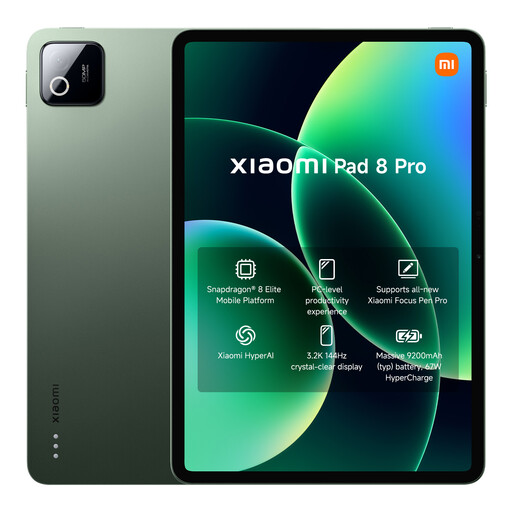
Xiaomi Pad 8 Pro, Pine Green, 8G RAM, 256G ROM
This tablet is worth considering if you want to review a draft on a mobile device and can confirm that your required apps and files work on it.
The listed variant has 8G RAM and 256G ROM. Check its weight, the exact accessory bundle and your Microsoft 365 access if handheld reading or Word review features matter to you.
View on Joybuy
 No image available
Apple 11-inch iPad Air (2026, M4), Wi-Fi, 128GB, Space Grey
Consider this iPad if you expect to review comments and tracked changes in Word for iPad rather than use desktop Office.
This listing is for the 11-inch Wi-Fi model with 128GB storage. Microsoft documents review controls in Word for iPad; confirm your Microsoft 365 entitlement and the accessories needed for your own workflow.
View on Joybuy
 No image available
TECLAST ArtPad Pro 2025 Edition, 12.7-inch 2K
Consider this larger tablet if page viewing and pen input matter more to you than keeping the screen close to 11 inches.
The product name specifies a 12.7-inch 2K display and an included stylus. Check its carrying dimensions and weight for your train journey, as well as the Word features and Microsoft 365 access your report requires.
View on Joybuy
 No image available
Samsung Galaxy Tab A11+, 11-inch, 128GB Wi-Fi, Grey
This 11-inch tablet is an option to assess if you want a screen of that size for reading a draft during travel.
The listed variant has 128GB storage and Wi-Fi connectivity. If your review calls for pen annotation or Word comments and tracked changes, confirm the input accessories, required app features and your Microsoft 365 entitlement for this model.
View on Joybuy
Common questions
Can I review tracked changes in Word on an iPad?
Yes, Word for iPad has controls for reviewing changes and comments, according to Microsoft Support. Check that your Microsoft 365 plan permits the features you need on your chosen iPad before relying on it for the report.
Will I need Microsoft 365 for a 10.9-inch or 11-inch tablet?
Check for a qualifying Microsoft 365 subscription before depending on editing and review features at those screen sizes. Microsoft places its free mobile core-editing threshold at 10.1 inches or less and sets subscription requirements for larger mobile devices in the stated cases.
Should I take a keyboard for report review on a train?
A keyboard is worth considering if you expect to write substantial corrections or replies rather than mainly read and make brief comments. Check whether it is included with the exact device and whether you will have room to use it in your usual seat.
Can I use a personal tablet for a confidential work report?
Check your organisation’s device and data-handling policy before putting the report on a personal tablet. The Information Commissioner’s Office advises organisations to consider access controls, software updates and separation of work and personal data when staff use their own devices.


