For train-based revision, start with a tablet around 11 inches if you mainly annotate PDFs and write notes by hand; check the pen, your files and the complete setup before choosing a model. An 11-inch iPad Air offers Apple's PDF markup tools but needs a separately purchased Pencil, while Samsung lists an S Pen in the Galaxy Tab S10 FE box. A Surface Pro 12-inch makes more sense when your revision depends on Windows document software or sustained typing, provided you account for its separate keyboard and pen.
Who needs which kind of tablet?
PDF-heavy handwritten revisers
If your journey is spent highlighting handouts and adding margin notes, put compatible pen input and a workable PDF annotation app ahead of laptop-style features. Apple Support documents PDF markup on iPad; check that your own files open and can be marked up as intended.
Windows-document editors
If revision means rewriting documents in desktop applications or typing for extended periods, check the required software and keyboard setup before settling on a pen-led tablet. Microsoft describes Surface Pro as a Windows 2-in-1 with optional keyboard and pen use.
Light-travel study commuters
If carrying less matters as much as having a screen large enough to edit notes, compare the exact tablet size and the accessories you would take aboard. Open essential files before leaving: Microsoft Support notes that reliable connectivity matters for prompt OneNote synchronisation.
What matters when choosing?
Choose the workflow before the screen size: PDF markup and handwriting point towards a pen-compatible tablet, whereas desktop document editing may justify a Windows 2-in-1. Then check what you will carry and whether your notes will be available during the journey.
iPad Air 11-inch
Consider it when: You mainly highlight and annotate PDFs using an iPad workflow; Apple Support documents those tools in Preview.
Allow for: Apple lists compatible Pencil models separately from the iPad Air.
Galaxy Tab S10 FE 10.9-inch
Consider it when: Handwriting is central and you want the S Pen that Samsung UK lists in the FE box.
Allow for: Check the exact Wi-Fi or 5G variant and box contents; the larger FE+ has a different screen size.
Surface Pro 12-inch
Consider it when: Your required revision software calls for Windows or your editing is mainly keyboard-led.
Allow for: Microsoft sells the 12-inch keyboard and Slim Pen separately, and some 13-inch Surface Pro keyboards do not fit.
| Concern | What to check | Who this matters to |
|---|
| Handwriting and PDF markup |
Check that your PDFs work with the annotation app and that a compatible pen is supplied or available separately. |
If I mark up handouts during a journey, I need to write on the files I actually use rather than switch between incompatible workflows. Around 40% of consumers might put handwriting and direct PDF annotation first. |
| Document editing and typing |
Confirm that required applications run on the exact device and that the keyboard fits its model and size. |
When revision involves restructuring long documents, I need a comfortable typing setup and access to my required software. For around 30% of consumers, that document-editing workflow could be the primary concern. |
| Carrying and offline preparation |
Compare the exact model's size and weight with its accessories; open essential files before boarding. |
If I travel with limited bag or table space and an unreliable connection, I need notes I can reach without waiting for a sync. Roughly 30% of consumers might put manageable carrying and prepared offline access first. |
Mistakes to avoid
-
Comparing tablets without the writing setup
A device that accepts a pen or keyboard may still need those accessories before you can use it for your intended notes. Apple lists Pencil options separately for iPad Air, and Microsoft sells the Surface Pro 12-inch keyboard and Slim Pen separately.
Check the exact generation and size, then account for the compatible pen, any keyboard you need, a case and a suitable charging arrangement.
-
Choosing a larger screen without considering the journey
More document space also changes what you have to hold and carry. Apple UK lists the 13-inch iPad Air Wi-Fi at 616 g and the 11-inch Wi-Fi version at 464 g, before accessories.
Compare the smaller format first if you usually annotate one document at a time; choose the larger display when the extra workspace serves a specific editing task.
-
Assuming cloud notes will always be current
A notebook may not show your latest changes promptly when the connection drops. Microsoft Support says a reliable internet connection helps OneNote synchronise quickly and successfully.
Synchronise and open important notebooks before travelling, and keep critical PDFs locally where your chosen app permits it.
-
Assuming every Surface Pro keyboard fits
Microsoft Support states that several 13-inch Surface Pro keyboards are incompatible with Surface Pro 12-inch.
Match the keyboard to the exact Surface Pro size and generation, particularly when buying an accessory separately.
Relevant brands to consider
Apple
The iPad Air is an iPadOS option for handwritten notes and PDF markup, available in 11-inch and 13-inch formats.
- Apple Support documents PDF highlighting and annotation on iPad; Apple UK lists Apple Pencil Pro and Apple Pencil (USB-C) support for iPad Air.
- The compatible Pencil is a separate purchase. Apple UK lists the 13-inch Wi-Fi iPad Air as heavier than its 11-inch Wi-Fi version.
Samsung
The Galaxy Tab S10 FE provides an Android option for pen-led revision, with a 10.9-inch model and a larger FE+ variant.
- Samsung UK lists S Pen support for the S10 FE and an S Pen in the FE box.
- Check the exact network variant and bundle. The 13.1-inch FE+ is a different size from the 10.9-inch S10 FE.
Microsoft
Surface Pro is a Windows 2-in-1 option when tablet annotation needs to sit alongside keyboard-led document work.
- Microsoft describes tablet use with an optional Slim Pen and laptop-style use with an optional keyboard.
- For Surface Pro 12-inch, the pen and keyboard are sold separately; Microsoft Support warns that some 13-inch keyboards are incompatible.
Lenovo
The Lenovo Tab Plus is an Android tablet to consider for reading study material as well as general media use.
- Lenovo UK describes an 11.5-inch 2K display and eight JBL speakers for the Tab Plus.
- If handwriting is essential, confirm active-pen compatibility, box contents and the PDF workflow for the exact model before choosing it.
Joybuy tablets for revision
These choices cover two 11-inch iPad Air storage variants for iPad PDF markup, an E Ink notebook for handwriting-led study, and a Xiaomi tablet to assess for pen-based revision. Check the exact file-editing workflow and accessories you need rather than assuming the devices do the same job.
 No image available
Apple iPad Air 11-inch (2026, M4) Wi-Fi 128GB, Space Grey
Consider this variant if you mainly annotate revision PDFs in an iPad workflow. Apple Support documents PDF markup on iPad, and Apple lists Pencil support for iPad Air; choose a compatible Pencil separately.
11-inch model with Wi-Fi and 128GB storage. Open essential files before travelling to check that they are available when you need them.
Joybuy
 No image available
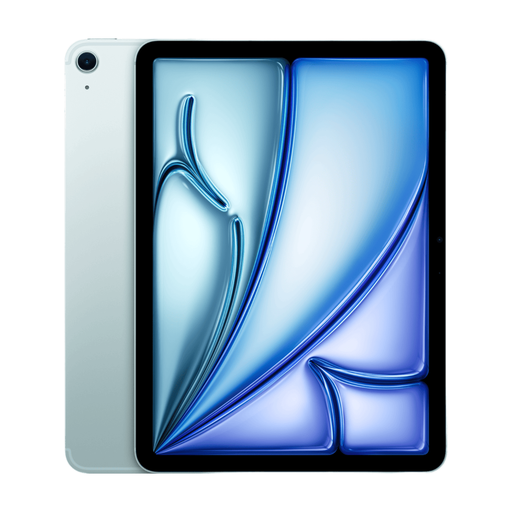
Apple iPad Air 11-inch (2026, M4) Wi-Fi 256GB, Blue
Consider this iPad Air if the iPad PDF annotation workflow suits you and you want the listed 256GB storage variant. Apple Support documents PDF markup on iPad; confirm that your revision files work in your chosen app.
11-inch model with Wi-Fi and 256GB storage. A compatible Apple Pencil is a separate purchase, and important files should be opened before the journey.
Joybuy
 No image available
iFLYTEK AINOTE 2 10.65-inch E Ink notebook with protective-case offer
Consider this notebook if writing revision notes is your main task. Before choosing it for PDF-heavy revision, confirm that it can annotate or edit your particular files rather than relying on PDF format support alone.
The title identifies a 10.65-inch E Ink device. Check the protective-case offer, lighting needs and access to your revision files for the journey.
Joybuy
 No image available
Xiaomi Pad 7 Grey, 8GB RAM, 128GB storage
Consider this tablet for handwritten study only after checking the Focus Pen supplied with the exact variant and the PDF annotation app you intend to use.
The product information identifies 8GB RAM and 128GB storage. Check its carrying weight and open required files before travelling.
Joybuy
Questions about train-based revision
Should I choose an 11-inch or 13-inch tablet for revision on a train?
Start around 11 inches if carrying comfort and limited table space matter more than viewing two documents side by side. Apple UK lists its 11-inch iPad Air Wi-Fi at 464 g and its 13-inch Wi-Fi version at 616 g, before a case or other accessories; compare the complete setup you would carry.
Does a tablet for handwritten revision come with a pen?
It depends on the model and bundle: Samsung UK lists an S Pen in the Galaxy Tab S10 FE box, while Apple lists Pencil options separately for iPad Air and Microsoft sells the Surface Pro 12-inch Slim Pen separately. Check the exact product variant and pen compatibility before buying.
Can I revise on a Wi-Fi tablet when the train connection drops?
You can work with files that your chosen app makes available locally, but do not rely on cloud changes synchronising during the journey. Microsoft Support says reliable connectivity helps OneNote sync promptly, so synchronise and open essential notebooks before boarding.


