A tablet with a compatible keyboard can suit hotel-room handout work centred on drafting, light formatting and PDF annotation. If a school template depends on desktop Word features, choose a Windows 2-in-1 instead; in either case, check the editing licence, accessories, charging arrangement and connection you will use away from your usual desk.
Who each setup suits
Teachers revising standard Word or PDF handouts
If you draft, edit and annotate ordinary lesson materials while travelling, file access and a comfortable keyboard may matter more than desktop-only software. Microsoft Support lists mobile versions of Microsoft 365 apps for iOS and Android; check what editing your account permits.
Teachers using complex school templates
If your handouts rely on desktop Word features or demanding formatting, test an actual template before choosing a mobile-only workflow. Microsoft Support advises using desktop Word for features unavailable in Word for the web and says Office can be installed on Surface Pro as on a desktop computer.
Frequent travellers who mark up materials
If you carry the device between rooms and annotate PDFs, consider its weight, pen arrangement, charging and secure access alongside typing. Apple UK lists the 11-inch iPad Air Wi-Fi model at 464 g, while Samsung UK describes S Pen use with the Galaxy Tab S10 FE.
What matters when choosing
iPad with a keyboard
Choose it when: Your handouts need mobile drafting and annotation rather than desktop-only Word features.
Allow for: Apple sells the iPad Air Magic Keyboard separately, and Microsoft 365 editing depends on the applicable plan and screen size.
Android tablet with pen input
Choose it when: Mobile document work and handwritten markup suit you; Samsung UK also lists microSD expansion of up to 2 TB for the Galaxy Tab S10 FE.
Allow for: Check the exact keyboard bundle and editing entitlement. Samsung UK says a travel adapter is not included with the Tab S10 FE family.
Windows 2-in-1
Choose it when: A school template requires desktop Word features or you need a laptop-style document workflow.
Allow for: Check the keyboard and Office licence separately; Microsoft describes the Surface Pro keyboard as optional.
| Concern | What to check | Who this matters to |
|---|
| Word and template compatibility |
Try an actual school handout, including the formatting and desktop features you use. Check the editing rights attached to your Microsoft 365 account. |
If a complex template must survive revision intact, I need to know whether my chosen Word workflow can handle it; around 42% of consumers would put document compatibility first. |
| Typing and annotation |
Check keyboard compatibility and layout, viewing angle, and whether the pen you want comes with the exact variant. |
For a session that moves between writing text and marking up PDFs, I want a setup I can carry and type on comfortably. Portable typing and annotation would come first for around 33% of consumers. |
| Travel readiness |
Confirm the charging arrangement and offline file access; plan an organisation-approved way to connect when handling sensitive material. |
If hotel connectivity or access to a socket interrupts my work, I need my files and power arrangements ready beforehand; roughly 25% of consumers would prioritise travel readiness. |
Mistakes to avoid
-
Assuming that opening a Word file means you can edit it
Microsoft Support describes screen-size limits that vary by Microsoft 365 plan. Viewing a handout on a tablet does not establish that the account you use for school documents permits editing on that screen.
Check your account and selected screen size, then try editing a real handout in the app you intend to use.
-
Choosing the tablet without checking the whole work setup
A hotel-room writing session may depend on a keyboard and suitable charging equipment. Apple sells its iPad Air Magic Keyboard separately, and Samsung UK says the Tab S10 FE family does not include a travel adapter.
Confirm the keyboard, pen if needed, cable and adapter for the exact product and bundle.
-
Reading a battery claim as document-work runtime
Microsoft quotes up to 15.5 hours of video playback for Surface Pro. That figure does not measure a session spent editing documents and using hotel connectivity.
Take a compatible charger and make essential files available offline rather than relying on a quoted playback figure to cover the session.
-
Sending sensitive school material over hotel Wi-Fi without a plan
The National Cyber Security Centre warns that public or insecure networks can expose data to interception or alteration.
Follow your organisation’s rules and use its approved secure connection method for sensitive files. Download permitted working documents before travelling where practical.
Relevant brands to consider
Apple
The iPad Air is a tablet-first option for drafting and marking up handouts with a compatible keyboard or Apple Pencil.
- Apple UK lists 11-inch and 13-inch iPad Air versions; the 11-inch Wi-Fi model weighs 464 g.
- The Magic Keyboard is sold separately. Check the Microsoft 365 plan and screen-size rules before depending on Word editing.
Samsung
The Galaxy Tab S10 FE offers an Android tablet route for mobile handout work and pen-led annotation.
- Samsung UK lists a 10.9-inch display and support for up to 2 TB of microSD storage for the Tab S10 FE.
- Samsung UK says the Tab S10 FE family does not include a travel adapter. Check the exact keyboard bundle and Microsoft 365 editing entitlement.
Microsoft
Surface Pro is a Windows 2-in-1 option when a handout needs a desktop Office workflow.
- Microsoft Support says Office can be installed on Surface Pro as on a desktop computer; Microsoft also describes an optional keyboard with a full-sized touchpad.
- The keyboard is optional. Microsoft’s quoted battery figure of up to 15.5 hours concerns video playback, not handout preparation.
Joybuy product choices
These choices include tablet-first devices for drafting and annotation, plus a Windows convertible for a laptop-style handout workflow. Match the exact accessory arrangement and document software to the files you need to produce.
 No image available
TABWEE T20 10.1-inch tablet with keyboard, mouse and stylus
The listed keyboard and stylus make this a setup to consider for typing and marking up a handout at a hotel desk.
The product name specifies 256 GB storage. Confirm the Android version for this SKU and whether your Microsoft 365 account permits editing on its 10.1-inch screen.
View on Joybuy
 No image available
HP OmniBook Ultra Flip 14-fh0006na, 16 GB/1 TB
This Windows 11 Home 2-in-1 is a laptop-style choice to examine when desktop document software matters more than a tablet-first setup.
Its product name specifies 16 GB RAM and a 1 TB SSD. Check the Office licence you will use and your charging arrangements for document work.
View on Joybuy
 No image available
Apple iPad Pro 11-inch (M5) Wi-Fi, 256 GB, standard glass, Silver
This iPad is a tablet-first option for reviewing handouts and, with a suitable setup, drafting or annotating them while travelling.
Check the compatible keyboard and Pencil arrangement for this variant, as well as the Microsoft 365 editing rights attached to your account.
View on Joybuy
 No image available
Xiaomi Pad 7 Grey, 8 GB/128 GB, with Focus Pen
The included Focus Pen makes this variant worth considering if marking up material is part of your handout workflow.
Check for a compatible keyboard if you expect extended typing. Confirm the charging equipment supplied with the exact variant and your Microsoft 365 editing rights.
View on Joybuy
 No image available
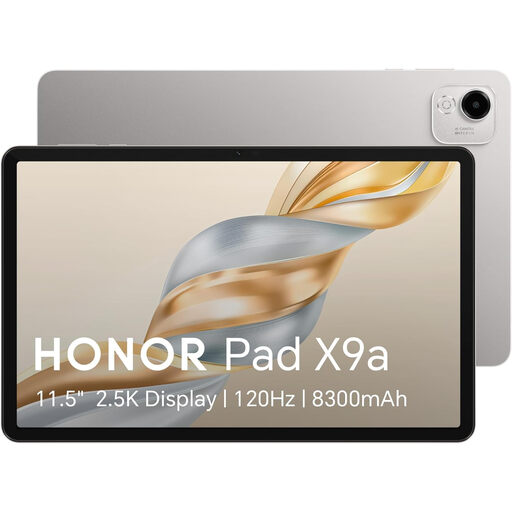
HONOR Pad X9a 11.45-inch Wi-Fi, 128 GB, Grey
Consider this tablet for mobile handout work if a compatible typing setup meets your needs.
This is a Wi-Fi-only variant. Check the exact keyboard and stylus bundle, Microsoft 365 editing rights and an approved connection method for hotel use.
View on Joybuy
Frequently asked questions
Will my Microsoft 365 account let me edit a handout on a tablet?
That depends on your plan, app and tablet screen size. Microsoft Support describes different screen-size editing limits for non-qualifying and some qualifying plans, so check the account you use for school files and try editing a real handout on the intended setup.
When is a Windows 2-in-1 the more suitable choice?
Choose a Windows 2-in-1 if your handout relies on desktop Word features that a mobile or web workflow cannot provide. Microsoft Support advises opening documents in desktop Word for features unavailable in Word for the web; test your school template and confirm your Office licence before relying on the setup.
Can I use hotel Wi-Fi for school handouts?
Use it for school material only in line with your organisation’s rules and an approved secure connection method. The National Cyber Security Centre warns that public or insecure networks can expose data to interception or alteration; having permitted files ready offline can also reduce your dependence on the connection.
Which accessories should I check before travelling?
Check the compatible keyboard, charging equipment and any pen your handout work requires for the exact variant you choose. Apple sells the iPad Air Magic Keyboard separately, while Samsung UK says the Tab S10 FE family does not include a travel adapter.


