For tile-matching games during ferry-terminal waits, choose a tablet you will comfortably carry and use: a compact screen saves bag space, while a larger one gives the game board more room. Consider cellular connectivity if the tablet needs its own mobile-data connection; otherwise, check whether your game works offline or whether a phone hotspot will meet your needs. Check the exact game, storage configuration and box contents before buying.
Who this choice suits
Light-travel casual gamers
If you mainly play during waits, a tablet that fits your travel bag may matter more to you than a larger display. Samsung lists an 8.7-inch screen for the Galaxy Tab A9 and an 11-inch screen for the A9+, illustrating the size choice.
Players who prefer a larger screen
If you want more room to see and tap tiles, consider whether you are happy to carry an 11-inch tablet. Lenovo lists an 11-inch, 1920 × 1200 anti-glare display for the cited UK Tab M11 configuration.
Travellers who need their own connection
If signing in, downloading updates or restoring game progress may require data away from Wi-Fi, a cellular model is worth considering. Check the exact variant and local coverage: Apple offers cellular iPad (A16) models, while Samsung says 5G on the Tab A9+ 5G requires a suitable network connection.
What matters when choosing
Start with the size you would carry through the terminal, then check how your particular game connects and how much internal storage it needs.
| Concern |
What to check |
Who this matters to |
| Easy carrying |
Compare the exact tablet's screen size and physical dimensions; models in one family can differ in size. |
If I am packing lightly for a short wait, I want a tablet that is convenient to bring along. Roughly 31% of consumers put portability first. |
| Connection away from home |
Check whether your game works offline after installation and whether the chosen variant has Wi-Fi only or cellular capability. |
If I need to sign in or retrieve game progress without relying on a hotspot, independent access matters most. For roughly 31% of consumers, connectivity is the primary concern. |
| Screen comfort |
Compare screen size on the exact model; check for an anti-glare specification if bright waiting areas concern you. |
When small tiles are awkward to see or tap, I would rather carry a roomier screen. Screen comfort comes first for roughly 23% of consumers. |
| Storage and essentials |
Check internal storage, the game's requirements and the exact box contents. Do not assume a microSD card can hold installed apps. |
If I mainly play casual games, I want enough space for what I will install without choosing specifications I do not need. Roughly 15% of consumers make that their primary concern. |
Buying pitfalls
-
Assuming cellular means a connection at every terminal
A cellular tablet still depends on local service. Samsung says its Galaxy Tab A9+ 5G needs a 5G-enabled location and an optimal connection for 5G service.
Check whether your game works offline and keep a fallback, such as downloaded content or a phone hotspot, if connectivity matters.
Using mobile data may require a separate plan or draw on your existing allowance.
-
Counting a microSD card as space for more games
Samsung says microSD expansion in the cited Galaxy Tab A9/A9+ range stores media rather than applications, so it does not replace internal space for installed games.
Check the internal storage of the exact variant against the games and updates you intend to keep installed.
-
Assuming a wall charger is in the box
Samsung's UK Galaxy Tab A9/A9+ buying information says a travel adapter is not included.
Read the box-contents listing for your chosen tablet and check that you have a suitable charger.
-
Leaving a tablet charging unattended during travel
The Royal Yachting Association advises against leaving portable devices charging unattended on board and recommends disconnecting them once fully charged.
Charge before travelling where practical. If you need to charge on your journey, follow the device instructions and your ferry operator's directions.
Brands to consider
Apple
The 11-inch iPad (A16) is a larger-screen option offered in Wi-Fi and Wi-Fi + Cellular versions.
- Apple lists a 2360 × 1640 display and Wi-Fi 6; 5G and Gigabit LTE apply to cellular models.
- Apple lists weights of 477 g for Wi-Fi and 481 g for cellular models, so check whether this size and weight suit your bag.
Samsung
The Galaxy Tab A9 family includes an 8.7-inch A9 and an 11-inch A9+; a 5G version of the A9+ is also offered.
- Samsung lists refresh rates of up to 60 Hz for the A9 and up to 90 Hz for the A9+.
- Configurations vary by market, and Samsung says microSD expansion in this range is for media, not applications. Check the exact UK variant.
Lenovo
The Tab M11 is an 11-inch Android option for players who prefer a larger screen.
- Lenovo's cited UK Tab M11 configuration lists a 1920 × 1200 anti-glare IPS display, 4 GB memory and 128 GB storage.
- Check the specifications and included accessories for the particular configuration you choose.
Joybuy tablet choices
These tablets cover compact carrying, larger game screens and models with stated mobile-data capability. Check the exact game's compatibility and offline behaviour whichever size you choose.
 No image available
Apple iPad mini 7 (A17 Pro), 512 GB, Space Grey
Consider this compact option if carrying a smaller tablet matters more to you than having a large game board.
Check whether this exact variant has the connection your game needs before buying.
View on Joybuy
 No image available
Xiaomi Pad 8 Pro, Grey, 12 GB RAM, 512 GB storage
Consider this Wi-Fi tablet if you prefer a larger area for the game board and can use offline play or another connection when needed.
The named configuration has 12 GB RAM and 512 GB storage. Check the exact game's compatibility and offline behaviour.
View on Joybuy
 No image available
TECLAST ArtPad Pro, 2025 edition, 12.7-inch, 256 GB
Consider its large screen if a roomier game board matters more than compact carrying.
The product name specifies a 12.7-inch 2K display, 256 GB storage and Dual SIM 4G LTE. Check its dimensions, UK network compatibility and the exact game before choosing it for travel; the separate '5G WiFi' wording does not establish 5G mobile service.
View on Joybuy
 No image available
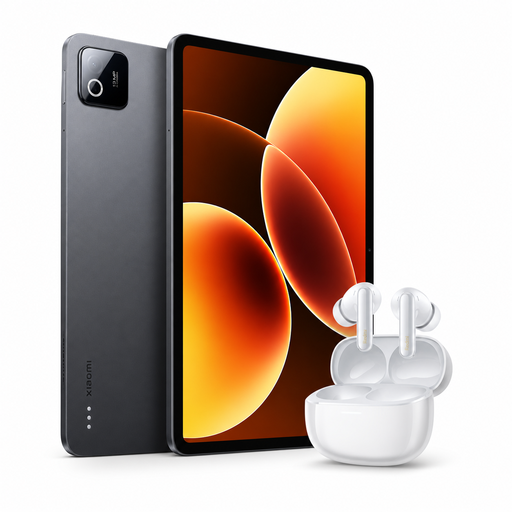
Xiaomi Pad 8, 8 GB RAM, 128 GB, Wi-Fi, with Redmi Buds 6 Pro
This Wi-Fi bundle is worth considering if you want a larger tablet and the named earbuds together.
The tablet is listed with 8 GB RAM and 128 GB storage; the bundle names Redmi Buds 6 Pro in Glacier White. Confirm the tablet's exact specifications and your game's offline behaviour before buying.
View on Joybuy
 No image available
DOOGEE Tab E3, Android 15, 11-inch FHD+ 90 Hz, Black
Consider its 11-inch screen if you want more room for tiles and can accommodate a larger tablet in your bag.
Check the exact included storage tier before buying. The named SIM slots do not, by themselves, establish which UK mobile-data networks the tablet can use; also check your game's compatibility and offline behaviour.
View on Joybuy
Frequently asked questions
Do tile-matching games require a powerful gaming tablet?
Choose around the requirements of the game you actually want to play rather than assuming you need high-end gaming specifications. Check its current app listing for device compatibility, then consider screen comfort, internal storage and whether it needs a connection.
Should I buy a Wi-Fi or cellular tablet for ferry-terminal waits?
A Wi-Fi tablet may meet your needs if your game works offline after installation or you can use a phone hotspot. Choose cellular if you need the tablet itself to use mobile data, but check the exact variant and local coverage: Apple lists 5G/LTE for cellular iPad (A16) models, while Samsung says Tab A9+ 5G service requires a suitable 5G connection.
Can I charge my tablet on a ferry?
Check your booked ferry operator's current instructions and whether a suitable socket is available; do not assume you can charge on every crossing. If you do charge on board, follow the device instructions. The Royal Yachting Association advises using an appropriate charger, not leaving portable devices charging unattended and disconnecting them once fully charged.


