Choose around the person’s main tasks and where they will use the device: a tablet is worth considering for mostly seated use at home, while a smartphone suits someone who needs a personal device away from home. Neither format is automatically easier. Try the intended interface with the recipient, then check connectivity, updates, account recovery and the help available after setup; Ofcom’s UK research shows that a device alone does not remove barriers involving confidence, access and affordability.
Who is this choice for?
Adult getting online with household help
Someone who wants to manage messages, video calls, services and everyday browsing, with a trusted person available for initial setup and occasional help. Ofcom identifies confidence as one of several barriers that can affect participation online.
User with a specific accessibility need
Someone who finds the standard interface difficult to read, hear, touch or navigate. They should try the relevant settings on the intended device rather than choose by brand or screen size alone.
Household planning ongoing support
A user and trusted supporter who need a workable plan for updates, charging and forgotten sign-in details. Apple and Google provide account-recovery options, but the appropriate arrangements need to be made with the user’s consent.
What matters when choosing?
Decide whether the device needs to travel with the person, then try the tasks and settings they will actually use. A larger screen or a focused interface is useful only if that particular setup works for them.
Tablet
Consider when: Most use will be seated at home and the person prefers a larger on-screen layout for calls and everyday tasks.
Trade-off: The tablet still needs a suitable connection and a comfortable way to hold or position it; a larger display does not make every interface simpler.
Smartphone
Consider when: The person needs calls, messages, sign-in codes or internet access while away from home.
Trade-off: Test text size, touch accuracy and navigation on the actual handset before relying on its smaller interface.
| Concern |
What to check |
Who this matters to |
| Focused interface |
Try a simplified layout on the exact device, and check that essential apps remain easy to find. |
If a crowded home screen makes familiar tasks hard to start, I need a layout I can understand each day; around 25% of consumers put a focused interface first. |
| Updates and account recovery |
Check the exact model’s update commitment and arrange account-recovery details with the user’s consent. |
I need to keep using my accounts after setup, even if I forget a password or an update needs attention; ongoing support is the primary concern for around 31% of consumers. |
| Accessible interaction |
Test the relevant display, audio or input controls with the required apps on the intended model. |
When reading, hearing or touching the screen is difficult, I need the final settings to work during a real task; around 25% of consumers prioritise accessible interaction. |
| Connection and charging |
Match Wi-Fi or mobile-data access to where the device will be used, and check the charger and daily charging routine. |
I need the device connected and ready when I want to use it, without a confusing charging setup; for around 19% of consumers, that is the first priority. |
Buying pitfalls to avoid
-
Choosing by screen size alone
A bigger display does not establish whether the person can find an app, read a service page or hold the device comfortably. Ofcom’s UK research also identifies confidence and connectivity as barriers beyond device access.
List the person’s most common tasks and let them try the intended text size, controls and connection before choosing a format.
-
Assuming Android features and updates are identical across models
Samsung says accessibility settings and available software updates can vary by model and software version. Google’s published Pixel update periods also differ by generation.
Check the exact model and installed software against the accessibility feature and update commitment you need, particularly when considering an older device.
-
Leaving account recovery until a password is forgotten
Lost access can interrupt email, apps and service sign-ins. Apple says its formal account-recovery process can take several days or longer in some cases.
Set appropriate recovery details with the user’s consent and agree how a trusted person will help without routinely taking possession of the password.
-
Adding a charger without checking the routine
An awkward cable or unstable stand can make everyday charging harder. London Fire Brigade advises using the supplied charger or a genuine replacement from a trusted supplier.
Check compatibility, cable reach and stability, and choose a visible charging location where the equipment will remain uncovered.
Relevant brands to consider
Brand features are a starting point, not a substitute for trying the exact device and checking its software version.
Apple
An iPhone or iPad may be worth considering when a focused interface is a priority and a trusted person can help configure it.
- Apple describes Assistive Access as offering larger on-screen items and more focused features on iPhone, and a simplified interface on iPad.
- Check compatibility and set up the user’s own Apple Account. Apple says account recovery can take several days or longer in some cases.
Samsung
Relevant to households comparing Galaxy devices with display, hearing and interaction adjustments.
- Samsung UK documents options including TalkBack, larger display settings, contrast adjustments and touch-interaction controls.
- Samsung says settings and available updates vary by model and software version; confirm both for the device under consideration.
Google Pixel
Relevant to buyers who want to check a published update policy alongside Android accessibility options on a particular Pixel phone.
- Google states that Pixel 8 and later phones receive seven years of operating-system and security updates, counted from first availability on the US Google Store.
- Older Pixel generations have different update periods, and accessibility-feature availability can depend on the model or Android version.
Joybuy product choices
These smartphones offer choices for personal use away from home; the tablet is an option to consider for mainly home-based use. Whichever format appeals, try the recipient’s essential tasks and check the exact model’s accessibility and support arrangements before buying.
 No image available
Google Pixel 9a, 128 GB, Obsidian
Consider this unlocked smartphone if the person needs a device to take away from home. Try its controls with the recipient, check the exact model’s accessibility settings and update dates, and confirm that a compatible charging adapter is available.
Joybuy
 No image available
realme 14T 5G RMX5074, 8 GB/256 GB, Obsidian Black
Consider this smartphone for someone who wants a personal device for calls and access away from home. The title identifies the 8 GB/256 GB variant; try the handset for readability and reach, and check its exact accessibility controls and update support.
Joybuy
 No image available
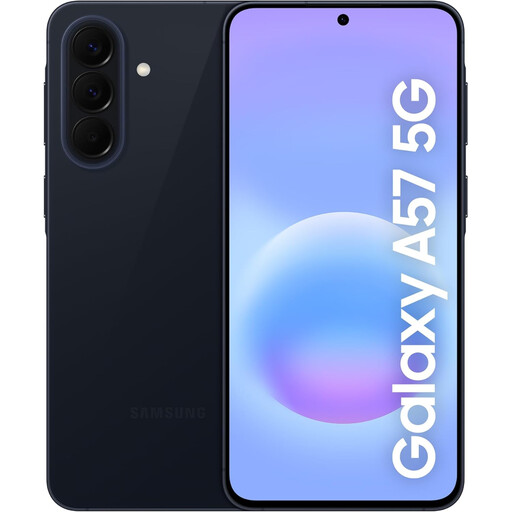
Samsung Galaxy A57 5G, 256 GB, Awesome Navy
This smartphone is worth trying if the recipient wants a phone for use away from home. Check whether its screen and controls suit them, confirm the required accessibility features and update support for this model, and arrange a compatible charging adapter.
Joybuy
 No image available
Xiaomi Pad 8, 8 GB/128 GB, Wi-Fi, grey
Consider this tablet when the person will mainly use a device where Wi-Fi is available. Check that they can comfortably position and handle it, then confirm the accessibility features, update support and charging equipment needed for the intended setup.
Joybuy
Common questions
Is a tablet or smartphone easier for a less-confident adult?
Neither format is automatically easier. Consider a tablet for mostly seated use when the person prefers its on-screen layout, or a smartphone when calls, messages and access away from home matter more; let the recipient try the final interface before deciding.
What should be ready before the person starts using the device?
Set up an account belonging to the user, the intended connection, essential apps and an agreed routine for updates and help. Choose a screen lock they can use, and arrange recovery information with their informed consent; Apple notes that a trusted supporter may help configure Assistive Access, while Google explains how recovery details can help restore account access.
How can a supporter help with a forgotten password?
Use the account provider’s recovery options where appropriate rather than routinely sharing the user’s password. Agree who the trusted supporter is and which recovery details the user consents to provide; Apple cautions that formal account recovery can sometimes take several days or longer.
What should I check when adding a stand or replacement charger?
Check that the device sits securely, the cable reaches comfortably and the person can place and remove it. London Fire Brigade advises using the supplied charger or a genuine replacement from a trusted supplier and keeping charging equipment uncovered.


