What matters when choosing
Start with the games you need to run, including their offline and save requirements. Then choose a screen size for the way you will actually play: handheld during a wait, or seated with room to set the tablet down.
| Concern |
What to check |
Who this matters to |
| Games and offline play |
Check each title’s iPadOS or Android listing, save requirements and offline-play behaviour before travel. |
If my games or saves will not work on the tablet, its other features cannot make up for that. Around 36% of consumers would put game and offline readiness first. |
| Map space and portability |
Compare screen size with the exact model’s dimensions and weight; consider whether you will hold it or use a table. |
I need to read maps and tap controls without carrying a tablet that feels awkward during airport waits. For around 29% of consumers, that balance is the primary concern. |
| Long-session use |
Check the intended game’s requirements and the model’s charging features; do not treat video-playback time as gaming time. |
If a wait turns into a long gaming session, responsiveness and access to power matter more to me than headline specifications alone. Around 21% of consumers would prioritise long-session use. |
| Storage and travel setup |
Confirm the selected storage variant, any expansion support and what comes in the box. |
I want space for games downloaded before departure and to know which accessories I must arrange separately. That would be the leading need for around 14% of consumers. |
Joybuy tablets for this decision
These choices span 11-inch iPads, approximately 11-inch Android tablets and a larger Android model for seated play. Match the operating system to your games first, then compare the listed storage and screen configurations with how you travel.
 No image available
Xiaomi Pad 8 Pro Grey, 12GB RAM, 512GB
Consider this Android tablet if you want substantial local storage for games downloaded before travel. The listed configuration has 12GB RAM and 512GB storage; check your games’ Android, offline and save requirements, as well as the tablet’s dimensions for handheld use.
View on Joybuy
 No image available
Apple iPad Air 11-inch (M3), 256GB, Blue
This 11-inch iPad Air suits a game library you have confirmed on iPadOS, with 256GB of listed storage. The UK App Store lists Sid Meier’s Civilization VI for iPad; check your other games and their offline and save requirements individually.
View on Joybuy
 No image available
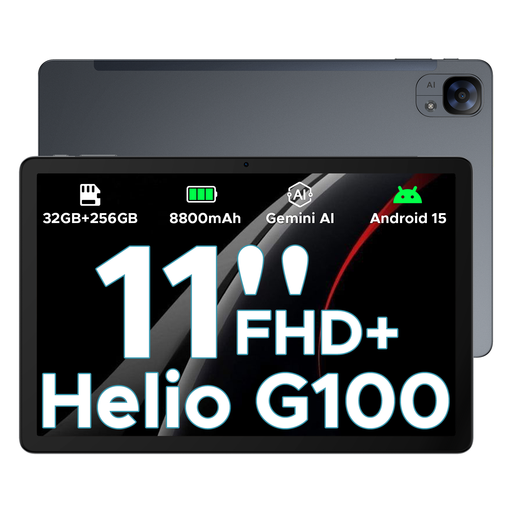
DOOGEE Tab E3, 11-inch, 256GB, Grey
Consider its 11-inch Android format if you want a full-size screen for strategy-game menus. The product name specifies Android 15, a 90 Hz FHD+ display and 256GB storage; confirm the selected memory configuration, game compatibility and offline behaviour before buying.
View on Joybuy
 No image available
Apple iPad Air 11-inch (2026, M4), Wi-Fi 128GB, Space Grey
This Wi-Fi iPad Air is another 11-inch route for games available on iPadOS. The selected variant is listed with 128GB storage; check whether that capacity fits games and downloads you need offline, and confirm each title’s save behaviour.
View on Joybuy
 No image available
TECLAST ArtPad Pro (2025), 12.7-inch, 256GB
Its 12.7-inch screen is worth considering if you expect to play seated and want more room for maps. The product name specifies Android 15, a 2K display, 256GB storage and dual-SIM 4G LTE; check its dimensions, the intended games and their offline requirements before relying on it for travel.
View on Joybuy
Common questions
Is a Wi-Fi-only tablet enough for airport gaming?
A Wi-Fi-only tablet can suit airport gaming if your intended games work offline or you have dependable hotspot access. Download games and updates before departure, and check whether launching a game or retrieving its saves requires a connection.
Will a larger tablet make strategy games easier to play?
A larger screen may give dense maps and text more room, but it can be less convenient to hold or fit into a confined seating area. OnePlus lists the 13.2-inch Pad 3 at 675 g, while Apple’s comparison lists the 11-inch iPad Air (M3) Wi-Fi model at 460 g; choose according to where you expect to play.
What should I check before taking a tablet through a UK airport?
Check your departure airport’s current screening instructions and your airline’s cabin-bag allowance before travelling. UK government guidance advises checking airport-specific hand-luggage rules, while nidirect advises confirming bag size and quantity with the airline.
Can I bring a power bank for the tablet?
Check your airline’s rules for the power bank’s battery rating and where it must be carried, as well as instructions from each airport on your journey. Do not assume that access to a socket will be available when you want to play.
Will I need a separate charger?
Check the box contents for the exact tablet you choose. Samsung’s UK Galaxy Tab S10+ buying page, for example, lists a USB-C cable but says a travel adapter is not included; that does not establish what comes with another model.


