What to prioritise when choosing a tablet
Check required apps and exam rules first, then compare the reading and carrying setup. Add pen and keyboard requirements according to the work you actually do.
| Concern |
What to check when buying |
Who this matters to |
| Required apps and exams |
Check the institution’s operating-system, exam-platform and file-format requirements, plus the features available under your software plan. |
If a course or work task depends on a particular app, exam system or document feature, I need to know it will work before choosing. About 28% of consumers put required-app, document and exam compatibility first. |
| Handwritten notes |
Match the pen to the exact tablet and check whether it is included in the selected bundle; confirm that your notes app handles the formats you need. |
If I annotate reading or write notes by hand, I need a compatible pen and a workable way to keep or share those notes. About 22% of consumers prioritise handwriting and annotation. |
| Reading and carrying |
Compare the screen and weight of the specific configuration, and assess battery information on a comparable test basis. |
If I read course material in different places, I need a screen that suits my reading and a device I can carry comfortably. About 17% of consumers put carrying comfort, screen size and battery considerations first. |
| Keyboard-led work |
Check model compatibility, bundle contents and whether the apps provide the document features you need. |
If I regularly revise documents or type longer emails away from a desk, I want to know whether a keyboard suits the tablet and my workflow. About 17% of consumers prioritise typing and document control. |
| Complete setup |
Check what is included and what you will need separately, including accessories and any required software entitlement. |
If I need a tablet ready for a particular mix of study or work tasks, I want to account for the whole setup rather than the device alone. About 16% of consumers put the complete setup and its service requirements first. |
Joybuy product choices
These Joybuy choices cover portable study and work tablets, including options described for keyboard use, reading and pen-compatible notes.
 No image available
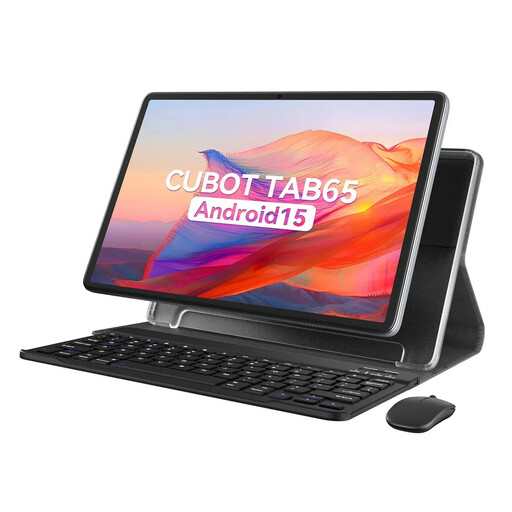
CUBOT Tab 65, 12 GB+128 GB/1 TB
The listed keyboard-and-mouse setup may suit typing emails or course documents away from a desk.
10.1-inch display; Android 15. The product description lists a keyboard and mouse.
If your required exam uses Examplify, ExamSoft says it does not run on Android.
View on Joybuy
 No image available
Samsung Galaxy Tab A11, 64GB, Silver
Its stated compact screen and weight may suit carrying a tablet for reading and video calls.
8.7-inch display; 335 g; 5MP front camera. The product description says a charging adapter is not included.
If your required exam uses Examplify, ExamSoft says it does not run on Android.
View on Joybuy
 No image available
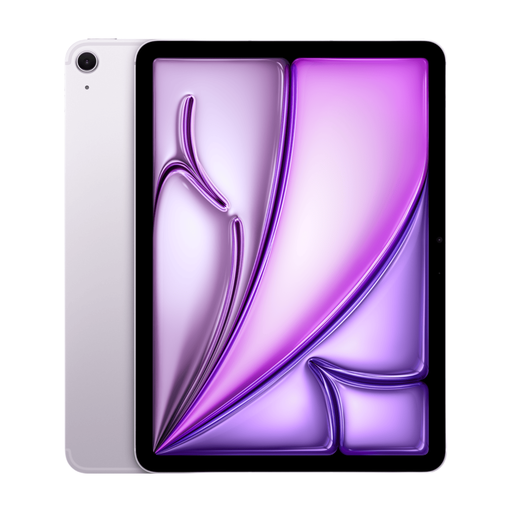
Apple 11-inch iPad Air (2026, M4), Wi-Fi, 256GB, Purple
This iPad may suit portable reading and productive app use, with compatible accessories available for handwriting or typing.
11-inch display; M4 chip; compatible with Apple Pencil and Magic Keyboard. The product description says these accessories are sold separately.
For LockDown Browser exams, Respondus says iPad use depends on the exam settings and a compatible learning system.
View on Joybuy
 No image available
HONOR MagicPad 4, 256GB, Grey
The described larger display may suit reading documents, with compatible accessories listed for typing and handwritten notes.
12.3-inch OLED display; approximately 450 g; compatible Smart Keyboard and Magic-Pencil accessories.
If your required exam uses Examplify, ExamSoft says it does not run on Android.
View on Joybuy
 No image available
TECLAST ArtPad Pro, 12.7-inch 2K
Its stated screen size and T-Pen compatibility may suit reading and handwritten annotation.
12.7-inch 2K display; Android 15; T-Pen compatibility with 4096-level pressure sensitivity.
If your required exam uses Examplify, ExamSoft says it does not run on Android.
View on Joybuy
Frequently asked questions
Can I use any tablet for my course’s exams?
No; the permitted device depends on the exam system and your institution’s setup. ExamSoft says Examplify does not run on Android. Respondus says iPad use with LockDown Browser depends on exam settings and a compatible learning system, so ask your institution which application, version and configuration your exam permits.
Do I need both a keyboard and a stylus?
Choose according to the work: a compatible pen is relevant for handwriting and annotation, while a model-compatible keyboard may help with sustained typing. Check the exact bundle; Samsung lists an S Pen in its cited Galaxy Tab S10 FE package, while the cited Apple and Microsoft products have optional pen and keyboard arrangements.
Will Microsoft 365 documents work the same way on an iPad or Android tablet?
Do not assume that the available editing features will be identical. Microsoft says mobile features and available files depend on the qualifying plan or other Office entitlement, so check the particular document feature and subscription you need.
What should I check before working away from a desk?
Sign in to the required apps, open a representative course or work file, try a call and test a note export or document edit. Doing these checks before relying on the device can help you identify account or compatibility issues relevant to your workflow.
What UK return rights apply to an online tablet purchase?
For an applicable distance purchase, GOV.UK guidance says you can notify the seller within 14 days of receiving the item that you wish to cancel, then have another 14 days to return it. Exceptions may apply, and faulty or misdescribed goods have separate remedies; check the circumstances and the seller’s return instructions.


