Start with the tablet you own: Apple Pencil, the named Samsung S Pen and Lenovo Tab Pen Plus each have model-specific compatibility requirements, so check the exact tablet before choosing a pen. For furniture sketches, compare the pen controls you will use, the space available on your desk and how you will carry and store the setup; a larger screen offers more canvas but takes up more room.
Who this is for
Students adding a pen to an existing tablet
If you already have an iPad, Galaxy Tab or Lenovo tablet, the immediate task is finding a pen compatible with its exact model and generation. Apple, Samsung and Lenovo each set model-specific conditions for the pens discussed here.
Small-room layout sketchers
If you draw furniture positions, dimensions or alternative layouts at a compact desk, consider both the visible drawing area and where the tablet and pen will go when you finish.
Students choosing a tablet and pen together
If you need both devices, check that the chosen tablet supports the pen and whether that exact configuration includes it. Compare the tablet’s footprint with the desk and bag you use for study.
What matters when choosing
Check tablet compatibility before comparing drawing controls. If you are buying a tablet as well, consider the drawing space, portability and contents of the exact configuration together.
| Concern |
What to check |
Who this matters to |
| Tablet compatibility |
Match the exact tablet model and generation to the pen maker’s compatibility information; a USB-C connection alone does not establish pen compatibility. |
I already have a tablet and want a pen that works with it, rather than one that merely looks suitable. Around 31% of consumers would put compatibility first. |
| Freehand control |
Compare the compatible pen’s documented tilt, pressure and palm-rejection functions, then check whether your intended app uses them. |
When I redraw furniture outlines and add notes, I want the pen controls that suit the way I sketch. For around 31% of consumers, drawing control would be the primary concern. |
| Desk space and portability |
Check the exact tablet’s dimensions and weight, along with how its pen is stored, against your desk and bag. |
I need to see a room layout clearly, but I also need to put the tablet away or carry it to class. Roughly 23% of consumers would prioritise that balance. |
| Complete setup |
Confirm whether the exact tablet configuration includes a compatible pen and what is needed to charge and store it. |
I want to start sketching without finding that a necessary pen or charging item is separate. Around 15% of consumers would put setup completeness first. |
Buying pitfalls
-
Assuming USB-C means a pen will work
USB-C can describe how a pen connects or charges; it does not establish support for a tablet’s active-pen functions. Apple, Samsung and Lenovo specify compatibility by model.
Check the tablet’s exact model and generation against the maker’s pen information, then confirm how the supported pen pairs and charges.
-
Assuming the tablet includes a stylus
Lenovo Tab Plus configurations can differ in pen inclusion, while Apple Pencil (USB-C) is sold as a separate accessory. A product-family name is not enough to identify what comes in the box.
Check the contents of the exact configuration, including the pen and any charging item you need.
-
Treating water resistance as permission for any wet use
Samsung’s IP68 claim for the cited Galaxy Tab FE S Pen is based on stated freshwater laboratory conditions; Samsung does not advise beach or pool use.
Follow Samsung’s stated conditions and dry the pen before attaching it to the tablet.
-
Choosing a larger tablet without checking its footprint
Apple lists 11-inch and 13-inch iPad Air options, while Lenovo lists an 11.5-inch display for Tab Plus. A larger canvas also occupies more desk and bag space.
Compare the exact device dimensions and weight with your workspace and what you carry each day.
Brands to consider for compatible styluses
Apple
Apple Pencil (USB-C) is an option for selected compatible iPads; Apple Pencil Pro is a separate option for selected newer iPad models.
- Apple describes precision, low latency and tilt sensitivity for its Pencil range. Pencil Pro adds controls including squeeze and barrel roll on supported devices.
- Check the exact iPad model. Apple Pencil (USB-C) pairs and charges using a USB-C cable; its magnetic attachment is for storage.
Samsung
The cited S Pen is designated for Galaxy Tab S9 FE, S9 FE+, S10 FE and S10 FE+ tablets.
- Samsung describes pressure- and tilt-sensitive input for sketches and notes on the named models.
- Do not assume this S Pen fits another Galaxy Tab. Its stated water resistance has freshwater test conditions and does not make beach or pool use advisable.
Lenovo
Tab Pen Plus is a route to consider when Lenovo confirms compatibility with the particular tablet.
- Lenovo specifies 4,096 pressure levels, tilt detection and palm rejection for Tab Pen Plus.
- Use Lenovo’s compatibility checker for the exact device. If choosing a Tab Plus configuration, check whether that configuration includes a pen.
Joybuy stylus choices
These pens offer choices for furniture sketching on a tablet, chiefly within the iPad range. Match an Apple Pencil to your exact iPad before deciding; for the VoxorAI pen, check the functions and setup available on your particular tablet.
 No image available
Apple Pencil (2nd Generation)
Consider this pen for furniture sketches only after matching your exact iPad model and generation to Apple’s compatibility information.
Check the pairing and charging arrangements for your iPad before choosing this generation.
View on Joybuy
 No image available
Apple Pencil Pro (2024) for iPad Air/iPad Pro
For sketches on a supported newer iPad Air or iPad Pro, this is a route if you want Pencil Pro controls as well as pen input.
Apple describes squeeze, barrel roll and haptic feedback for Pencil Pro. Confirm your exact iPad model and generation with Apple before choosing it.
View on Joybuy
 No image available
Apple Pencil (USB-C)
For room-plan outlines and annotations on a compatible iPad, consider this pen if cable-based pairing and charging fit your routine.
Apple specifies tilt sensitivity and USB-C cable pairing and charging; magnetic attachment is for storage. Check your exact iPad model and required software.
View on Joybuy
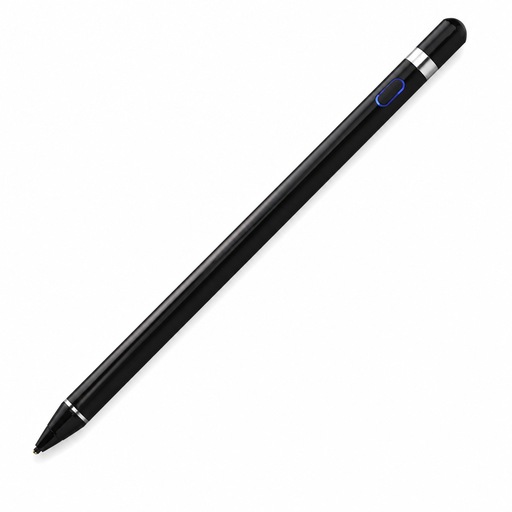 No image available
VoxorAI HL-U05 Black Active Stylus
For basic furniture outlines, consider this pen only after checking what input your particular tablet and sketching app can use.
Check whether its app-based pairing steps suit your device; a broad compatibility description does not establish which active-pen functions will work on it.
View on Joybuy
Common questions
Can I choose a stylus before checking my tablet model?
Check the exact tablet model and generation first. Apple lists compatible iPads for Apple Pencil, Samsung names the Galaxy Tab FE models supported by the cited S Pen, and Lenovo directs Tab Pen Plus buyers to its compatibility checker.
Which pen controls matter for simple furniture sketches?
Start with a pen that works with your tablet and drawing app, then compare tilt and palm-rejection support for freehand outlines and annotations. Pressure sensitivity is another control to consider if you want variable line weight, rather than a requirement for every room plan.
Does Apple Pencil (USB-C) charge while attached magnetically?
No: Apple says Apple Pencil (USB-C) pairs and charges through a USB-C Charge Cable, while magnetic attachment is for storage. Check iPad compatibility and the required software before choosing it.
Will a new tablet include the stylus?
Check the exact configuration rather than assuming it will. Lenovo shows Tab Plus configurations with different pen arrangements, and Apple sells Apple Pencil (USB-C) separately.


