Start with your exact tablet model: a stylus that does not work with it cannot help you annotate lecture slides. Samsung describes the pen supplied with its Galaxy Tab S11 as charge-less; compatible iPads offer cable or magnetic charging depending on the Apple Pencil, while Surface Slim Pen needs a powered compatible device or accessory to charge.
Who is this for?
Students with limited access to sockets
If you annotate slide PDFs through several classes, the pen’s charging arrangement matters alongside tablet compatibility. Samsung describes the pen supplied with its Galaxy Tab S11 as charge-less; other routes may need a cable or a powered charging accessory.
Existing iPad owners annotating PDFs
Your exact iPad model determines which Pencil you can consider. Apple says Apple Pencil (USB-C) charges through a cable, while Apple Pencil (2nd generation) charges magnetically on compatible iPads.
Surface-based note-takers
If you use compatible Surface hardware, check where Surface Slim Pen will charge between classes. Microsoft says it needs a powered compatible device or accessory, and its standalone charger is sold separately.
What matters when choosing a stylus?
For lecture-slide annotation when sockets are scarce, establish compatibility with your tablet first. Then check how the pen charges and whether that arrangement fits your day.
| Concern |
What to check |
Who this matters to |
| Charging between lectures |
Check whether the exact pen is charge-less or needs a cable or powered accessory. |
With several classes before I can reach a socket, I want to avoid a separate pen-charging routine. Around 42% of consumers put charging independence first. |
| Exact iPad compatibility |
Match your iPad model and generation to the Pencil’s compatibility list; distinguish cable charging from magnetic charging. |
I already have an iPad and need a Pencil that works with that particular model for slide markup. Around 33% of consumers put the exact iPad match first. |
| Charging accessories |
For Surface Slim Pen, confirm a compatible charging device or accessory and whether it must be powered. |
My existing Surface setup needs somewhere to charge the pen between sessions. Roughly 25% of consumers prioritise having the right charging setup. |
Charging and compatibility mistakes to avoid
-
Assuming a magnetic attachment charges the pen
Apple says Apple Pencil (USB-C) attaches magnetically for storage but pairs and charges through a USB-C cable. Leaving it attached does not replace that cable connection.
Check the charging instructions for the exact Pencil before deciding what you need to carry to lectures.
-
Choosing by tablet brand alone
Apple Pencil (USB-C) and Apple Pencil (2nd generation) have different compatible-iPad lists. An iPad brand name alone is not enough to establish a match.
Compare your full tablet model and generation with the manufacturer’s compatibility list before ordering.
-
Overlooking the Surface charging setup
Microsoft says Surface Slim Pen charges wirelessly through a powered compatible device or accessory. Its standalone charger does not come with the pen.
Check whether your Surface device or keyboard can charge the pen; if not, confirm which separate accessory you would need.
-
Applying one S Pen charging claim to every model
Samsung describes the pen supplied with Galaxy Tab S11 as charge-less, but says Bluetooth Air Actions on its Tab S8-series S Pen require the pen to be charged.
Check the charging behaviour of the exact pen and any Bluetooth features you intend to use.
Relevant brands to consider
Samsung
Relevant if you are considering a Galaxy Tab S11 rather than adding a pen to a tablet you already own.
- Samsung UK describes the pen supplied with Galaxy Tab S11 as charge-less.
- That description does not establish the charging behaviour of every Galaxy Tab or replacement S Pen.
Apple
Relevant to iPad owners comparing Pencil compatibility and charging arrangements.
- Apple says Apple Pencil (USB-C) charges by cable, while Apple Pencil (2nd generation) pairs, charges and stores magnetically on compatible iPads.
- Check the compatibility list for your exact iPad; magnetic storage on the USB-C model is not magnetic charging.
Logitech
Relevant to iPad owners considering Crayon for PDF markup and handwritten notes.
- Logitech presents Crayon as an iPad-focused digital pencil and describes use for marking up PDFs.
- Check the charging-port version and compatibility with your exact iPad before choosing one.
Microsoft
Relevant to students who already use compatible Surface hardware.
- Microsoft says Surface Slim Pen can charge wirelessly with a powered compatible device or accessory.
- The standalone Surface Slim Pen Charger is sold separately, so confirm that you have a suitable charging setup.
Joybuy styluses for lecture-slide notes
These Joybuy choices include Apple Pencils for compatible iPads and a ZTE Nubia pen for which tablet and PDF-app suitability should be checked. Choose by your device and charging needs rather than treating the pens as interchangeable.
 No image available
Apple Pencil (2nd generation)
For notes and PDF markup on a compatible iPad, this is an option if you want the pen to charge while attached to the tablet.
Apple says it pairs, charges and stores magnetically. Check your exact iPad model against Apple’s compatibility list.
View on Joybuy
 No image available
Apple Pencil Pro (2024)
If you want to use Apple Pencil Pro for handwritten lecture notes, establish that your exact iPad model supports it before choosing this variant.
Confirm the charging arrangement for your device before relying on the pen between classes.
View on Joybuy
 No image available
Apple Pencil (USB-C)
For marking up slides on a compatible iPad, this Pencil suits a charging plan that includes a USB-C cable.
Apple says it pairs and charges through that cable and attaches magnetically for storage only. Check your exact iPad model before ordering.
View on Joybuy
 No image available
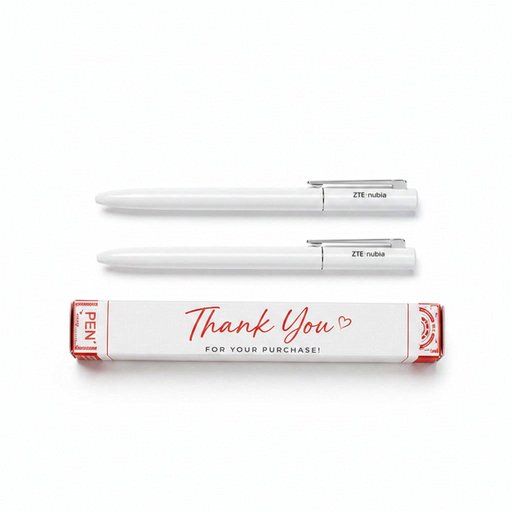
ZTE Nubia Pen White (Free Gift Only)
If you want this pen for touchscreen notes, confirm that it works with your tablet and the app you use to annotate lecture slides.
The listing identifies it as “Free Gift Only”; check the conditions for obtaining it before ordering.
View on Joybuy
Frequently asked questions
Will any tablet stylus work for annotating lecture-slide PDFs?
No stylus should be assumed to work with every tablet. Check your exact tablet model and generation against the pen maker’s compatibility information; Apple, for example, lists compatible iPads separately for Apple Pencil (USB-C) and Apple Pencil (2nd generation).
Does a magnetic attachment charge an Apple Pencil?
Not always. Apple says Apple Pencil (USB-C) attaches magnetically for storage but charges through a USB-C cable; Apple Pencil (2nd generation) charges magnetically on compatible iPads.
What do I need to charge Surface Slim Pen between lectures?
You need a compatible powered device or charging accessory. Microsoft says Surface Slim Pen charges wirelessly only when that device or accessory is powered on, and its standalone charger is sold separately.


