What matters when choosing?
For train-time survey review, establish how you will access your files, then balance screen comfort against the editing you need to do.
11-inch iPad Air
Consider it when: your dashboards and annotation tools work in your iPadOS workflow and you want a tablet primarily for visual review.
Trade-off: confirm your Microsoft 365 editing rights and whether you need a separate keyboard or pen.
Galaxy Tab S10 FE
Consider it when: you use Android apps and want the model's microSD support for local files, with a cellular variant if useful outside poor-coverage stretches.
Trade-off: 5G cannot replace offline preparation; confirm the editing features available in your required apps.
Surface Pro 12-inch
Consider it when: review regularly becomes work in Windows desktop applications or calls for sustained keyboard input.
Trade-off: Microsoft sells the keyboard and Slim Pen separately, adding to the equipment you need to carry.
| Concern | What to check | Who this matters to |
|---|
| Offline file access |
Check whether your survey platform can export usable local files and whether your organisation permits offline copies. Microsoft advises opening required cloud-stored Office files online before an offline journey. |
I need my survey files available when the train loses signal, even if changes cannot sync until later. Around 42% of consumers put offline readiness first. |
| Screen and carrying comfort |
Compare display size and the exact model's weight; assess reflections and brightness in the conditions where you expect to read. |
When I review charts and tables at my seat, I want enough room to read without carrying a device that feels unwieldy. Portable visual review is the primary need for around 33% of consumers. |
| Editing and typing |
Confirm your spreadsheet apps, Microsoft 365 editing entitlement and any screen-size conditions. Check keyboard compatibility and what is included. |
My journey sometimes involves revising workbooks or writing more than brief notes, so viewing files alone will not do. Around 25% of consumers chiefly need an editing and keyboard workflow. |
Joybuy tablets for train-time review
These tablets offer different screen sizes, storage configurations and input options for reviewing survey results while travelling. Match the device to your files and apps, then check offline access and editing rights before choosing.
 No image available
Samsung Tab A11+ SM-X230, 6/128GB, silver
Consider this tablet for reading saved survey results if your required apps work with your files. The listed configuration is 6/128GB; confirm offline file access, spreadsheet editing rights and any keyboard arrangement you need.
View on Joybuy
 No image available
DOOGEE U11 PRO, 11-inch, 256GB, black
The 11-inch screen and stated 256GB storage make this an option for a portable, file-led review workflow. Its title also lists a 90Hz IPS screen and microSD expansion up to 2TB; check that your survey and spreadsheet apps provide the offline and editing features you require.
View on Joybuy
 No image available
TABWEE T20, 10.1-inch, 256GB, with keyboard
Consider the keyboard bundle if your train-time review includes typing comments as well as reading results. The title lists a 10.1-inch display, 256GB storage, keyboard, mouse and stylus; check the complete kit's carried weight and your apps' offline and editing features.
View on Joybuy
 No image available
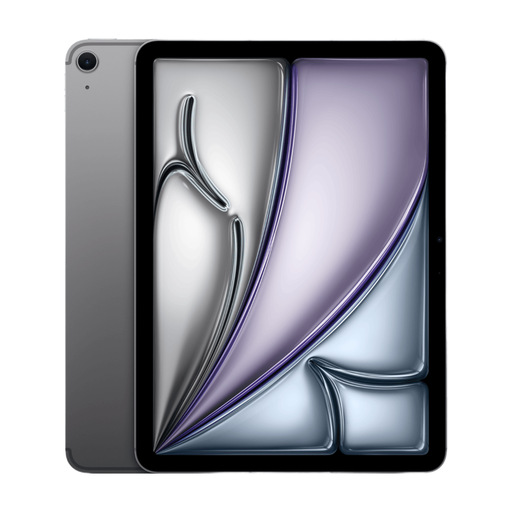
Apple 11-inch iPad Air (2026, M4), Wi-Fi 512GB, Space Grey
This iPad Air suits visual review where your survey tools work on iPadOS. Apple specifies a 464 g Wi-Fi weight and a fully laminated, anti-reflective display for the 11-inch model; this listing is the 512GB Wi-Fi variant. Check offline access and Microsoft 365 editing rights, and whether you need the separately sold Apple Pencil or Magic Keyboard.
View on Joybuy
 No image available
TECLAST ArtPad Pro (2025 Edition), 12.7-inch, 256GB
The larger display may appeal if you prefer more room for survey visuals, but assess its size and carried weight for your seat and journey. The title specifies a 12.7-inch 2K display, 256GB storage and an included stylus. Confirm that your required apps support offline files and the edits you need.
View on Joybuy
Frequently asked questions
Is a cellular tablet worth choosing for train journeys?
Choose cellular capability if you will also use mobile data where coverage is available, but keep essential survey files ready offline. In research published in June 2026, Ofcom found poor mobile performance in 58% to 83% of its train tests, depending on the network.
How do I prepare Office survey files for an offline journey?
Download and open the files you need while the tablet is online, before you travel. Microsoft says cloud-stored Office files must have been opened online at least once for offline work; changes can sync when connectivity returns.
Can I edit Excel files on any tablet?
No tablet choice alone establishes which Excel editing features you can use. Microsoft says mobile-app capabilities depend on the Office version or Microsoft 365 plan and identifies screen-size limits for some editing scenarios, so check your licence and required edits before buying.
When should I add a keyboard?
Consider a keyboard if your journeys involve extended comments, report revisions or substantial spreadsheet editing rather than mainly reading results. Check compatibility and what comes with the exact tablet; Microsoft states that the keyboard for Surface Pro 12-inch (2nd Edition) is sold separately.


