Readers who annotate by hand
If you underline passages or write in the margins before drafting a summary, check pen compatibility for the exact tablet and whether the pen comes with your chosen bundle.


If you plan to annotate passages by hand before writing your chapter summary, start with a tablet that supports a compatible pen and has enough room for comfortable reading. An approximately 11-inch model is a practical choice when you will hold it or use a small hotel-room surface; consider a larger screen if viewing the textbook and your notes side by side matters more than compactness. Check the exact pen bundle, storage and offline access before choosing.
If you underline passages or write in the margins before drafting a summary, check pen compatibility for the exact tablet and whether the pen comes with your chosen bundle.
If you will hold the tablet or use a bedside table or compact desk, compare its dimensions and weight as well as its screen size. A larger display is worth considering when you need space for two documents at once.
If you download textbooks, scans and course files before travelling, check the selected storage capacity and whether the exact model supports a microSD card.
Decide how you will turn passages into notes, then choose a screen size for the space you expect to use and storage for the files you need offline.
| Concern | What to check | Who this matters to |
|---|---|---|
| Handwritten annotation | Check the exact compatible pen and whether it comes with the tablet; confirm that your intended note-taking app works on its operating system. | If I build a chapter summary from marked passages, I need a writing setup that fits the way I take notes. Around 42% of consumers would put annotation first. |
| Screen and footprint | Compare dimensions and weight for the chosen variant, then decide whether you will hold it or work with the textbook and notes side by side. | A small desk or bedside table leaves little room for an awkward setup, so I would prioritise a tablet I can place and hold comfortably. For around 33% of consumers, that compact workspace is the main concern. |
| Offline files and setup | Check local capacity, microSD support if needed, and which accessories your intended workflow requires. | Before travelling, I want my course files available locally and the accessories needed to use them. That is the primary concern for around 25% of consumers. |
Pen compatibility does not mean every tablet package contains one. Lenovo says the pen for its cited Idea Tab configuration is optional and sold separately; Apple lists compatible Pencil accessories for iPad Air.
Check the exact tablet, pen and keyboard combination you need before deciding whether it will support your note-taking workflow.
A larger screen gives you more room to arrange a textbook page and notes, but also occupies more of a hotel desk or bedside table. Apple and Samsung offer both smaller and larger models in the tablet families discussed here.
Choose the larger format for a specific side-by-side task; otherwise, compare how the smaller model would fit where you expect to study.
Hotel connectivity may not be suitable for accessing sensitive study material. The National Cyber Security Centre warns that attackers on public or insecure Wi-Fi may be able to intercept or modify data.
Download permitted textbook and reference files before travelling, lock your device and follow your school or employer’s rules for confidential material.
Department for Business and Trade guidance dated March 2026 distinguishes the marking routes for electrical equipment placed on the Great Britain and Northern Ireland markets.
When considering a marketplace listing, check the intended market, product documentation and applicable marking rather than relying on the product title alone.
The iPad Air range offers 11-inch and 13-inch options for readers who use iPadOS apps and want a Pencil-compatible tablet.
The Galaxy Tab S10 FE is a 10.9-inch Android option associated with S Pen note-taking; the FE+ offers a larger 13.1-inch screen.
The cited Idea Tab configuration is an 11-inch Android tablet with an optional folio keyboard for readers who expect to type their summary.
These choices include tablets around 11 inches for a compact reading setup and a larger model to consider for desk-based work. Check the pen and document workflow of the exact variant you choose.
 No image available
Consider this E-Ink model if you prefer its reading format while preparing handwritten notes. Confirm that its document apps and export options fit the way you make a chapter summary, and check the lighting available where you will work.
 No image available
This 11-inch iPad Air suits readers who want an iPadOS workflow for reading and annotation. Apple UK lists compatible Pencil options for iPad Air; confirm the exact Pencil and whether the accessories you need are part of your chosen bundle.
 No image available
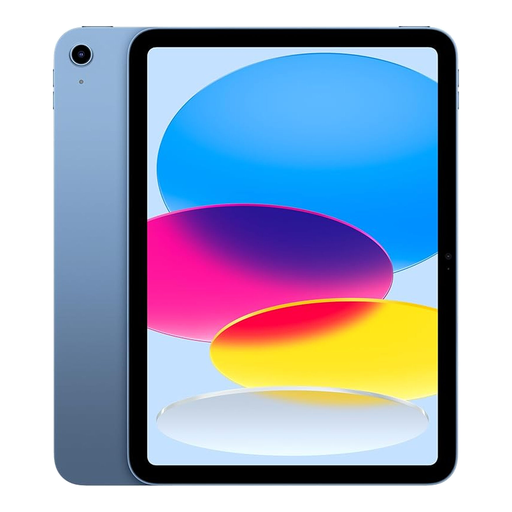
Its 11-inch format is worth considering if you will read and draft notes in a compact space. If handwriting matters, confirm the compatible Pencil for this exact iPad and whether it comes with your chosen bundle.
 No image available
Consider its larger 12.7-inch 2K display if you expect to study at a desk rather than hold the tablet for long periods. The product title specifies an included stylus and 256 GB storage; check that your intended app can annotate and export your textbook files.
 No image available
Consider this tablet for reading and drafting a summary if its screen and file workflow suit your hotel-room setup. If you want to annotate by hand, confirm the exact compatible stylus and whether it comes with this variant.
No, if you can download the textbook and other required files before travelling, a Wi-Fi tablet can support an offline study session. Consider independent connectivity only if your work requires it; the National Cyber Security Centre warns that public or insecure Wi-Fi can expose data to interception or modification.
Do not assume that pen compatibility means a pen is included. Apple lists compatible Pencil options for iPad Air, while Lenovo says the pen for its cited Idea Tab configuration is optional and sold separately; check the exact model and bundle before buying.
Check which market the electrical equipment is intended for and review its documentation. Department for Business and Trade guidance dated March 2026 lists UKCA or CE marking for Great Britain and CE, or UKNI together with CE, for Northern Ireland; the applicable route should not be inferred from a listing title alone.