Handwritten-summary students
If you underline passages and turn them into handwritten revision notes, check whether the exact tablet configuration includes a pen or requires a compatible one separately.


For handwritten chapter summaries, start by comparing tablet-and-pen configurations with models that need a separate stylus. A larger display may give you more room for a textbook page and notes at the table, but consider its weight if you also read away from the table. If you prefer an iPad Air, Apple lists compatible pencils separately; factor in a keyboard too if your final summaries will be typed.
If you underline passages and turn them into handwritten revision notes, check whether the exact tablet configuration includes a pen or requires a compatible one separately.
If you want a textbook page and your notes visible together, compare screen size alongside weight. More display space at the table may mean a heavier tablet to carry or hold.
If your final output is an outline or a set of typed revision prompts, check keyboard compatibility and whether the keyboard comes with the chosen configuration.
Decide whether you will write mainly with a pen or keyboard, then compare page space and the accessories needed for your complete study setup.
| Concern | What to check | Who this matters to |
|---|---|---|
| Handwritten annotation | Check pen compatibility and whether the pen is included with the exact variant. | I want to mark up a chapter and write revision points by hand without having to choose an accessory afterwards. Around 36% of consumers put pen-based annotation first. |
| Page space | Compare display size and tablet weight, especially if you will also hold it away from the table. | Keeping the page and my notes visible together matters more to me than having the lightest tablet. For around 29% of consumers, visible workspace is the main concern. |
| Complete study setup | Compare the selected tablet configuration with the pen, keyboard, case or charger you actually need. | I need to know what it takes to start reading and summarising, rather than comparing tablet bodies alone. The complete setup comes first for around 21% of consumers. |
| Typed summaries | Confirm that a suitable keyboard fits the exact tablet and whether it is included. | My annotations are brief, but I plan to turn them into a structured typed summary. Around 14% of consumers make keyboard-led writing their primary concern. |
The two configurations may not be ready for the same handwriting task. Apple lists compatible pencils separately for the iPad Air, while Samsung lists an S Pen in the Galaxy Tab S10 FE series box and Lenovo lists pens with the cited Idea Tab study bundles.
Compare the exact configurations you would use, including a pen and any keyboard you need.
A larger screen may help you keep reading and notes in view at a kitchen table, but it can be less convenient when you carry or hold the tablet. Apple lists its 13-inch iPad Air Wi-Fi model as heavier than its 11-inch Wi-Fi model.
Balance display size against where else you expect to read, rather than choosing by screen diagonal alone.
Accessories differ by configuration: Apple and Lenovo list keyboards separately for the cited models, and Samsung's Galaxy Tab S10 FE series purchase information says a travel adapter is not included.
Read the box contents for the exact variant and check whether a charger you already own is suitable.
Electrical products need an appropriate disposal route when they are no longer used.
In the UK, use an electrical-waste collection point or ask about like-for-like retailer take-back when buying a replacement. GOV.UK states that retailers must accept an old electrical item on that basis.
The iPad Air is an option for readers considering an 11-inch or 13-inch display and a separately selected Apple Pencil.
The Galaxy Tab S10 FE series offers a choice between a 10.9-inch tablet and a larger 13.1-inch FE+ for pen-led notes.
Lenovo lists an 11-inch Idea Tab and a 12.1-inch Idea Tab Plus in study configurations that include a pen.
These tablets offer different ways to read and draft a chapter summary, including listings with a pen and one with a keyboard bundle. Check the exact accessories and a suitable way to prop up your chosen tablet before relying on it for hands-free work at the table.
 No image available
Consider this listing if you want a larger display for reading and a pen for handwritten notes. The product name specifies a 12.7-inch 2K display, 256GB storage and an included stylus. If you will type or work with the tablet propped up, check the keyboard and stand options for this variant.
 No image available
This configuration is worth checking if you want to annotate reading with a pen. Its name lists 8GB RAM, 128GB storage and a Focus Pen as included; confirm the bundle contents before ordering. Check keyboard and prop-up case options separately if your summaries will be typed at the table.
 No image available
This 11-inch iPad Pro is an option for reading at the table, but it is not the iPad Air discussed above. The listed variant has Wi-Fi, 256GB storage and Standard Glass. If you intend to handwrite or type, confirm compatible Pencil and keyboard accessories for this exact iPad Pro; they are separate purchases.
 No image available
If your chapter summary will mainly be typed, this listing names a keyboard and mouse alongside the tablet. It also names a stylus, but check what it can do before relying on it for handwriting. Consider whether the 10.1-inch screen suits dense textbook pages and confirm how the tablet can be propped up.
 No image available
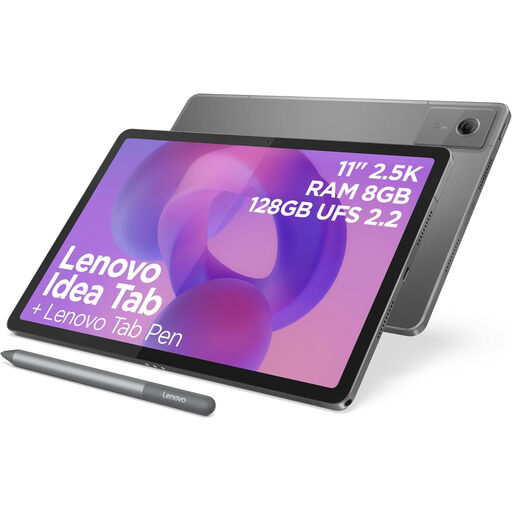
This 11-inch tablet is a reading option if you prefer to choose handwriting accessories separately. Its product name specifies a 2.5K display and 128GB storage. Confirm pen compatibility and what is included for this exact variant; the keyboard is a separate purchase, and a prop-up case is worth checking if you need one.
An approximately 11-inch tablet is a compact starting point; consider a 12.1-inch or larger model if seeing more of the page and notes together is your priority. Compare weight as well if you will hold the tablet away from the table. Apple, Samsung and Lenovo list the cited study options in different display sizes, so check the exact model rather than the brand alone.
That depends on the exact tablet and bundle. Apple lists compatible Apple Pencils separately for the iPad Air, Samsung lists an S Pen in the cited Galaxy Tab S10 FE series box, and Lenovo lists a pen with the cited Idea Tab study configurations. Check the selected product's box contents before comparing complete setups.
Not necessarily. Apple lists a Magic Keyboard separately for the cited iPad Air, and Lenovo lists folio keyboards separately for the cited Idea Tab configurations. If you plan to type most of your summary, check keyboard fit and inclusion for the precise model you choose.
Use an appropriate electrical-waste collection route rather than household rubbish. GOV.UK states that a retailer must accept an old electrical product on a like-for-like basis when you buy a replacement; ask the retailer how its take-back arrangement works for your purchase.