What matters when choosing?
Start with the operating system that supports your game and account, then decide how much screen space you can comfortably manage in a coach seat. Battery claims and mobile-data options do not replace testing the particular game in the conditions in which you plan to use it.
iPadOS
Consider it when: Your game, purchases or saved progress are tied to Apple’s ecosystem.
Bear in mind: The cited 11-inch iPad (A16) Wi-Fi model weighs 477 g; mobile data requires a cellular configuration and suitable service.
Standard Android
Consider it when: You use Google Play and want to compare Android tablets by their exact screen and storage configuration.
Bear in mind: A game’s availability in Google Play does not establish compatibility with every tablet or guarantee offline play.
Amazon Fire OS
Consider it when: Your exact game is available in Amazon’s Appstore and you prefer a compact option such as the 8-inch Fire HD 8.
Bear in mind: Amazon says Google Play is not supported on Fire tablets, so check account and progress-transfer options separately.
| Concern |
What to check |
Who this matters to |
| Game and account compatibility |
Find the exact game in the tablet’s app store; check device compatibility, sign-in and saved-progress transfer. |
If I cannot open my usual game or recover my progress, the screen specifications will not help. Around 33% of consumers put game and account continuity first. |
| Battery and limited connectivity |
Check the basis of any battery claim, charge before departure and test the installed game without a connection. |
When a coach has no usable socket or Wi-Fi, I need my game ready before I board. Around 27% of consumers prioritise unplugged play. |
| Screen size and carrying comfort |
Compare screen size and tablet weight, including how you expect to hold or prop up the device. |
I want tiles and controls to be clear without struggling to handle the tablet in my seat. For around 20% of consumers, that balance is the main concern. |
| Configuration and accessories |
Compare the exact memory and storage variant, in-box charging equipment and any optional storage. |
If I also keep videos or other apps on the tablet, I want enough storage and to know what I need to bring for charging. Around 20% of consumers place configuration and accessories first. |
Brands to consider
These examples show how particular tablet lines differ; a brand name alone does not establish the specifications of every model it sells.
Apple
The iPad 11-inch (A16) is an iPadOS option for players whose chosen game and account work in Apple’s ecosystem.
- Apple UK specifies an 11-inch 2360 × 1640 display and a 477 g weight for the Wi-Fi model.
- The Wi-Fi-only configuration should not be mistaken for the separately available cellular version.
Samsung
The Galaxy Tab A9+ is an 11-inch standard Android option for players using Google Play.
- Samsung UK describes a high screen refresh rate and microSD expansion of up to 1 TB for the cited line.
- Check the exact model and regional configuration before assuming a particular memory or storage capacity.
Lenovo
The cited UK Tab M11 configuration offers another 11-inch standard Android screen to compare.
- Lenovo UK lists an 11-inch 1920 × 1200 IPS display, 4 GB RAM, 128 GB eMMC storage and a 7040 mAh battery for that configuration.
- Those figures describe the cited configuration, not every Tab M11 variant or Lenovo tablet.
Amazon
The Fire HD 8 is a compact Fire OS option when the particular game is available through Amazon’s Appstore.
- Amazon lists an 8-inch format and says games including Candy Crush can be streamed or downloaded.
- Amazon says Google Play is not supported; its cited Fire HD 8 listing also says a power adaptor is not included.
Joybuy tablet choices
These Android tablet choices span compact and larger screens for playing on a coach. Before choosing one, confirm that your particular game runs on the selected device, that your progress can be restored and that it works under the connection conditions you expect during travel.
 No image available
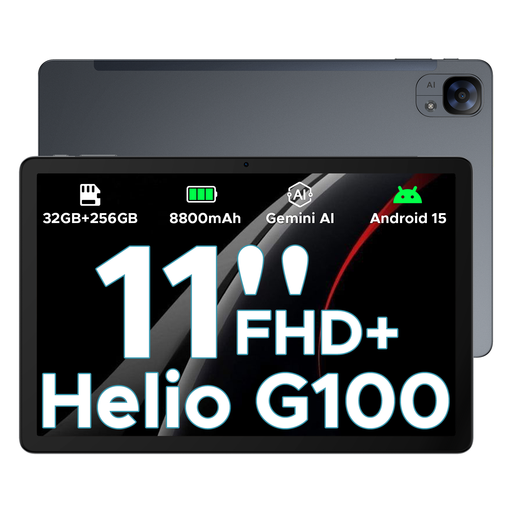
DOOGEE Tab E3 11-inch tablet, 256 GB, grey
Consider its 11-inch screen if you want more room for the game board in your coach seat.
The listing names Android 15, an FHD+ 90 Hz display, 256 GB storage and an 8800 mAh battery. Battery capacity does not establish gaming duration; check the device’s weight if you expect to hold it for long periods.
View on Joybuy
 No image available
DOOGEE Tab E3+ 12-inch tablet, black
Its 12-inch screen may appeal if viewing space matters more to you than a compact tablet in a coach seat.
The listing names Android 15, an FHD+ 90 Hz display, a SIM card slot and an 8800 mAh battery. Check the selected memory and storage variant and UK network compatibility before relying on mobile data; the battery figure is capacity, not gaming runtime.
View on Joybuy
 No image available
DOOGEE Tab G6 Plus 11-inch tablet, 256 GB, grey
This is an 11-inch option to consider if you want screen space and are also checking whether a SIM connection would be useful.
The listing names an FHD+ display, 256 GB storage, a SIM card slot and an 8000 mAh battery. Confirm UK network compatibility and the in-box charging equipment; capacity alone does not tell you how long your game will run.
View on Joybuy
 No image available
Alldocube Kido 8-inch tablet with blue protective case
The 8-inch format is worth considering if you prefer a smaller device to handle in a coach seat and its child controls are useful to you.
The title specifies Android 15, 3 GB RAM, 32 GB storage, child lock and a 5000 mAh battery. It also states that no adaptor is included, so check that you have a compatible charger; battery capacity is not a journey-duration claim.
View on Joybuy
 No image available
TECLAST ArtPad Pro 2025 Edition, 12.7-inch, 256 GB
Consider the larger screen if you value viewing space and have room to handle a 12.7-inch tablet on the coach.
The title specifies Android 15, a 2K display, 256 GB storage, 8 GB RAM plus 12 GB virtual memory, dual-SIM 4G LTE and a 10,000 mAh battery. Check the tablet’s weight, UK network compatibility and charging arrangements; the stated capacity does not establish gaming runtime.
View on Joybuy
Common questions
Will my tile-matching game work offline on a coach?
Check the particular game rather than assuming it works offline. Google Play Help says only some games can be played without a connection; install your game, download any required content and test opening and saving it with connectivity disabled before travelling.
Can I use my Google Play games on an Amazon Fire tablet?
Do not assume you can: Amazon says Fire tablets do not support Google Play. Look for the exact game in Amazon’s Appstore and confirm how you would sign in and restore progress before choosing Fire OS.
Will the battery last for my whole journey?
A manufacturer battery figure cannot guarantee your own gaming duration. Amazon’s Fire HD 8 claim of up to 13 hours covers mixed activities, including gaming; charge before departure and test your game before depending on the tablet away from power.
Does the Fire HD 8 come with a charging adaptor?
The cited Amazon Fire HD 8 listing says a power adaptor is not included. Check the exact listing’s box contents and charging requirements so you can arrange a compatible adaptor before travelling.
What should I do with an old tablet in the UK?
Take it to an appropriate electrical-waste collection point rather than putting it in household rubbish, in line with UK government guidance. Erase your personal data first, or check whether an applicable retailer take-back route is available when replacing it.


