For puzzle games on a train, choose a compact tablet if you expect to hold it or have little room to pack it; consider a larger screen if you can rest the device and want more space for puzzle boards or text. Gaming-focused hardware is more relevant if you also play demanding games. Whichever format you choose, check whether your games work offline and plan for journeys without a socket or reliable Wi-Fi.
Who is each tablet format for?
Frequent train puzzle players
If you regularly hold a tablet during a journey, carrying size and weight deserve attention alongside the screen. Apple lists its 8.3-inch iPad mini Wi-Fi model at 293g; Lenovo lists its 8.8-inch Legion Tab Gen 3 at 350g.
Casual players who prefer a larger view
For word games, logic puzzles or board-style layouts, you may prefer room for text and controls over a compact hand-held format. Lenovo lists an 11-inch Tab M11 configuration with 4GB of memory and 128GB of storage; check your games against that configuration before choosing it.
Commuters who play other games too
If puzzles are only part of what you play, compare the requirements of your more demanding games. Lenovo lists the Legion Tab Gen 3 with a Snapdragon 8 Gen 3 processor, 12GB of memory and a 165Hz display; those specifications alone do not establish how long your games will run on a charge.
What matters when choosing?
Decide whether you will usually hold or rest the tablet, then check your games and travel arrangements against the exact model and variant.
| Concern |
What to check |
Who this matters to |
| Hand-held portability |
Compare the dimensions and weight of the exact variant, not just its screen size. Apple lists the iPad mini Wi-Fi model at 293g; Lenovo lists the Legion Tab Gen 3 at 350g. |
If I expect to hold the tablet for much of the journey, I need something manageable in my hands and bag. Around 36% of consumers put hand-held portability first. |
| Room for puzzles |
Check whether the display gives your particular games enough room for text and controls, and whether you can rest a larger tablet during travel. |
A larger board helps me follow word or logic puzzles, provided I have somewhere to place the tablet. For around 29% of consumers, viewing room is the primary need. |
| Offline play and charging |
Test downloaded games without a connection, check the exact charging bundle and confirm facilities with your train operator. National Rail says onboard Wi-Fi and power availability vary. |
I do not want a puzzle session to depend on a train connection or an available socket. Avoiding that dependence comes first for around 21% of consumers. |
| Other demanding games |
Check your games' operating-system, storage and hardware requirements against the exact tablet configuration. |
If I also play demanding games, I need to choose for those titles rather than puzzles alone. Around 14% of consumers primarily need that extra gaming headroom. |
Buying pitfalls to avoid
-
Choosing an 11-inch tablet for its screen alone
More screen room can help with dense puzzle boards, but an 11-inch device also takes more space to pack or place during a journey than the compact 8.3- and 8.8-inch examples listed by Apple and Lenovo.
Decide whether you will usually hold the tablet or rest it, then compare the exact dimensions and weight.
-
Counting on train Wi-Fi or a socket
National Rail says onboard Wi-Fi and power facilities vary by train company, so neither should be essential to your plan for playing.
Download and test your games before departure, start with a full charge and check your operator's facilities.
A compatible charger or power bank adds another item to carry if your journey requires one.
-
Assuming a gaming label helps with puzzles
Lenovo's Legion Tab Gen 3 has hardware aimed at more demanding games, including a Snapdragon 8 Gen 3 processor and a 165Hz display. Those specifications do not establish a better experience in every puzzle game.
Check the titles you actually play; give gaming-focused specifications more weight if demanding games are part of your use.
-
Assuming every box contains a charging adaptor
Bundle contents differ. Samsung says its Galaxy Tab A9/A9+ purchase listing does not include a travel adaptor, while Lenovo shows different accessories and bundles for the Tab M11.
Check the contents of the exact tablet listing and whether you already have a compatible adaptor.
Relevant brands to compare
Apple
The iPad mini is a compact iPadOS option for people who expect to carry and hold their tablet regularly.
- Apple specifies an 8.3-inch display, an A17 Pro chip and a 293g weight for the iPad mini Wi-Fi model.
- Choose the Wi-Fi or cellular variant deliberately. Apple's stated battery figures concern web or video use, not puzzle-game runtime.
Lenovo
The cited Tab M11 and Legion Tab Gen 3 illustrate different Android choices: a larger display for casual use or a compact format with gaming-focused hardware.
- Lenovo lists an 11-inch, 4GB/128GB Tab M11 configuration and an 8.8-inch, 12GB/256GB Legion Tab Gen 3 configuration.
- The Tab M11 needs more room during travel; the Legion's gaming specifications should be weighed against the games you actually play.
Samsung
Samsung's UK Galaxy Tab A range gives Android shoppers compact and larger-screen models to compare.
- Samsung lists 8.7-inch Galaxy Tab A11 and 11-inch Galaxy Tab A11+ options, as well as LTE variants in the range.
- Check the exact variant for memory, weight, game requirements and box contents rather than applying one model's details to the whole range.
Joybuy tablets for this scenario
These tablets include a compact iPad mini and larger-screen Android options. For train puzzle games, the key distinction is whether you expect to hold the device or have room to rest it.
 No image available
Apple iPad Mini 7 (A17 Pro), 256GB, Space Grey
The 8.3-inch format is worth considering if you will hold your tablet during the journey.
A17 Pro chip and 256GB storage. Check whether your chosen games work offline; Apple's published web and video battery figures are not puzzle-game runtime figures.
View on Joybuy
 No image available
TECLAST ArtPad Pro, 12.7-inch 2K, 256GB
Consider this larger format if viewing space matters more to you than compact hand-held use.
The title specifies a Helio G99 processor, 8GB physical memory plus 12GB virtual memory, 256GB storage and an included stylus. Check its weight and whether you will have room to rest it on your journey.
View on Joybuy
 No image available
DOOGEE Tab E3, 11-inch FHD+, Black
The 11-inch screen is an option if you prefer more room for puzzle layouts and can accommodate a larger tablet.
The title specifies a 90Hz display, Helio G100 processor, 8800mAh battery capacity and dual SIM slots. Check the selected storage configuration and weight; battery capacity alone does not tell you how long your games will run.
View on Joybuy
 No image available
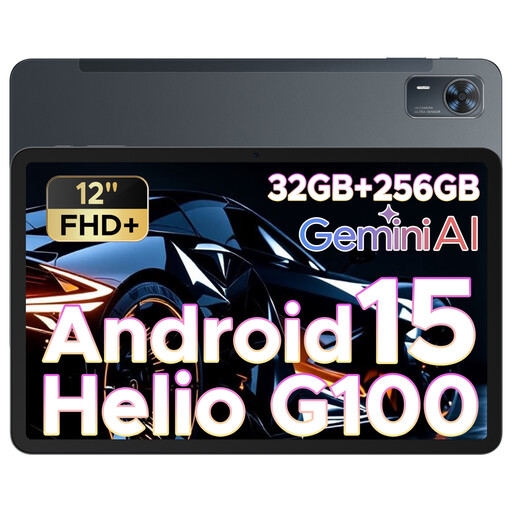
DOOGEE Tab E3+, 12-inch FHD+, Gray
Consider the 12-inch format if you can rest the tablet and want a larger view of puzzle boards.
The title specifies a 90Hz display, Helio G100 processor, 256GB storage, an 8800mAh battery capacity and a SIM slot. Confirm the exact configuration and weight before choosing it for train travel.
View on Joybuy
 No image available
TECLAST P50T, 11-inch Android 16, 128GB
This is another larger-screen option if you will usually rest the tablet rather than hold it throughout the journey.
The title specifies 4GB RAM, 128GB storage, a T7200 octa-core processor and 7000mAh battery capacity. Check the screen resolution, weight and requirements of your chosen games.
View on Joybuy
Frequently asked questions
Can I rely on Wi-Fi and a charging socket on a train?
Do not make either essential to playing: National Rail says onboard Wi-Fi and power availability vary by train company. Download and test your puzzle games before travelling, start with a full charge and check the facilities for your service.
Should I choose Wi-Fi-only or cellular for train puzzle games?
A Wi-Fi-only tablet can suit you if your chosen games work offline after downloading. Consider a cellular variant if you regularly need online game features or other mobile data while travelling; check the exact tablet variant and whether you will have coverage on your route.
Will a tablet include a wall charger?
Check the exact bundle rather than assuming it will. Samsung states that its Galaxy Tab A9/A9+ purchase listing does not include a travel adaptor, and Lenovo lists different charger and bundle options for the Tab M11.


