For memoir reading on a train, start with a compact 8–9-inch tablet if you expect to hold it or pack it in a small bag; consider a larger screen when page space matters more than one-hand comfort. Check that your book and library apps work on the exact device, and download what you need before travelling. Display features, storage and headphone options can then help distinguish models that otherwise look similar.
Who is this for?
Readers who hold their tablet
If you read for long stretches with the tablet in your hands or carry it in a small bag, compare the weight of the exact model as well as its screen size. Apple specifies 293 g for the Wi-Fi iPad mini (A17 Pro); Joybuy lists the Galaxy Tab A11 Wi-Fi at around 335 g.
Readers with books across several services
If your memoirs are spread across Kindle, library apps and other services, app access may decide which tablet works for you. Amazon supports Kindle apps on iOS and Android, but says Google Play is not supported on Fire tablets.
Readers preparing books for offline journeys
If you download books and other media before setting off, check storage alongside the apps you need. Samsung specifies microSD expansion and a 3.5 mm headphone jack for the Galaxy Tab A11.
What matters when choosing?
Decide how you will hold the tablet, then check your reading apps and offline books before comparing display and storage features.
| Concern | What to check | Who this matters to |
|---|
| Carrying and holding |
Compare the weight of the exact connectivity variant and how an 8–9-inch tablet feels with its intended case. |
If I will hold a memoir for much of the journey, I want a tablet that also fits easily in my bag. Around 29% of consumers put carrying comfort first. |
| Long-form reading |
Compare display resolution and any anti-reflective treatment; try your reading app’s text and layout controls. |
When I read for a long stretch in changing light, the appearance of the text matters most to me. Roughly 29% of consumers make reading comfort their primary concern. |
| Books and offline access |
Confirm each essential app on the device’s operating system, then check how to download books and where they can be stored. |
I need access to my existing books even when the train connection drops. Around 24% of consumers prioritise library compatibility and offline access. |
| Storage and travel essentials |
Check built-in capacity, the exact model’s microSD rules and whether the charging equipment you need is included. |
If I mainly read downloaded books, I want enough usable storage and a charging setup that works for my journeys. For roughly 18% of consumers, those practical basics come first. |
Common buying mistakes
-
Choosing a platform before checking your book apps
A tablet may not offer the service holding your purchased or borrowed books. Amazon says Google Play is not supported on Fire tablets.
List the ebook, library and audiobook apps you rely on, then check each one in the app store for the operating system you plan to use.
-
Assuming a larger screen is easier to read on a train
A larger page can be useful, but screen size alone does not tell you how comfortable a tablet will be to hold or pack.
Compare listed weights and dimensions for compact models before choosing an 11-inch tablet for its extra page space.
-
Assuming a microSD card expands everything
Storage rules depend on the device. Samsung says external memory on its Galaxy Tab A9 line can hold media but not apps; do not assume another model handles app storage the same way.
Check the exact tablet’s rules for files and apps before choosing its built-in capacity.
Expanding storage also requires a compatible microSD card.
-
Overlooking the charging and carrying setup
Amazon says a power adaptor is not included with its Fire HD 8 listing. A protective case can also change how the tablet feels in your hand and bag.
Check the included charging equipment for the exact model and consider how you will carry it before choosing accessories.
Brands to consider for train reading
Apple
The iPad mini (A17 Pro) is a compact iPadOS option for readers who want an 8.3-inch screen and access to their compatible iPad apps.
- Apple specifies a 293 g Wi-Fi model and a 2266 × 1488, 326 ppi display with True Tone and an anti-reflective coating.
- Confirm that the exact connectivity and storage variant suits your journeys, rather than assuming every iPad mini has the same weight.
Samsung
The Galaxy Tab A11 is an 8.7-inch Android option for readers interested in expandable storage and wired headphones.
- Samsung lists a 1340 × 800 display, microSD expansion up to 2 TB and a 3.5 mm headphone jack for the Galaxy Tab A11.
- If text appearance is a priority, compare its display with other tablets in person where possible; check the specifications of the storage variant you choose.
Amazon Fire
The Fire HD 8 is an 8-inch option for readers whose essential content and apps are available through Amazon’s services.
- Amazon lists 32 GB and 64 GB configurations and microSD expansion up to 1 TB for the 2024 Fire HD 8.
- Amazon says Google Play is not supported on Fire tablets. Check every essential library or travel app in the Amazon Appstore.
Tablets to consider on Joybuy
These tablets cover compact models for holding while you read and larger screens for readers who prefer more page space. The iFLYTEK model offers an E Ink screen; check app access and your usual reading conditions before choosing it for train journeys.
 No image available
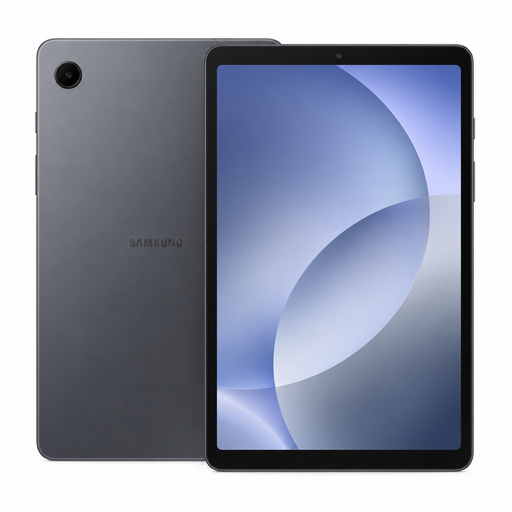
Samsung Galaxy Tab A11 Wi-Fi 64 GB
Consider this compact Android tablet if you plan to hold it while reading and want to check your preferred reading apps on Android.
Samsung specifies an 8.7-inch, 1340 × 800 display, microSD expansion up to 2 TB and a 3.5 mm headphone jack for the Galaxy Tab A11. Joybuy lists this Wi-Fi model at around 335 g.
Joybuy
 No image available
Apple iPad Mini 7 (A17 Pro), 128 GB, Space Grey
Consider the 8.3-inch iPad mini if a compact screen and access to compatible iPad reading apps suit your journeys.
Apple specifies a 2266 × 1488 display with True Tone and an anti-reflective coating for iPad mini (A17 Pro). Check this item’s connectivity variant and weight if carrying weight will decide your choice.
Joybuy
 No image available
iFLYTEK AINOTE 2 10.65-inch E Ink tablet with protective case
Consider this larger E Ink option if you want to assess that type of screen for your memoirs rather than choosing solely by compact size.
The product title specifies a 10.65-inch E Ink tablet and a protective-case bundle. Check that your book files or essential reading apps work on the device and that its screen suits the lighting on your journeys.
Joybuy
 No image available
Samsung Galaxy Tab A11+ 11-inch Wi-Fi, 128 GB, Grey
Consider this model if you prefer an 11-inch page view and do not need the smallest tablet for holding or packing.
The product title identifies a Wi-Fi model with 128 GB of storage. Compare its weight and your preferred reading apps before choosing it for regular train journeys.
Joybuy
 No image available
Xiaomi Pad 7 Grey, 8 GB RAM, 128 GB storage, with Focus Pen
Consider this tablet if a larger page and the included Focus Pen matter to you more than a compact reading format.
The product title specifies 8 GB RAM and 128 GB storage. Check the tablet’s weight and access to your reading apps before relying on it for hand-held train reading.
Joybuy
Frequently asked questions
Do I need a cellular tablet to read memoirs on a train?
No, if you download the books you need before travelling, reading them need not depend on a live connection. Amazon provides instructions for downloading books to its Kindle app; consider cellular connectivity if you also need mobile data for new downloads or other connected tasks during the journey.
Can I read my Kindle books on an iPad or Android tablet?
Yes. Amazon supports delivering Kindle books to its iOS and Android apps. Check any other book or library service you use separately before choosing a tablet.
Will my Android reading apps work on a Fire tablet?
Not necessarily: Amazon says Google Play is not supported on Fire tablets. Look for each essential reading, library-loan or travel app in the Amazon Appstore before choosing Fire HD 8.
What if I want to listen to a memoir on the train?
Use headphones and keep audio considerate of other passengers. Check your tablet’s headphone connection and your operator’s conditions if you need guidance for a particular journey.


