Choose a tablet that carries your exact tile-matching game, then check that the game and any required content work offline before travelling. An 8-inch-class screen takes up less bag space, while an 11-inch screen gives you a larger board to view and tap; a cellular connection offers another way online but cannot be relied on throughout a train journey.
Who is this choice for?
Offline-first rail commuters
If you want to keep playing when the train loses its connection, check whether your game starts and runs without internet access. Ofcom’s 2026 train measurements found poor mobile performance in 58%–83% of tests, depending on the network.
Travellers packing light
If the tablet needs to fit into a small bag and feel manageable between station and seat, compare dimensions and weight as well as screen size. Apple lists its 8.3-inch iPad mini Wi-Fi model at 293 g; an 11-inch screen gives you more board area but needs more room to pack.
Value-conscious casual gamers
If tile-matching is your main use, start with the exact game’s app-store and operating-system requirements rather than choosing by gaming claims alone. Storage configuration and offline behaviour matter too, particularly when comparing Android tablets with Amazon Fire tablets.
What matters when choosing?
Check the game and its offline behaviour first, then decide how much screen space you want to carry. Treat mobile data as an extra connection option, not a substitute for a game that works during signal gaps.
| Concern |
What to check |
Who this matters to |
| Offline-ready play |
Find the exact game in the tablet’s app store, download its required content and test whether it starts in aeroplane mode. |
I want to keep playing through signal gaps rather than depend on train Wi-Fi. Around 42% of consumers put reliable game access first. |
| Size and carry comfort |
Compare the exact model’s weight and dimensions with its screen size, allowing for any case you plan to use. |
Carrying a tablet through stations matters more to me than having the largest tile board. Compact carry comfort comes first for around 33% of consumers. |
| Value and game compatibility |
Check the game’s operating-system requirements, the applicable app store and the tablet’s storage configuration. |
I mainly want a tablet for casual games, but it needs to run the one I intend to play. Around 25% of consumers make value and app access their primary concern. |
Buying pitfalls
-
Assuming the train connection will keep the game running
Ofcom’s 2026 measurements found poor mobile performance on many train tests; onboard Wi-Fi performed well in only 1% of tests in its measurement study. A game that requires a connection may therefore be interrupted.
Download the game, updates and required content before departure, then try it without a connection.
-
Choosing a Fire tablet because the game is on Google Play
Amazon states that Fire tablets do not support Google Play. A Google Play listing does not establish that the same game is available on Fire OS.
Search for the exact title in Amazon’s Appstore before choosing a Fire tablet.
-
Choosing an 11-inch screen without considering the journey
A larger board may be easier to view, but the tablet also needs to fit where you carry and use it. For a model-specific comparison, Apple lists its iPad mini Wi-Fi model at 293 g and its 11-inch iPad Wi-Fi model at 477 g.
Compare the dimensions and weight of the models you are considering, preferably with a similar-sized device and the type of case you would use.
-
Overlooking the listed regional variant
A regional version can change which configuration and support terms you are buying. The Joybuy Galaxy Tab A9+ listing referenced here identifies an HK Version.
Confirm the model number, memory and storage variant, regional version and applicable warranty terms on the item you intend to order.
Brands to consider
Apple
Apple’s iPad range offers both the compact iPad mini (A17 Pro) and a larger 11-inch iPad (A16).
- Apple specifies an 8.3-inch display and 293 g Wi-Fi weight for the iPad mini.
- The iPad mini has less board area than an 11-inch tablet; check that your exact game is in the App Store and works offline if needed.
Samsung
The Galaxy Tab A9+ is an Android option for consumers who prefer an 11-inch screen.
- Samsung lists an 11-inch display with a refresh rate of up to 90 Hz, plus different memory and storage configurations.
- Check the exact configuration and regional version rather than assuming every Galaxy Tab A9+ listing is the same.
Lenovo
Lenovo’s Tab M11 is another 11-inch Android route for straightforward casual use.
- Lenovo’s cited UK configuration has an 11-inch 1920 × 1200 anti-glare display, 4 GB RAM and 128 GB storage.
- Check the chosen game’s Android requirements; those specifications alone do not establish how every game will run.
Amazon
The Fire HD 8 offers an 8-inch Fire OS route when the intended game is available through Amazon’s Appstore.
- Amazon lists an 8-inch HD display for its cited Fire HD 8 configuration.
- Amazon states that Google Play is not supported on Fire tablets, so check the exact game in Amazon’s Appstore.
Joybuy tablet choices
These compact and larger-screen tablets offer different ways to play while travelling. For any of them, check the exact game’s compatibility and offline behaviour before relying on it for a journey.
 No image available
Apple iPad Mini 7 (A17 Pro), 512GB, Space Grey
Consider this compact iPad mini if a smaller tablet is your priority for train travel. Check that your game is available in the App Store and can be played offline when needed.
View on Joybuy
 No image available
Xiaomi Pad 8 Pro, Grey, 12GB RAM, 512GB storage
Consider this option if you prefer a larger screen for a tile board. Confirm its dimensions for your bag, and check the exact game’s compatibility and offline operation.
The product name specifies 12GB RAM and 512GB storage.
View on Joybuy
 No image available
DOOGEE U11 PRO, 11-inch, 256GB, Black
Its 11-inch screen suits consumers who want more board area and have room to carry a larger tablet. Check the exact game’s Android compatibility and offline behaviour.
The product name specifies 256GB storage, a Unisoc T7200 processor and a 90 Hz IPS screen. Check the physical RAM specification separately from any expanded-memory figure.
View on Joybuy
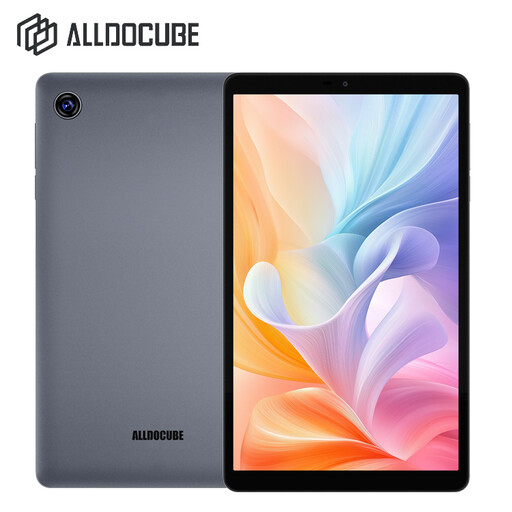 No image available
ALLDOCUBE iPLAY60 Mini, 8.68-inch, 4GB RAM, 64GB storage
The 8.68-inch screen is worth considering if you want a smaller tablet for travel. Check that your game supports its Android version and plays offline.
The product name specifies Android 15, 4GB RAM and 64GB storage. It also states that no charger is included, so check that you have a compatible one.
View on Joybuy
 No image available
OPPO Pad SE OPD2420 EUN, 6GB RAM, 128GB storage, Twilight Blue, LTE
Consider the LTE variant if you want a mobile-data option as well as tablet gaming. It will still need a game that works through signal gaps; confirm the operating system, app-store access and offline behaviour before buying.
The product name specifies 6GB RAM and 128GB storage. Check its weight and dimensions if carry comfort matters.
View on Joybuy
Frequently asked questions
Do I need a cellular tablet for tile-matching games on trains?
Choose cellular connectivity if you also need internet access away from Wi-Fi, but do not rely on it to keep an online game running throughout the trip. Ofcom’s 2026 train measurements found poor mobile performance in 58%–83% of tests, depending on the network; check whether your game works offline.
What should I do before travelling with a tablet?
Install and open the exact game, download its updates and required content over a reliable connection, then test it in aeroplane mode if you intend to play offline. Charge the tablet before leaving and check whether you need to bring a compatible cable or power bank.
Will a Google Play game work on an Amazon Fire HD 8?
A Google Play listing alone does not establish Fire HD 8 compatibility: Amazon states that Fire tablets do not support Google Play. Look for the exact game in Amazon’s Appstore before choosing a Fire tablet.


