Choose a tablet whose operating system supports your document and transcription workflow, then assess it with the keyboard you would actually use. An 11-inch iPad Air suits a carry-focused iPadOS setup, the Galaxy Tab S10 FE+ offers a larger Android screen, and a Surface Pro offers a Windows workflow; each choice still depends on your exact apps, offline files and accessories.
Who this is for
Long-session transcript typists
If you repeatedly correct wording, add timestamps and move between speaker labels, assess the physical keyboard and editing layout as carefully as the tablet itself. Samsung and Microsoft both describe keyboard-and-trackpad accessories for the tablet lines discussed here.
Offline library workers
If you cannot rely on Wi-Fi throughout a session, check that your documents and audio are accessible on the device before you arrive. Microsoft advises opening cloud-stored Word files online before relying on them offline.
Sensitive-interview handlers
If recordings or transcripts contain personal information, your choice must fit an approved storage workflow. The Information Commissioner’s Office advises enabling storage encryption on tablets that hold personal information.
What matters when choosing
Check that your required apps and files work on the operating system before comparing screen sizes. Then assess the tablet, keyboard and other accessories as one working setup.
| Concern |
What to check |
Who this matters to |
| Sustained typing |
Check keyboard compatibility with the exact tablet model, and try the keys, trackpad and supported typing position where possible. |
If I will spend long sessions correcting speech and moving between speaker labels, I need physical input that suits that work. Roughly 36% of consumers put sustained typing first. |
| Offline files and software |
Confirm your transcription app, audio format and export process on the chosen operating system; open required cloud files while connected. |
When a library connection is unreliable, I need my transcript and audio to remain accessible and my usual tools to work. Around 29% of consumers make workflow and offline access their primary concern. |
| Carry weight and screen space |
Compare the complete tablet-and-keyboard kit, and decide whether you need a transcript and reference material visible together. |
If I carry the kit to the library but also consult notes while editing, I need a screen I can read without making the setup awkward to transport. About 21% of consumers prioritise that balance. |
| Interview-file protection |
Check storage-encryption settings and the storage rules set by your employer, client or research project. |
For interviews containing personal information, I need to know how files are protected on a portable device. Roughly 14% of consumers put secure handling first. |
Mistakes to avoid
-
Choosing the tablet before the typing setup
A keyboard or stand can change how practical the tablet is for repeated transcript corrections. Apple, Samsung and Microsoft describe the relevant keyboard accessories separately from their tablets.
Check the keyboard against the exact model and generation, and assess the complete setup you would take to the library.
-
Assuming cloud files will open offline
A transcript that has not been prepared for offline access can interrupt a session without Wi-Fi. Microsoft advises opening cloud-stored Word documents online before using them offline.
Open the required documents and audio while connected, then test access and editing with the connection turned off.
-
Assuming every Windows app works with a Surface Pro
Current Snapdragon-based Surface Pro models use Windows on Arm. Microsoft says most Windows apps can run, but that does not establish support for a particular transcription program, foot pedal or driver.
Confirm your exact software and peripherals with their suppliers before choosing a Windows-on-Arm model. If you use Microsoft 365, check that your installation is supported.
-
Treating interview files like ordinary media
A portable device can hold recordings and transcripts containing personal information. The Information Commissioner’s Office advises enabling storage encryption on tablets that store such information.
Use a strong device passcode and follow the storage and retention process approved for the interview material.
Relevant brands to consider
Apple
The 11-inch iPad Air is an iPadOS option when carrying the tablet matters and your document and transcription tools work on iPadOS.
- Apple specifies the 11-inch Wi-Fi iPad Air at 464 g, with a 2360 × 1640 display, USB-C and storage options from 128GB to 1TB.
- The Magic Keyboard is a separate accessory. Confirm the compatible version and whether your audio, exports and any specialist input devices fit the iPadOS workflow.
Samsung
The Galaxy Tab S10 FE+ offers a 13.1-inch Android screen for readers who want more room to view transcript text and reference material.
- Samsung describes a compatible Book Cover Keyboard with Trackpad for the Tab S10 FE+, with full-size keycaps, function keys, a trackpad and DeX mode.
- The keyboard is a separate accessory, and its compatibility is model-specific. Check that the Android apps you need handle your files and editing process.
Microsoft
Surface Pro is a Windows 2-in-1 option if your transcript process depends on desktop applications or Windows-style file handling.
- Microsoft lists 12-inch and 13-inch Surface Pro options and an optional keyboard with a full-sized haptic touchpad.
- Current models use Snapdragon X-series processors. Microsoft says most Windows apps can run on Windows on Arm, but specialist apps and peripherals need individual checks; it also says security updates for 32-bit Microsoft 365 Apps on Windows Arm-based PCs end in December 2026.
Joybuy tablet choices for transcript editing
These tablets cover carry-focused iPadOS use and Android setups with different approaches to physical typing. For any of them, confirm your transcription tools, offline file access and complete keyboard setup before relying on it for a library session.
 No image available
Apple 11-inch iPad Air (2026, M4), Wi-Fi, 128GB, Space Grey
Consider this iPadOS model if you carry your editing setup to the library and your required tools work on iPadOS.
Apple specifies the matching 11-inch Wi-Fi iPad Air at 464 g before accessories. A compatible Magic Keyboard is sold separately; check your audio files, exports and offline workflow before purchase.
Joybuy
 No image available
TABWEE T20 10.1-inch tablet, 256GB, with keyboard, mouse and stylus
This bundle may suit consumers who want a physical keyboard for transcript corrections without selecting one separately.
The listed tablet has a 10.1-inch display and 256GB storage. Confirm the delivered Android version, the keyboard layout and whether your transcription app, files and offline workflow operate as needed.
Joybuy
 No image available
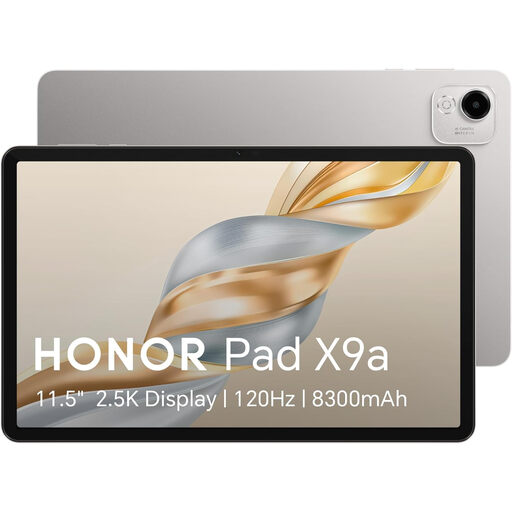
HONOR Pad X9a 11.45-inch Wi-Fi tablet, 128GB, Grey
Consider this Android tablet if you want an 11.45-inch screen for reading transcript text and plan to choose a typing setup separately.
The listing specifies a 2K display and 128GB storage and states that Bluetooth keyboards are supported. Confirm keyboard compatibility and whether your editing tools and files work offline as required.
Joybuy
Common questions
Can I edit a Word transcript in a library without Wi-Fi?
Yes, if the file is accessible offline before your session. Microsoft says locally stored Office files can be opened and saved offline; open cloud-stored documents online at least once beforehand, and allow pending changes to sync when you reconnect.
Is a keyboard included with these tablet setups?
It depends on the exact product and bundle. Apple lists the Magic Keyboard for iPad Air separately, Microsoft calls the Surface Pro keyboard optional, and Samsung’s cited Tab S10 FE+ keyboard is a separate accessory. The listed TABWEE T20 bundle includes a removable keyboard; check its layout before choosing it for extended typing.
Will a current Surface Pro run my transcription software?
Check the exact application and any connected hardware before choosing a Snapdragon-based Surface Pro. Microsoft says most Windows apps can run on Windows 11 Arm-based PCs, but that general support does not establish compatibility with a particular transcription app, foot pedal, driver or audio interface.
How should I protect interview transcripts on a tablet?
If the files contain personal information, follow the storage rules that apply to your work and enable appropriate device protection. The Information Commissioner’s Office advises enabling storage encryption on tablets storing personal information; also use a strong passcode and the approved process for storing and retaining the files.


