Couples planning at a desk
You want the guest-list spreadsheet visible while you refer to messages or another planning document. Look for an extended workspace, not a monitor that merely repeats the tablet screen.


Choose a tablet with documented extended-display support if you need the guest list on one screen and invitations, seating notes or messages on another; a USB-C port alone does not establish that capability. Samsung describes a two-screen DeX setup for the Galaxy Tab S11 Ultra, while Apple describes moving windows between compatible iPads and an external display. If you mainly want more room on the tablet itself, the Lenovo Tab Extreme offers a different approach, but check its external-display behaviour before relying on it for two independent screens.
You want the guest-list spreadsheet visible while you refer to messages or another planning document. Look for an extended workspace, not a monitor that merely repeats the tablet screen.
You and a partner, family member or planner need to decide who can view, comment on or edit the list. If connectivity may be unreliable, prepare the file for offline use before you leave.
You need to update RSVPs away from your desk, then return to a keyboard and monitor for longer editing sessions. Consider what the complete setup will be like to carry, not just the tablet on its own.
Decide whether two independent screens are essential before comparing tablet size or accessories: a spacious tablet display and an extended monitor workspace solve different problems.
Choose it when: You want to keep the spreadsheet on one display and planning material on another; Samsung describes DeX Extended Mode for this model as a two-screen setup.
Check first: Confirm the monitor connection and keyboard arrangement. Samsung UK says a travel adapter is not included.
Choose it when: You prefer iPadOS and want to move spreadsheet and reference windows between the iPad and a connected display, as described by Apple Support.
Check first: Confirm the exact model, installed iPadOS version and compatible cable or adapter before planning around an external workspace.
Choose it when: Your priority is working in several windows on one large tablet; Lenovo describes a 14.5-inch display with floating-window and split-screen options.
Check first: Confirm its external-display behaviour if a separate monitor workspace is essential, and check whether the keyboard pack is included in the bundle you choose.
| Concern | What to check | Who this matters to |
|---|---|---|
| Independent screens | Check the exact model and software version for extended display rather than mirroring; match its connection requirements to your monitor. | I need the guest list open while I read invitations or seating notes on the other display. Around 33% of consumers would put independent screens first. |
| Spreadsheet input | Check keyboard compatibility, key layout and bundle contents, plus whether the stand suits your desk. | Entering names and correcting RSVP details for a long session makes comfortable typing my priority; roughly 27% of consumers would prioritise this need. |
| Portability | Compare tablet size and weight with the case and accessories you expect to carry. | I take the list to planning meetings but still want to use my desk setup afterwards. About 20% of consumers would make portability their primary concern. |
| Shared and offline access | Check your spreadsheet app’s sharing roles and prepare the relevant file for offline editing. | Several people need controlled access to the list, and I may have to edit it without a connection; around 20% of consumers would put that need first. |
A USB-C connector does not, by itself, establish whether a tablet can put different windows on the tablet and monitor. Lenovo’s monitor-connection guidance says the result depends on the tablet’s supported display standards and the monitor’s inputs.
Check the exact tablet model’s documented display behaviour, then identify the connection your monitor requires and whether you need to charge the tablet at the same time.
The setup may also call for a compatible cable, adapter, hub or separate charger.
Mirroring repeats the tablet’s image. It will not let you keep the guest spreadsheet on one screen and separate reference windows on the other.
Look for an explicit extended-display feature, such as Samsung’s stated DeX Extended Mode for the Galaxy Tab S11 Ultra or Apple’s documented ability to move windows between displays on a compatible iPad.
Repeated entry of names, contact details and RSVP changes can make the keyboard an important part of a desk-based setup. Lenovo says Tab Extreme accessories may be sold separately or bundled, so the contents depend on the offer.
Check the bundle contents and the keyboard’s compatibility with the exact tablet model.
A guest list can contain contact and RSVP details. A broadly accessible link gives you less control over who can use it than sharing with named collaborators.
Google Workspace lets you assign Viewer, Commenter or Editor roles. Give each collaborator the access they need, and prepare and test offline access before travelling.
The Galaxy Tab S11 Ultra is relevant when a tablet and external monitor need to show separate working windows.
Compatible iPad Air and iPad Pro models offer an iPadOS route to working across an iPad and external display.
The Tab Extreme is an option for organising the list across windows on a large tablet screen.
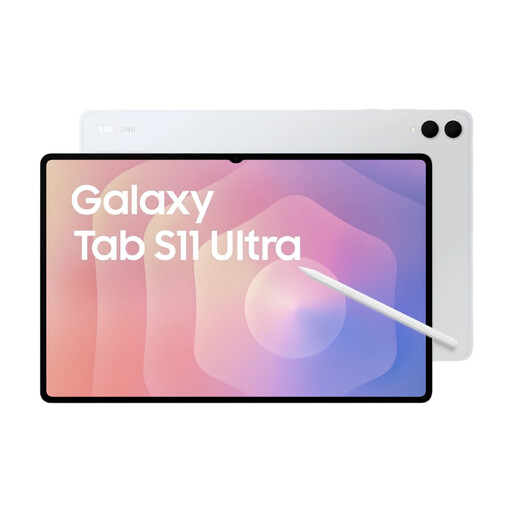
The Galaxy Tab S11 Ultra shown here is a choice for the tablet-and-monitor route. Before using it as a guest-list planning station, confirm the monitor connection, keyboard arrangement and spreadsheet app setup you need.
 No image available
Consider this model if you want the guest list and planning references on separate screens: Samsung describes an extended-display setup for the Galaxy Tab S11 Ultra.
This variant is identified as WiFi with 12GB RAM and 256GB storage. Check the keyboard bundle and the cable or adapter needed for your monitor before buying.
No: a USB-C port alone does not establish extended-display support. Lenovo’s monitor-connection guidance says capability depends on the tablet’s supported display standards and the monitor’s inputs, so check the exact model for documented window movement rather than relying on its connector.
Share the file with named collaborators and give each person only the access they need. Google Workspace offers Viewer, Commenter and Editor roles for spreadsheets; check those settings before sharing a list containing contact details.
Yes, if your chosen app supports offline editing and you prepare the file in advance. Google Docs Editors Help describes offline editing in Sheets; make the specific guest-list file available offline and test that you can open it before travelling. Edits made offline will need to synchronise later.
Ask the retailer how to use its electrical-waste take-back scheme when buying the replacement. GOV.UK says retailers must offer to take back electrical waste of the same type as the item purchased; confirm the retailer’s arrangements for handing in your old tablet.