Who is this setup for?
The right setup depends less on the size of the wedding than on how you will update the list, who else needs access and whether you will also draw or annotate plans.
Shared-list organisers
If a partner, family member or wedding-party organiser also updates RSVPs and contact details, prioritise access to the same master file. Agree on the spreadsheet app and plan which devices need an offline copy before relying on room Wi-Fi.
Keyboard-first student-room planners
Entering names, addresses and dietary notes from a small desk calls for a workable typing position. Compare the tablet together with any keyboard and stand you would need, rather than judging the device alone.
Visual seating-plan note-takers
If you will sketch table layouts or mark up screenshots alongside the guest list, check pen compatibility and the exact bundle contents. A pen is less important if your work is mainly spreadsheet entry.
What matters when choosing?
Start with the shared-file workflow, then decide whether sustained typing, the complete setup cost or easier handling is your primary concern. That choice helps determine whether a keyboard, pen or larger display earns its place in a student room.
| Concern |
What to check |
Who this matters to |
| Shared-list access |
Confirm that each organiser can use the chosen spreadsheet app and edit the shared file. Set up offline access on devices that may lose Wi-Fi. |
When several people update RSVPs, I need to reach the current master list even if room Wi-Fi drops; around 31% of consumers put reliable shared-list access first. |
| Repeated typing |
Check keyboard compatibility, the exact bundle contents and whether the keyboard or case provides a useful stand. |
If I have many addresses and meal notes to enter at a small desk, typing comfortably matters more than occasional on-screen edits; roughly 31% of consumers make that their primary concern. |
| Complete setup cost |
Compare the exact tablet configuration with the case, keyboard, pen and charger you would actually use. |
I want to keep enough room in my budget for the accessories that make list editing practical; about 23% of consumers prioritise the complete setup cost. |
| Handling and guest-data care |
Compare the exact model’s size and weight, check pen inclusion if you will annotate plans, and restrict access to guest details. |
If I move between a student room and planning meetings, I need a tablet I can carry and store while keeping the guest list under control; around 15% of consumers put these handling and data-care needs first. |
Screen size affects the trade-off between spreadsheet space and compact handling. Samsung lists an 8.7-inch display for the Galaxy Tab A11, while its Galaxy Tab S10 FE has a 10.9-inch display; Apple and Lenovo also describe 11-inch options. If your list has several columns, check the spreadsheet layout at the size you intend to use rather than assuming the smallest screen will be comfortable.
Offline editing also needs preparation. Google says Google Sheets files can be created, viewed and edited offline on iPhone and iPad when offline access is enabled for recent files or a specific file. Make the master list available offline before you need it, and check the sharing workflow with your co-organisers when a connection is available.
Relevant brands to consider
These product lines illustrate different screen and accessory arrangements; the useful comparison is the exact tablet and bundle that fit your guest-list workflow.
Apple
iPad Air suits organisers who want an iPadOS workflow and a choice of 11- or 13-inch displays.
- Apple specifies Apple Pencil support and a compatible Magic Keyboard option for iPad Air, which may suit a mix of typing and seating-plan annotation.
- Pencil and keyboard accessories are separate choices. Check compatibility and the complete setup before buying for a spreadsheet-led task.
Samsung
The Galaxy Tab A11 offers an 8.7-inch format, while the 10.9-inch Galaxy Tab S10 FE offers more screen space and a supplied S Pen.
- Samsung specifies an S Pen in the Galaxy Tab S10 FE box for organisers who also annotate plans.
- The Galaxy Tab A11 gives a wide spreadsheet less display space. Samsung says the Galaxy Tab S10 FE box does not include a travel adapter.
Lenovo
The researched Idea Tab configuration offers an 11-inch Android format for organisers who want spreadsheet space and the option of a keyboard.
- Lenovo specifies an 11-inch 2560 × 1600 display, 8GB of memory and 128GB of storage for that configuration, and lists a Folio Keyboard add-on.
- Lenovo describes the pen as optional and sold separately. Confirm accessory compatibility and contents for the exact bundle you choose.
Tablets to consider on Joybuy
These tablets cover compact guest-list work, larger displays and models marketed with a pen or protective case. For any of them, check your chosen spreadsheet app, sharing arrangement and typing setup against the exact product before using it for the master list.
 No image available
HONOR MagicPad 4, 256GB, grey
Consider this tablet if you want to assess a larger-screen option for the guest list. Check that your chosen spreadsheet app supports the sharing and offline workflow you need, and confirm keyboard or pen compatibility before adding either accessory.
256GB storage; grey finish.
View on Joybuy
 No image available
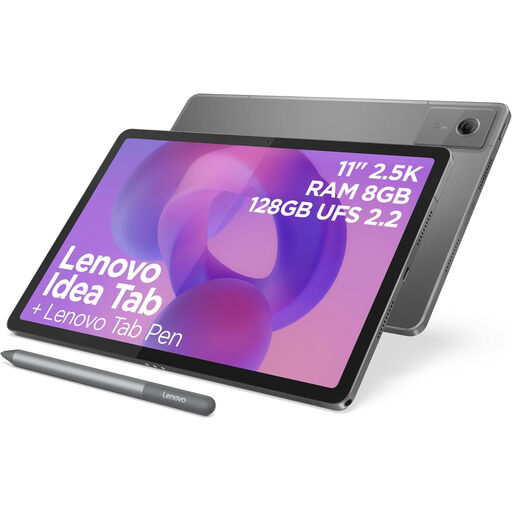
Lenovo Idea Tab 11-inch, 2.5K, 128GB
The 11-inch format is worth considering if you expect to edit several guest-list columns. Check the exact keyboard and pen bundle, and confirm that your chosen spreadsheet app works for every organiser who needs access.
11-inch display; 2.5K designation; 128GB storage.
View on Joybuy
 No image available
Apple 11-inch iPad Air (2026, M4), Wi-Fi, 128GB, Starlight
This iPad is an option if your organisers use an iPad-compatible spreadsheet workflow. Google says Sheets files can be edited offline on iPad after offline access is enabled; confirm shared-file access and the compatibility of any keyboard or Pencil you plan to use.
11-inch model; M4 variant; Wi-Fi; 128GB storage; Starlight finish.
View on Joybuy
 No image available
iFLYTEK AINOTE 2 10.65-inch E-Ink tablet with protective case
Consider this model for handwritten planning notes only after checking whether your chosen guest-list app supports the shared editing you require. If you will enter many names and addresses, also check its keyboard options and handling before choosing it as the master-list device.
10.65-inch E-Ink model; protective case described in the product title.
View on Joybuy
 No image available
Xiaomi Pad 7, grey, 8GB RAM, 128GB, with Focus Pen
The listed Focus Pen may appeal if you annotate seating plans as well as maintain a guest list. Confirm your spreadsheet app’s sharing and offline behaviour, and check the keyboard and charger arrangements if you need them.
8GB RAM; 128GB storage; grey finish; Focus Pen included according to the product title.
View on Joybuy
Common questions
Can I update the guest list without student-room Wi-Fi?
Yes, if your app and file are prepared for offline editing. Google says Google Sheets users on iPhone and iPad can create, view and edit files offline after enabling access for recent files or a specific file. Set up the master guest-list file before you lose your connection.
Do I need a cellular tablet for wedding planning?
A Wi-Fi tablet can meet your needs if you have dependable Wi-Fi or can use phone tethering where you plan to work. Consider cellular when you need an independent connection away from those options, and account for the mobile data plan it requires.
Will a keyboard and pen come with the tablet?
Check the exact model and bundle rather than assuming either accessory is supplied. Apple lists Pencil and Magic Keyboard options separately for iPad Air; Samsung lists an S Pen in the Galaxy Tab S10 FE box; and Lenovo describes the Idea Tab pen as optional and its Folio Keyboard as an add-on.
Does UK data-protection law apply to a private wedding guest list?
Do not assume that rules applying to a business or organisation apply unchanged to your private wedding list. GOV.UK sets out duties for people responsible for using personal data; seek appropriate advice if you manage the list for a business or organisation. In either case, limit access to guest details and keep only the information you need.


