A Wi-Fi-only tablet can suit travellers who check connections on known airport networks or have a dependable phone hotspot. Choose a cellular-capable variant if timely updates matter away from Wi-Fi, provided its mobile-data arrangement works for your journey. In either case, check your airline’s app and boarding-pass rules, save essential information offline where possible, and keep the device charged.
Who needs which setup?
Travellers following a tight connection
If gate changes or onward bookings may need checking between networks, independent mobile data or a dependable phone hotspot matters more than access to Wi-Fi at one terminal. British Airways offers connecting-flight boarding passes for download where possible, but live changes still require a connection.
Travellers using known airport Wi-Fi
A larger screen may be useful for booking pages and saved documents when online access is mainly needed in a terminal. Heathrow provides free Wi-Fi throughout its terminals; check access separately for the other airports on your itinerary.
Travellers relying on browser check-in
A Fire tablet is worth considering only after checking that the required airline tasks work in its browser or through an available app. Amazon states that Fire tablets do not support Google Play, so ordinary Android app availability is not enough.
What matters when choosing?
For checking a flight connection, settle how you will get live updates before comparing screen size and software: airport Wi-Fi, a phone hotspot and tablet mobile data are different ways of meeting that need.
| Concern |
What to check |
Who this matters to |
| Live connection updates |
Check whether the exact variant has cellular data or only Wi-Fi. For cellular use, confirm the SIM or eSIM arrangement, plan and coverage for your journey. |
If my gate or onward booking changes while I am away from airport Wi-Fi, I need another way to get online promptly. Around 45% of consumers would put independent access to live updates first. |
| Readable, portable screen |
Compare the stated screen size and device weight, then check whether the tablet and its case fit your bag. Assess brightness under its specified mode rather than assuming a quoted maximum is constant. |
I want room to read booking details and other travel documents without carrying a tablet that feels cumbersome in a queue. Readable portability would be the primary concern for around 33% of consumers. |
| Access to airline tools |
Check the exact airline app or browser workflow on the device, including how you will retain boarding information offline. Amazon says Fire tablets do not support Google Play. |
If I mainly manage bookings in a browser, I can keep the device choice simple, but I cannot assume the app I need will be available. Around 22% of consumers would make straightforward access for these basic tasks their first priority. |
Mistakes to avoid
-
Relying on Wi-Fi without a backup for urgent changes
Wi-Fi at a familiar terminal does not cover every point in a connection. Heathrow provides free terminal Wi-Fi, but that does not establish access elsewhere on your journey.
If a missed update would disrupt your plans, consider a cellular-capable variant with a suitable plan or check that your phone hotspot will work. Save essential booking information before you travel.
-
Assuming every Android airline app works on Fire tablets
Amazon states that Fire tablets do not support Google Play. An app’s presence there therefore does not establish that it can be installed on a Fire tablet.
Check the exact app in the supported catalogue, or confirm that the airline’s browser process meets your needs before choosing the device.
-
Assuming a tablet boarding pass is accepted everywhere
Boarding-pass arrangements can differ by airline and departure airport. easyJet publishes airport exclusions for mobile boarding passes.
Check the current instructions for every departure airport on your itinerary, including any requirement to print a pass or complete a document check.
-
Letting the tablet run out of charge before security
GOV.UK advises travellers to charge electronic devices before travelling and says a device that cannot switch on when requested will not be allowed onto the aircraft.
Charge the tablet before departure and check the airline’s separate rules if you intend to carry a power bank.
Relevant brands for reference
Apple
The 11-inch iPad Air offers an iPadOS option for travellers considering either Wi-Fi or Wi-Fi + Cellular.
- Apple lists the 11-inch iPad Air at 464 g for Wi-Fi and 465 g for Wi-Fi + Cellular; its March 2026 M4 announcement also specifies Wi-Fi 7 support.
- Select the Wi-Fi + Cellular variant if the tablet itself needs mobile data. A larger 13-inch model also takes up more space in a travel bag.
Samsung
The 10.9-inch Galaxy Tab S10 FE provides an Android option with distinct Wi-Fi and 5G variants.
- Samsung lists the Tab S10 FE at 497 g for Wi-Fi and 500 g for 5G, and specifies physical-SIM plus eSIM support for the 5G version.
- The Wi-Fi version does not provide independent mobile data; check the exact variant before arranging a tablet data plan.
Amazon
The Fire HD 10 is a browser-first option when the required airline tasks work through its available apps or a web browser.
- Amazon specifies a 10.1-inch 1080p display and quotes up to 13 hours of battery life for the cited Fire HD 10.
- Amazon states that Fire tablets do not support Google Play; verify airline-app availability rather than assuming Android compatibility.
Tablets to consider on Joybuy
These tablets offer different ways to view connection details: some list 4G mobile-data hardware, while others are suited to use with known Wi-Fi or a phone hotspot. Confirm the exact airline workflow and any boarding-pass requirements before relying on a tablet during your journey.
 No image available
TABWEE W90 11-inch dual-4G tablet
Consider this model if you want to check connection details using tablet mobile data, subject to a compatible SIM, plan and coverage.
The product title specifies an 11-inch screen, dual 4G SIM and 5G Wi-Fi; 5G Wi-Fi does not mean 5G mobile data.
Confirm the exact Android version and battery capacity before buying, as the supplied product information gives conflicting values. Check that your airline’s required app, browser process and offline boarding information will work.
View on Joybuy
 No image available
Samsung Galaxy Tab A11+ 11-inch 128GB Wi-Fi, Grey
This Wi-Fi model suits checking bookings where you have a known airport network or a phone hotspot.
The product title specifies an 11-inch screen and 128GB storage. It identifies the variant as Wi-Fi, so arrange another connection for live updates away from Wi-Fi.
Check the airline app or browser process and how you will access boarding information offline.
View on Joybuy
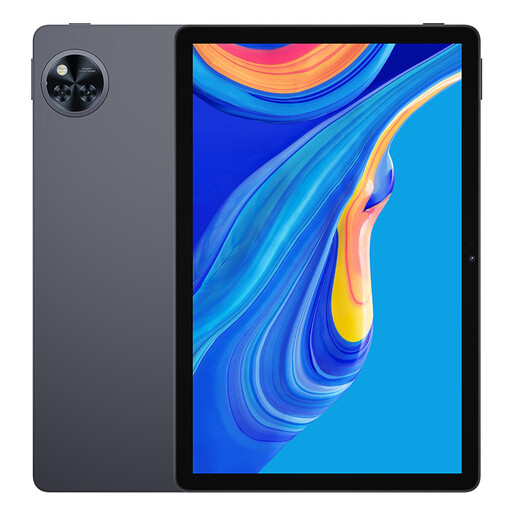 No image available
DOOGEE U11 11-inch 128GB tablet, Grey
This is an option for viewing itineraries using airport Wi-Fi or a separate hotspot.
The product title specifies an 11-inch screen, 128GB storage, an 8580mAh battery and 5G Wi-Fi. The Wi-Fi designation does not establish mobile-data access.
Check the airline’s app, browser check-in and offline boarding-pass process for your itinerary.
View on Joybuy
 No image available
TECLAST ArtPad Pro 12.7-inch 4G LTE, 2025 Edition
Consider the larger screen if viewing travel documents matters more to you than keeping the tablet compact, and you want to assess a mobile-data option.
The product title specifies a 12.7-inch 2K display, dual-SIM 4G LTE, 256GB storage and an included stylus. Check the tablet’s weight and whether it fits your bag.
Confirm its 4G bands and SIM arrangement for your plan and destinations, along with the airline app or browser workflow you need.
View on Joybuy
 No image available
DOOGEE Tab E3 11-inch 256GB tablet, Blue
Assess this model for reading booking details over Wi-Fi, rather than assuming it can receive independent mobile-data updates.
The product title specifies an 11-inch FHD+ display, 256GB storage, 5G Wi-Fi and dual SIM slots. Neither 5G Wi-Fi nor the stated slots alone establishes a usable mobile-data service.
Confirm cellular capability if you need it, as well as device weight and the exact airline app, browser and offline boarding-pass process.
View on Joybuy
Frequently asked questions
Is Wi-Fi enough to check a flight connection?
A Wi-Fi-only tablet can be enough if you will use a known airport network or dependable phone hotspot and save essential information before going offline. Heathrow provides free Wi-Fi throughout its terminals, but check access elsewhere on your itinerary; choose cellular hardware only if independent data matters to you and you have a suitable plan and coverage.
Can I use a tablet boarding pass for a connecting flight?
You can use one where your airline and each relevant departure airport accept it. British Airways says connecting-flight boarding passes can be downloaded where possible for flights departing within 24 hours; easyJet supports offline wallet passes but publishes airport exclusions. Check the current instructions for every leg and keep any required alternative.
Can I take a tablet in hand luggage on a UK flight?
GOV.UK lists tablets as permitted in hand luggage for flights to the UK, while noting that airlines can impose different restrictions. It also advises keeping devices charged: a device that cannot switch on when requested will not be allowed onto the aircraft.
Will an Android airline app work on an Amazon Fire tablet?
Do not assume it will: Amazon states that Fire tablets do not support Google Play. Check the exact app in the Fire-compatible catalogue, or confirm that the airline’s browser check-in and document-saving process covers your itinerary.


