For checking tram routes mainly in a hotel room, start with a Wi-Fi tablet and a screen large enough to read maps and timetables comfortably, provided you can rely on the hotel connection. Consider a cellular model if you also need to check routes away from Wi-Fi; it requires a compatible mobile-data plan, and neither connection type guarantees live departures for every stop.
Who is this for?
Hotel Wi-Fi route planners
If you mainly check maps, timetables and departures in your room, an approximately 11-inch Wi-Fi tablet is a useful starting point. Live updates still depend on your connection and the local transport service’s data, as Google Maps Help and Citymapper explain.
Travellers who need another connection
If hotel Wi-Fi may be unreliable or you plan routes while out, compare cellular variants and compatible data plans. Apple, for example, distinguishes its Wi-Fi iPad (A16) from its Wi-Fi + Cellular version.
Occasional route checkers
If route lookup and light browsing are the main tasks, compare the exact screen size, memory and storage variant, and included accessories before paying for features intended for other uses.
What matters when choosing?
Decide where you need an internet connection before choosing a screen size and comparing exact tablet variants. A cellular connection can provide another way online, but live departure coverage depends on the journey-planning service.
| Concern |
What to check |
Who this matters to |
| Access to route updates |
Check the hotel Wi-Fi where you will use the tablet. If you need another connection, check cellular compatibility and the required data plan. |
I need to check a departure even if the hotel connection fails, rather than rely on a saved timetable. Around 33% of consumers put connection reliability first. |
| Map and timetable viewing |
Compare screen size and display specifications for the exact model; consider how you will hold or prop it up. |
When comparing several stops or a multi-step route, I want enough screen space to follow the details without constant zooming. For around 27% of consumers, a readable route view is the primary need. |
| Variant and accessories |
Compare the stated memory, storage, connectivity and included items for each variant. |
I only need occasional route lookup, so features and accessories for other tasks may not matter to me. Keeping the purchase proportionate is the first concern for around 20% of consumers. |
| Hotel Wi-Fi use |
Check the manufacturer’s software-support information for the exact model; use a screen lock and install updates. |
I expect to use shared networks while travelling and want a tablet I can keep updated. Around 20% of consumers place secure, maintainable use ahead of the other concerns. |
Buying pitfalls
-
Expecting live departures without a connection
A Wi-Fi tablet needs a usable network for live updates. Google Maps Help says some transit stations show real-time departures while others show scheduled times.
Ask about the hotel connection and decide whether a phone hotspot would be a sufficient fallback before choosing a cellular tablet.
-
Choosing a small screen without viewing a route map
An 8.7-inch tablet takes up less packing space than an 11-inch model, but a map and several timetable panels may need more zooming and scrolling.
If you will mainly use the tablet in your room, compare an approximately 11-inch screen first; choose the compact size if carrying it matters more.
-
Treating hotel Wi-Fi like a private network
The National Cyber Security Centre warns that public or insecure networks can expose data to interception or modification.
Confirm the network name with hotel staff, keep the tablet updated, use a screen lock and take care with sensitive activity on the connection.
-
Comparing different variants as though they were identical
Storage, memory, connectivity and included accessories can differ even within one tablet line.
Check the exact model and bundle, including whether a charger, case or pen is supplied and whether you need a mobile-data plan.
Brands to consider
Apple
The iPad (A16) is an 11-inch iPadOS option if you want that platform and may need to compare Wi-Fi with Wi-Fi + Cellular.
- Apple specifies an 11-inch, 2360 × 1640 display and Wi-Fi 6 for the iPad (A16).
- Cellular connectivity is variant-specific and needs a suitable data plan; consider whether you need it for a task mainly done in your room.
Samsung
The Galaxy Tab A11+ is an 11-inch Android line to consider for Wi-Fi-based route planning and other everyday browsing.
- Samsung’s UK Wi-Fi listing specifies an 11-inch, 90 Hz display and offers different memory and storage configurations.
- Check the precise variant before comparing specifications; a Wi-Fi listing does not establish cellular connectivity for that tablet.
Lenovo
The Tab M11 is an 11-inch Android option if an anti-glare display specification or a pen-included bundle matters beyond route checking.
- Lenovo lists an 11-inch, 1920 × 1200 anti-glare display for its 4GB/128GB Tab M11 configuration.
- Check the exact bundle and assess the 4GB memory configuration against any tasks you plan to run alongside route lookup.
Joybuy tablet choices
These tablets cover three ways to check routes: approximately 11-inch Wi-Fi use in the hotel, larger models with stated 4G connectivity, and a compact Wi-Fi model for travellers who prioritise packing space. Check mobile-network compatibility before relying on any cellular option.
 No image available
TABWEE W90 11-inch tablet, 256GB, dual 4G SIM
Consider this for room-based route viewing if you also want the stated 4G LTE connection option. The product name specifies an 11-inch screen and 256GB storage; check UK network compatibility and the required data plan before relying on mobile access.
Confirm the battery capacity and included charger for the exact item before ordering.
View on Joybuy
 No image available
TECLAST ArtPad Pro 12.7-inch, 256GB, dual-SIM 4G tablet
Consider the larger screen if you expect to inspect maps and timetable pages in your room. The product name specifies a 12.7-inch 2K display, dual-SIM 4G LTE and an included stylus; consider its size for travel and check UK network compatibility before relying on cellular service.
View on Joybuy
 No image available
Teclast T65 13.4-inch, 128GB, dual-SIM 4G tablet
This is another large-screen option for viewing route pages, with dual-SIM 4G stated in the product name. Its 13.4-inch display is larger than the approximately 11-inch room-use starting point, so consider how you will carry and position it; check UK network compatibility and your data plan before depending on 4G.
View on Joybuy
 No image available
Samsung Galaxy Tab A11+ Wi-Fi, 8GB/256GB, grey
Consider this Wi-Fi variant if route checks will mainly happen on a usable hotel connection. The product name identifies the 8GB memory and 256GB storage version; if you need mobile access away from Wi-Fi, check the connectivity of the exact variant you choose.
View on Joybuy
 No image available
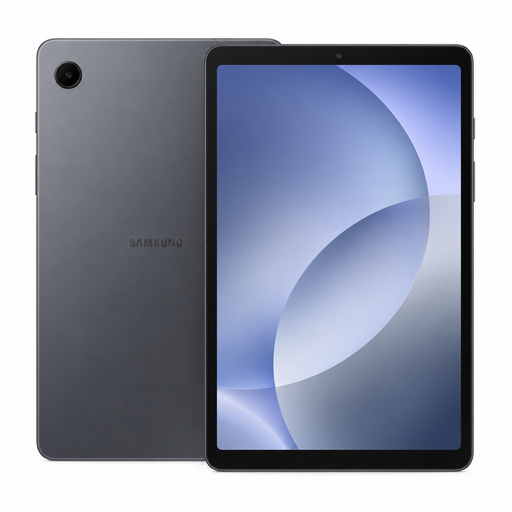
Samsung Galaxy Tab A11 Wi-Fi, 8.7-inch, 64GB
Consider this compact Wi-Fi tablet if carrying a smaller device matters more than seeing a larger route map at once. Its stated 8.7-inch screen may call for more zooming on maps and multi-step journeys; plan for a usable Wi-Fi connection or another way online.
View on Joybuy
Frequently asked questions
Do I need a cellular tablet to check trams from a hotel room?
Usually not if you can rely on hotel Wi-Fi and plan routes in your room. A cellular variant is worth considering when you also need an independent connection away from Wi-Fi; check the exact model’s network compatibility and arrange a suitable data plan.
Will a tablet show live departures at every tram stop?
No. Google Maps Help says some transit stations show real-time departures while others show schedules; Citymapper offers live tram times for supported locations. Check the service you intend to use for the local stops, and remember that live updates need a working connection.
What should I do before using hotel Wi-Fi for route planning?
Confirm the network name with hotel staff and keep the tablet updated and screen-locked. The National Cyber Security Centre warns that public or insecure networks can expose data to interception or modification, so take particular care with sensitive activity.
Can I return a tablet bought online in the UK?
For most online purchases, GOV.UK says you can tell the seller you want to cancel within 14 days of receiving the item, then have another 14 days to return it. Check how the seller handles cancellation and any applicable product exceptions; remedies for faulty or misdescribed goods are separate from changing your mind.


