Choose a cellular-capable tablet if a passenger needs to refresh train connections away from dependable Wi-Fi; a Wi-Fi-only model can work when a phone hotspot or planned Wi-Fi stops will meet that need. An approximately 11-inch screen and space for downloaded road maps are useful considerations, but offline Google Maps cannot provide transit directions or live traffic, so it cannot replace a connection for current train information.
Who needs this kind of tablet?
Passengers checking live connections
If you will compare departures or check changes during the drive, you need a connection that works when you want to refresh the journey. National Rail offers real-time information through its app and says its Journey Planner can be used on a tablet.
Travellers planning an offline road-map backup
Downloaded Google Maps areas can help with driving navigation when a connection drops. Google Maps Help says offline transit directions are unavailable, so keep a separate way to connect when checking train legs.
Travellers using a phone hotspot
If your phone and data plan can provide a dependable hotspot, a Wi-Fi tablet may meet your planning needs without built-in mobile data. Check that arrangement before relying on it for updates between stops.
What matters when choosing?
Decide how you will get live train information first. Then compare map storage, screen size and carrying needs against the exact tablet configuration.
| Concern |
What to check |
Who this matters to |
| Live connections |
Check whether the exact variant has cellular capability or will need a phone hotspot, and confirm the intended mobile-data arrangement. |
I want to check a changed train connection while travelling, without waiting for a Wi-Fi stop. Around 33% of consumers put independent access to live information first. |
| Offline road-map backup |
Check storage for the areas you plan to download and update them before departure; plan how you will charge the tablet. |
If coverage drops, I want the driving map ready on the tablet, while knowing it will not give me offline train directions. Roughly 27% of consumers prioritise that offline backup and its storage needs. |
| Reading and carrying |
Compare screen size and weight, plus any model-specific brightness or ingress rating; check safe placement in the car. |
I will read route details at stops and carry the tablet between the car and station, so size matters as much as viewing space. Around 20% of consumers make reading and carrying practicality their primary concern. |
| Essential planning needs |
Check the exact model’s connectivity, storage and app compatibility, along with which accessories are included. |
I already expect to use my phone’s hotspot and mainly need a tablet for journey pages and saved maps. Approximately 20% of consumers put those essential planning needs first. |
Buying mistakes to avoid
-
Expecting offline road maps to plan train journeys
Google Maps Help says downloaded areas can support driving navigation, but offline transit directions are unavailable. A saved road map will not supply current train connections.
Download the road areas before leaving, and arrange connectivity for train searches and disruption checks.
-
Choosing Wi-Fi without a connection plan
A Wi-Fi-only tablet needs a hotspot or another Wi-Fi connection to refresh National Rail’s real-time information while away from home.
Decide whether you can depend on a phone hotspot or planned Wi-Fi stops before choosing the tablet variant.
-
Assuming a mount permits handheld use while driving
GOV.UK states that drivers must not hold and use a tablet while driving. Mounting a device does not change that prohibition.
Set up the journey before moving. Let a passenger handle changes, or make them when the driver is safely parked.
-
Overlooking the exact configuration
Connectivity and storage vary between tablet variants. A model name alone may not tell you whether the version you are buying meets your live-update and offline-map needs.
Check the model, storage, connectivity and included accessories together, especially if you need a case or a suitable mount.
A case or mount may need to be obtained separately.
Relevant brands to consider
Apple
Consider the iPad 11-inch (A16) if you want an approximately 11-inch tablet and the option of direct mobile data on a Wi-Fi + Cellular variant.
- Apple lists an 11-inch display and Wi-Fi 6; its Wi-Fi + Cellular models support 5G and Gigabit LTE.
- Direct mobile-data use requires the appropriate cellular variant and a suitable plan. Confirm storage and accessories for the version you choose.
Samsung
The Galaxy Tab S10 FE Wi-Fi is an Android option to assess if you can use a hotspot and want model-specific display and storage features.
- Samsung lists a 10.9-inch display, microSD support up to 2 TB, up to 800 nits in High Brightness Mode and IP68-rated water and dust resistance for this model.
- The cited configuration is Wi-Fi-only, so live train updates away from Wi-Fi need a hotspot. Its ingress rating does not establish protection against drops or insecure mounting.
Lenovo
The listed Tab M11 configuration is worth considering for viewing journey information and saved road maps when a hotspot is available.
- Lenovo identifies a 4 GB/128 GB Wi-Fi configuration with an 11-inch 1920 × 1200 anti-glare display and a 7,040 mAh rated battery capacity.
- That configuration does not establish built-in mobile-data access. Rated battery capacity alone does not tell you how long it will last on your trip.
Tablets for passenger planning
These Joybuy tablets have listed SIM or mobile-data features for passengers who want to check train information on the move. Confirm the exact mobile-network compatibility and data arrangement before relying on any of them for live updates; the larger models also deserve a closer look at carrying and in-car placement.
 No image available
TABWEE W90 11-inch dual 4G SIM tablet
Consider this for passenger train checks if its stated mobile-data arrangement works with your intended UK network and plan.
The listing names an 11-inch display, dual 4G SIM, 5G Wi-Fi and 256 GB storage. Its battery-capacity figures conflict, so confirm the capacity of this exact SKU if it matters to your charging plans.
View on Joybuy
 No image available
DOOGEE Tab G6 Plus 11-inch SIM-slot tablet, Grey
This is an option for passenger planning if the SIM-slot configuration meets your mobile-data needs.
The listing names an 11-inch display, 256 GB storage, an 8,000 mAh battery and GPS. Check the exact SIM arrangement and UK network compatibility before depending on live train updates.
View on Joybuy
 No image available
TECLAST ArtPad Pro 2025 Edition, 12.7-inch 4G LTE tablet with stylus
Its larger screen may suit someone who will mostly review journey details while stopped; check whether it fits your carrying and placement plans.
The listing names a 12.7-inch 2K display, dual-SIM 4G LTE, 256 GB storage and an included stylus. Confirm the SIM arrangement and UK network compatibility for live updates.
View on Joybuy
 No image available
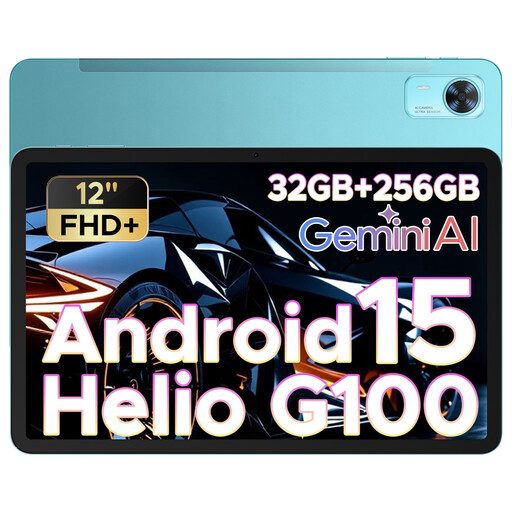
DOOGEE Tab E3+ 12-inch SIM-card tablet, Blue
Consider the 12-inch format if you want more viewing space and can accommodate the tablet when travelling.
The listing names an FHD+ display, SIM-card capability, 256 GB storage and an 8,800 mAh battery. Check its UK network compatibility and SIM arrangement before relying on mobile data.
View on Joybuy
 No image available
TECLAST T65 Plus 13.4-inch dual-SIM 4G LTE tablet
This larger tablet is more relevant if viewing space matters more to you than compact carrying or placement in the car.
The listing names a 13.4-inch 120 Hz display, dual-SIM 4G LTE and 256 GB storage. Check its dimensions against your intended placement and confirm UK network compatibility before depending on live updates.
View on Joybuy
Common questions
Can I check train connections on a tablet while driving?
A driver must not hold and use a tablet while driving: GOV.UK states that this applies to devices that can send or receive data. Have a passenger handle journey changes, or make them when the driver is safely parked.
Will downloaded Google Maps show train connections offline?
No. Google Maps Help says offline transit directions are unavailable. Downloaded areas can provide a driving-navigation backup within their coverage, but check train journeys and disruptions when connected.
Is a Wi-Fi-only tablet enough for a road trip?
It can be enough if you can reliably use a phone hotspot or plan train connections at Wi-Fi stops. If a passenger needs to refresh live information away from those connections, compare a cellular-capable variant and the data arrangement it requires.
Can I use National Rail’s Journey Planner on a tablet?
Yes. National Rail says its Journey Planner can be used on a tablet, and its app provides real-time journey information. Keep the tablet connected when you need current results rather than relying on an earlier search.


