Offline-first journal editors
If you write entries, organise photos and add captions between stations, look for an app that lets you keep the files you need on the tablet. National Rail says onboard Wi-Fi availability varies by train company.


For writing, captions and occasional annotation on a train, start with an 11-inch-class tablet; consider a larger screen if editing space matters more to you than compact handling. Choose iPadOS or Android for a touch-first app workflow, or a Windows detachable if your journal requires desktop software. Check your exact apps, offline access and separately purchased accessories before deciding.
If you write entries, organise photos and add captions between stations, look for an app that lets you keep the files you need on the tablet. National Rail says onboard Wi-Fi availability varies by train company.
If your journal combines typing with sketches, handwritten notes or image mark-ups, consider screen size, pen compatibility and whether the pen comes with the tablet.
If you rely on desktop applications, several windows or long stretches of keyboard writing, consider a Windows detachable alongside the keyboard and pen you would actually carry.
Choose the software workflow first, then decide how much screen space, connectivity and writing equipment you need on the train.
Consider it: If the iPad apps you use can handle your journal files, photos and annotations.
Bear in mind: Apple Pencil and Magic Keyboard are separate purchases for the referenced iPad Air.
Consider it: If Android apps suit your workflow and an included pen or expandable storage matters to you; Samsung lists both for the referenced Galaxy Tab S10 FE range.
Bear in mind: Check the exact model and bundle: screen size and connectivity options vary, and the referenced Samsung package has no travel adaptor.
Consider it: If your journal depends on desktop Windows software or laptop-style document handling.
Bear in mind: Microsoft lists the Surface Pro keyboard and Slim Pen as optional accessories.
| Concern | What to check | Who this matters to |
|---|---|---|
| Working between connections | Check offline access to your journal, photos and maps. Decide whether you need mobile data for live uploads or syncing. | I want to keep writing and sorting photos even when train Wi-Fi drops out. Around 40% of consumers put a dependable offline or connectivity workflow first. |
| Writing and photo-review comfort | Compare screen size and carried weight, then check pen compatibility or inclusion. | I want room to annotate pages and review images without carrying a tablet that feels cumbersome in my seat. Around 30% of consumers prioritise this balance. |
| Desktop-style editing | Confirm support for your exact applications, plug-ins, fonts and file formats; check the keyboard setup. | If my journal relies on desktop tools and substantial typing, a touch-first app may not cover the work. Roughly 30% of consumers make that full workflow their primary concern. |
National Rail says Wi-Fi and power availability vary by train company. A journal kept only in the cloud could interrupt editing when you cannot connect.
Make the files and maps you need available offline before travelling. Consider cellular only if live access is important to your work.
A cellular setup may also require a mobile data plan.
The tablet alone may not represent the setup you need for long entries or handwritten notes. Apple lists Pencil and Magic Keyboard separately for iPad Air, while Microsoft lists Surface keyboard and Slim Pen as optional; Samsung includes an S Pen in the referenced Galaxy Tab S10 FE package but no travel adaptor.
Compare the exact tablet and the keyboard, pen, case and charging equipment you intend to use together.
A larger canvas may help with complex pages, but size changes how a tablet fits in a bag or on a train seat. Apple lists its referenced 13-inch iPad Air Wi-Fi model at 616 g and the 11-inch Wi-Fi model at 464 g, before accessories.
Consider the larger size if you regularly work across several images or long documents; otherwise compare the smaller model with your usual seated setup in mind.
iPadOS, Android and Windows offer different application and file workflows. A tablet's screen and pen specifications cannot establish whether your particular journal project will work as intended.
Check your writing and photo-editing apps, offline files, fonts and required formats on the intended operating system and processor before buying.
The 11-inch iPad Air is an iPadOS option for a touch-first journal built around iPad apps and occasional pen work.
The Galaxy Tab S10 FE range is an Android option for pen-led notes and locally stored journal material.
Surface Pro is a Windows detachable to consider when desktop applications or laptop-style editing are central to the journal.
These tablets cover compact, pen-led and larger-screen approaches to writing a travel journal. The E Ink option is directed more towards handwritten notes; check your photo-editing workflow before treating it as an alternative to a conventional tablet.
 No image available
Consider this Android tablet if handwritten annotations are part of your journal and the included Focus Pen suits your writing style.
Check the weight, charging equipment and offline behaviour of your chosen apps against your travel needs.
 No image available
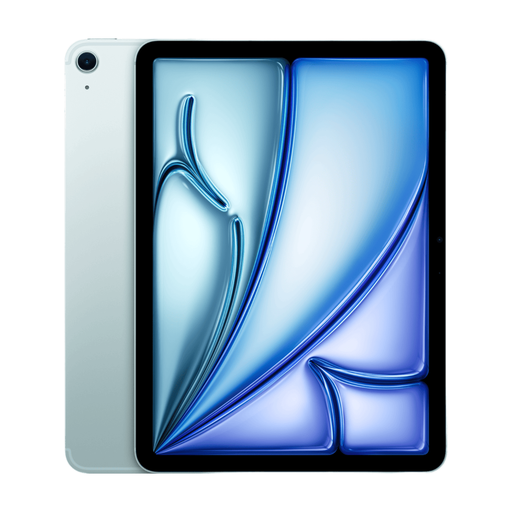
The 11-inch Wi-Fi format suits an app-led journal when you can keep the files you need available offline.
Apple Pencil and keyboard accessories are separate purchases. Check your intended apps and file workflow before choosing this configuration.
 No image available
Consider the larger display if you want space for handwritten pages and can accommodate a 12.7-inch tablet while travelling.
The product name specifies a 2K display, Android 15, 256GB storage and Dual SIM 4G LTE. Check its carried weight and whether your journal apps work offline as required.
 No image available
Consider this tablet if you want 256GB of storage for journal files and prefer an app-led editing workflow.
Check its size in your usual train-seat setup, what accessories come with this configuration and whether your chosen apps support the files you need offline.
 No image available
Consider this E Ink option if handwritten journal entries matter more to you than editing photos on the device.
Check its app and file workflow against your journal, particularly if reviewing or changing images is part of each entry.
Not if your journal, photos and other files are available offline. Consider cellular if you need live uploads, research or syncing during the journey: National Rail says onboard Wi-Fi availability varies by train company.
Start with the smaller format if carrying and holding the tablet matter most; consider a larger screen if you regularly need more room for images or long pages. For the referenced iPad Air Wi-Fi models, Apple lists 464 g at 11 inches and 616 g at 13 inches, before accessories.
Account for the keyboard, pen and charging equipment your writing routine requires. Apple lists Pencil and Magic Keyboard as separate purchases for the referenced iPad Air, Microsoft lists Surface keyboard and Slim Pen as optional, and the referenced Samsung Galaxy Tab S10 FE package includes an S Pen but no travel adaptor.
Check the product information and seller for the particular tablet supplied to the Great Britain market. The Office for Product Safety and Standards explains that electrical equipment must meet applicable requirements before it is placed on that market.