Casual daily puzzle players
If you play in short or regular sessions, concentrate on comfortable touch play, internal app storage and whether your game works on the device. Processor specifications alone will not answer those questions.


For match-three games, start with a screen you can comfortably view and hold, enough internal storage for your apps, and compatibility with the particular game you play. Choose between Android and iPadOS according to game availability and any account or purchase history you need to keep; a display refresh-rate figure alone cannot establish how that game will run.
If you play in short or regular sessions, concentrate on comfortable touch play, internal app storage and whether your game works on the device. Processor specifications alone will not answer those questions.
An approximately 11-inch screen may make boards and menus easier to view at home. Compare weight and how you plan to hold or support the tablet too, particularly if you play for longer sessions.
If a particular game, saved progress or previous purchases matter to you, check the game listing and publisher’s transfer rules before choosing Android or iPadOS. Google Play Help notes that Android developers can restrict compatibility by factors including device and location.
For consumers choosing a tablet primarily for match-three games, check the game and account requirements alongside the screen and storage configuration. Give the most attention to the factor that would affect your own play most.
| Concern | What to check | Who this matters to |
|---|---|---|
| Screen comfort | Compare screen size and device weight with how you expect to hold or support the tablet. Do not equate a refresh-rate specification with a game’s frame rate. | If I regularly scan a puzzle board and tap through menus, I want a screen I can see clearly without making the tablet awkward to hold. Around 43% of consumers put viewing and touch-play comfort first. |
| Internal storage and bundle | Check the selected internal-storage variant and included accessories. For the Galaxy Tab A9+, Samsung says microSD storage is for media, not applications. | When I keep several games and other apps installed, I need sufficient built-in space and want to know what comes with the tablet. Around 29% of consumers make storage and the selected bundle their primary concern. |
| Game and account compatibility | Check the exact game’s store listing, operating-system requirements and the publisher’s rules for saves and purchases. | If I am moving to a new tablet, keeping access to my game and progress matters more than a display specification. Around 28% of consumers put game and account compatibility first. |
Samsung specifies a refresh rate of up to 90Hz for the Galaxy Tab A9+, but that figure does not establish the frame rate of an individual match-three game.
Check the game’s compatibility first, then consider screen size and handling for the way you play.
Samsung says the Galaxy Tab A9+ can use external memory for media but not applications. A card therefore does not replace adequate internal storage for installed games.
Choose built-in storage with the games and other apps you intend to keep in mind.
A case, pen or charger may be included with one configuration and separate from another.
Compare the exact storage and connectivity variant, then read its included-items list before deciding.
Lenovo UK lists a Tab M11 configuration with an 11-inch 1920 × 1200 display, 4GB memory and 128GB storage.
Samsung lists an 11-inch Galaxy Tab A9+ with a display refresh rate of up to 90Hz.
Apple UK lists the iPad (A16) with an 11-inch Liquid Retina display and A16 chip for buyers considering iPadOS.
These Android tablets offer different screen sizes and listed storage configurations for puzzle play. Check the particular game’s compatibility and consider how you will hold or support the tablet before choosing.
 Image unavailable
Consider this model if you want an 11-inch Android tablet for puzzle play. The title lists 4GB RAM and 128GB storage; check the game listing and the tablet’s weight if you expect to hold it while playing.
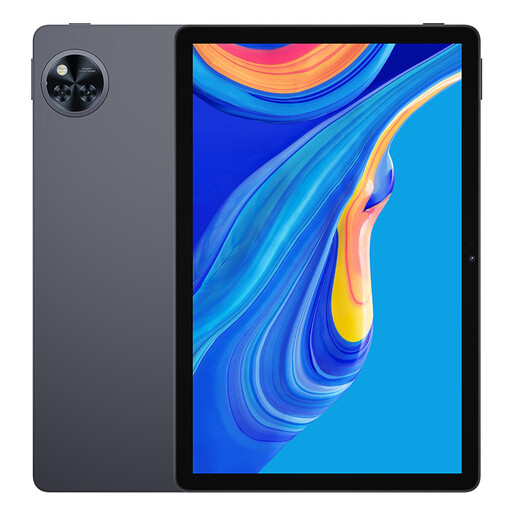 Image unavailable
The listed 11-inch screen and 128GB storage may suit home puzzle play with several apps installed. Confirm compatibility with your game and check the weight against how you intend to hold it.
 Image unavailable
Consider the 12.7-inch display if you expect to play with the tablet supported at home. The title lists a 2K display, 256GB storage and an included stylus; check game compatibility and whether its size suits your preferred way of playing.
Image unavailable
The listed 11-inch FHD+ display may appeal if you want a larger puzzle board. The title states 90Hz and lists a 256GB storage configuration; confirm the selected variant and physical memory, as well as game compatibility. A 90Hz display does not establish the game’s frame rate.
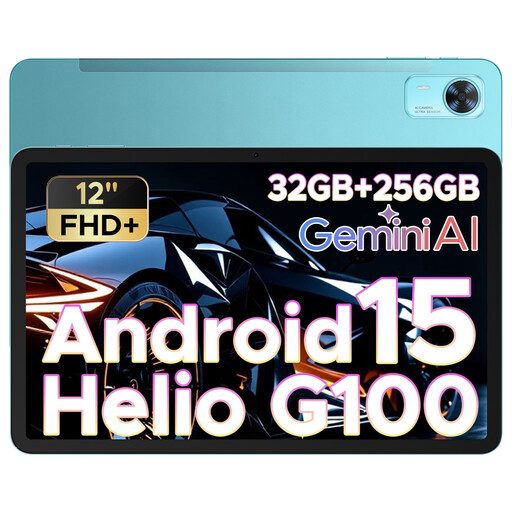 Image unavailable
The listed 12-inch display may suit puzzle play with the tablet supported rather than held throughout a session. The title states FHD+, 90Hz and 256GB storage; check the physical-memory configuration and your game’s compatibility. Refresh rate alone does not establish game performance.
Not solely for the match-three use described here: start with screen comfort, internal storage and compatibility with your particular game. A faster chip or higher display refresh rate may matter for other uses, but neither specification by itself establishes how that game will play.
Check the exact game’s Google Play listing for the device and operating-system version you plan to use. Google Play Help says developers can limit compatibility by factors including device characteristics and location; ask the game publisher separately about saved progress and purchases.
Samsung says the Galaxy Tab A9+ can use external memory for media, but not applications. Choose an internal-storage variant that accommodates the games and other apps you intend to keep installed.