What matters when choosing?
Choose the games first, then weigh up how comfortably you can see and control them, whether they will work during gaps in connectivity, and how the tablet will be held or shared. For passengers choosing mainly for road-trip escape-room puzzles, each concern below represents a different first priority.
| Concern |
What to check |
Who this matters to |
| Clue inspection and touch control |
Compare the exact model’s screen size and display details, then check how your chosen games look and respond on it. |
If I am reading clues and manipulating objects in a passenger seat, I want text and touch controls that feel comfortable to use; around 37% of consumers would put puzzle interaction first. |
| Play away from Wi-Fi |
Install games and updates before travelling, and test each game with Wi-Fi and mobile data off. Check the tablet’s connectivity variant if independent data matters. |
Without dependable Wi-Fi, I need my games ready to launch and want to know which features still need a connection; roughly 36% of consumers would prioritise uninterrupted play. |
| Passenger comfort and sharing |
Compare the exact variant’s dimensions and weight, and decide whether you will hold it or prop it up safely as a passenger. |
When we share a screen, I want enough viewing room without a tablet that is awkward to handle in the car; around 27% of consumers would put handling and sharing first. |
Joybuy tablet choices
These tablets offer different screen sizes, storage configurations and connectivity choices for passenger puzzle play. Check each intended game’s compatibility and offline behaviour before choosing a model; a tablet’s battery capacity or general battery claim does not establish gaming time.
 No image available
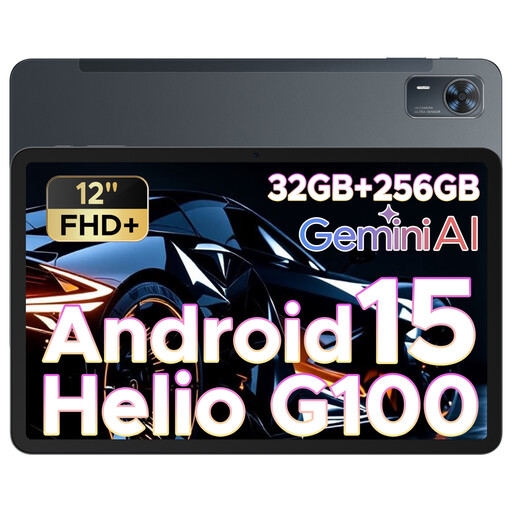
DOOGEE Tab E3+ 12-inch Android 15 tablet, 256GB, Grey
Consider its larger screen if a passenger wants more room to inspect clues or share entertainment, provided it is comfortable to handle in the car.
- Listed with a 12-inch FHD+ display, 90Hz refresh rate, 256GB storage and a SIM slot.
- The stated 8800mAh battery capacity is not a gaming-runtime figure; plan a charging option and check the data requirements of the exact configuration.
View on Joybuy
 No image available
Xiaomi Pad 8 8G RAM/128GB Wi-Fi, Grey
This Wi-Fi configuration suits a passenger who can install and test puzzle games before setting off or use dependable phone tethering when a connection is needed.
- The listed configuration has 8G RAM and 128GB storage.
- Check that your chosen games fit alongside updates and other downloads; arrange charging for the journey.
View on Joybuy
 No image available
Apple iPad Pro 11-inch (M5) Wi-Fi 256GB, Standard Glass, Silver
Consider this configuration if your shortlisted games are available for iPad and you want an 11-inch tablet with 256GB of storage.
- The listed variant is Wi-Fi only, with standard glass.
- Install and test the games before travel if a connection may be unavailable, and plan how to charge the tablet.
View on Joybuy
 No image available
Xiaomi Pad 8 Pro 12G RAM/512G ROM, Grey
Its listed storage may appeal if you want to keep several games and media downloads on the tablet for a journey.
- The title specifies 12G RAM and 512G ROM.
- Check this exact variant’s connection type before buying if the tablet needs mobile data independently of a phone.
View on Joybuy
 No image available
Apple iPad Air 11-inch (2026, M4) Wi-Fi 128GB, Starlight
This 11-inch Wi-Fi iPad is an option if your chosen escape-room games run on iPad and you can prepare them before the trip.
- The listed variant has 128GB storage and Wi-Fi connectivity.
- Check the games’ download requirements and test offline launching before relying on them away from a connection.
View on Joybuy
Common questions
Can the driver use the tablet while the car is moving or waiting in traffic?
The driver must not hold and use a tablet while driving, including while stopped at traffic lights or queuing, according to GOV.UK. A hands-free setup does not remove the need to remain in control or keep the view of the road clear. Puzzle play should be left to passengers.
Do escape-room games require a cellular tablet on a road trip?
No, if the games you choose work after being downloaded and tested offline, or you can reliably tether when they need data. Choose a cellular-capable variant only if independent mobile data matters to you; confirm that capability for the exact model and arrange a suitable service.
How much tablet storage should I allow for puzzle games?
Check the current download sizes of the specific games you want, then allow room for updates, saved data and any other media you plan to carry. Apple lists 128GB as the starting capacity for the iPad (A16), while Samsung lists microSD support for the Galaxy Tab S10 FE; do not assume a memory card can hold every installed game.
Should I pick the games before choosing the tablet?
Yes: a shortlist lets you check operating-system compatibility, download size and offline requirements before settling on a tablet. For example, the UK App Store lists The Room for iPad, while Google Play describes Amnesia – Room Escape Games as playable offline and notes ads and in-app purchases. Check the current listing for each game you actually intend to play.


