Who these tablets suit

Offline field-minute editors

If connectivity may drop, you need the agenda and minutes ready on the device before leaving. Microsoft Support advises downloading and opening cloud-stored documents while online before working on them offline; changes can synchronise after reconnection.

Keyboard-first document workers

Lengthy minutes, action lists and several reference documents make typing and navigation central to the choice. Microsoft describes an optional Surface Pro keyboard with a full-sized haptic touchpad for a laptop-style setup.

Outdoor and mobile-site teams

Moving between sites brings carrying weight, screen visibility and exposure to dust or water into the decision. Samsung lists IP68-rated dust and water resistance and a High Brightness Mode of up to 800 nits for the Galaxy Tab S10 FE; assess the keyboard and other accessories separately.

What matters when choosing

Windows 2-in-1

Choose when: Your minutes rely on desktop-oriented document work or navigation across several applications; Microsoft offers an optional Surface Pro keyboard and touchpad.

Allow for: The keyboard is separate, and Microsoft’s video-playback battery figure does not describe a day of document editing.

iPad with keyboard case

Choose when: A lighter touch-first device takes priority and your required documents work in iPad office apps; Apple lists the 11-inch Wi-Fi iPad Air at 464 g without a keyboard.

Allow for: Apple lists a USB-C cable, but not a keyboard, among the iPad Air’s in-box items.

Android tablet

Choose when: An Android document workflow suits your team and outdoor exposure or a cellular option matters; Samsung offers a 5G Galaxy Tab S10 FE with stated IP68 resistance.

Allow for: The tablet’s ingress rating does not establish protection for a separately selected keyboard or charger.

Concern What to check Who this matters to
Typing and document editing Check the exact keyboard bundle and whether the required document app handles your formatting and review tasks. If minutes involve sustained typing and moving between reference files, I need a comfortable way to edit rather than just read them. Around 38% of consumers would put this editing need first.
Carrying and outdoor use Compare weight with the keyboard attached; check screen visibility and any stated protection for the exact device. When I carry the tablet between sites or work outdoors, weight and exposure matter as well as the document itself. This would be the primary need for around 31% of consumers.
Offline access and reconnection Open required files before departure and test editing offline; decide how approved Wi-Fi, tethering or cellular access will handle later synchronisation. Where coverage may disappear, I need to keep editing and save my work until I can reconnect. Around 23% of consumers would make reliable file access their first concern.
Security-policy fit Confirm permitted devices, accounts, storage and sharing procedures with your organisation before using the tablet for sensitive minutes. If the notes contain personal data or my employer controls device use, approval determines which setup I can use. For around 8% of consumers, that policy fit would come first.

Mistakes to avoid

  • Choosing the tablet without planning the typing setup

    A tablet may support a keyboard without including one, leaving the setup for sustained minute-taking incomplete.

    Check what the exact bundle contains and which keyboard fits it. Consider the weight of the assembled setup if you will carry it between sites.

  • Waiting until arrival to try offline editing

    Microsoft Support advises opening cloud-stored documents online before offline use; changes may remain unsynchronised until you reconnect.

    Download and open the agenda, earlier minutes and templates before travelling, then test opening, editing and saving them without connectivity.

  • Assuming an IP rating covers every accessory

    Samsung’s stated IP68 rating for the Galaxy Tab S10 FE does not establish the same protection for a separate keyboard, charger or paper records.

    Check protection for each item exposed to the expected conditions and carry accessories accordingly.

  • Using a personal tablet for sensitive minutes without approval

    Minutes may contain personal data, while permitted devices and storage depend on the organisation’s controls.

    Confirm the approved device, account, sharing and lost-device procedures before using a personal tablet for this work.

Relevant brands to consider

Apple

The iPad Air offers a touch-first route for field editors whose documents work in iPad apps and who are willing to select a keyboard separately.

  • Apple lists 11-inch and 13-inch iPad Air versions, USB-C and support for keyboard and Pencil accessories. Its 11-inch Wi-Fi model weighs 464 g before accessories.
  • Apple lists a USB-C cable, not a keyboard, among the in-box items; check the complete working setup.

Samsung

The Galaxy Tab S10 FE is an Android option where a 5G configuration or the tablet’s stated resistance to dust and water is relevant to field work.

  • Samsung lists a 10.9-inch display, support for up to 2 TB microSD storage and IP68-rated dust and water resistance for the Galaxy Tab S10 FE.
  • Those tablet specifications do not determine whether your organisation’s document apps, device controls or separately chosen accessories meet its requirements.

Microsoft

Surface Pro is a Windows 2-in-1 route for minute-taking that benefits from laptop-style typing and document navigation.

  • Microsoft describes an optional Surface Pro keyboard with a full-sized haptic touchpad.
  • The keyboard is sold separately. Microsoft’s quoted battery duration of up to 15.5 hours is for video playback, not a field-day editing workload.

Joybuy tablet choices

These choices cover portable iPad Air models and an Android tablet offered with a keyboard. Check the document workflow and full typing setup for the exact model before deciding which suits your field-trip minutes.
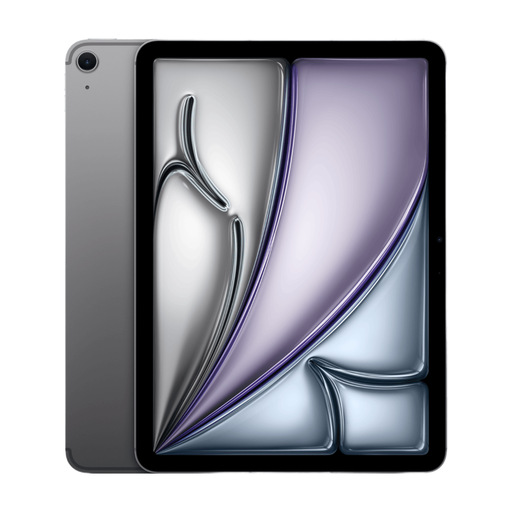
Apple 11-inch iPad Air M4, Wi-Fi, 512GB, Space Grey

Apple 11-inch iPad Air (2026, M4), Wi-Fi, 512GB, Space Grey

Consider this configuration if a portable iPad document setup and 512GB of storage suit the files you plan to take into the field.

Apple lists the 11-inch Wi-Fi iPad Air at 464 g without a keyboard. Select a compatible keyboard separately, and test your required app and files offline before travelling.

View on Joybuy

TABWEE T80 10-inch Android 16 tablet with keyboard, 128GB

TABWEE T80 10-inch Android 16 tablet with keyboard, 128GB

Consider this tablet if you want a 10-inch Android device offered with a keyboard for editing notes between sites.

Its title states 128GB of storage and Wi-Fi connectivity. Check the supplied keyboard layout and your document app’s offline editing behaviour; the stated Wi-Fi feature should not be mistaken for mobile-network 5G.

Purchase link unavailable

Apple 11-inch iPad Air M4, Wi-Fi, 128GB, Starlight

Apple 11-inch iPad Air (2026, M4), Wi-Fi, 128GB, Starlight

Consider this 128GB configuration if the 11-inch iPad Air format suits your field-trip documents and planned local files.

Apple lists the 11-inch Wi-Fi iPad Air at 464 g without a keyboard. Confirm keyboard compatibility and test the required files and app offline before departure.

View on Joybuy

Frequently asked questions

Can I edit meeting minutes offline on an iPad or Android tablet?

Yes, supported Microsoft Word mobile apps can work with files offline, provided you prepare cloud-stored documents first. Microsoft Support advises downloading and opening the files while online; changes synchronise after reconnection.

Do I need a 5G tablet for a field trip?

Not if prepared files can be edited offline and suitable Wi-Fi or approved phone tethering will be available when you need to synchronise. Consider a cellular model if those connection options will not meet your needs and your organisation permits the required data arrangement.

Will a tablet suitable for work include a keyboard?

Not necessarily: Apple does not list a keyboard among the iPad Air’s in-box items, and Microsoft describes the Surface Pro keyboard as optional. Check the contents and compatibility of the exact configuration you intend to use.

What if the meeting minutes contain personal data?

Use the device, account, storage and sharing arrangements approved by your organisation. GOV.UK guidance on securing personal data in government services addresses appropriate security controls; a tablet’s consumer features alone do not establish approval for your workplace.

Will a quoted battery-life figure cover a full day of editing?

Do not assume it will. Microsoft quotes up to 15.5 hours of video playback for Surface Pro, a different workload from typing, synchronising files, using mobile data or joining video meetings; plan charging around the tasks you expect to perform.