Choose a compact colour tablet if holding it while reclining matters most; choose a larger tablet if your guides have fixed-layout pages and you want room for notes. A dedicated E Ink reader is an alternative for compatible, mainly text-based guides, but check your actual files and annotation needs before buying. For reading close to sleep, Oxford Health NHS Foundation Trust advises avoiding screen time and blue light for at least an hour before bed.
Who each format suits
One-hand bedside readers
If you read short lessons or dictionary entries while reclining but still want colour apps, a compact tablet is worth considering. Apple UK lists the iPad mini Wi-Fi with an 8.3-inch display and a weight of 293 g; check how your own guide looks at that size.
PDF and annotation learners
If your guides contain worksheets, grammar tables or notes alongside passages, consider a larger screen and the pen workflow you intend to use. Samsung UK lists a 10.9-inch Galaxy Tab S10 Lite, while Lenovo UK lists an 11-inch Tab M11 configuration with a Tab Pen.
Focused text-first readers
If your guides are compatible documents or ebooks and you do not need a general-purpose tablet interface, a dedicated E Ink reader may suit you. Amazon UK lists a 6-inch Kindle E Ink display, and Amazon Customer Service lists PDF and EPUB among Send to Kindle formats. Preview your guide's layout before relying on that route.
What matters when choosing
Start with a representative language guide and your usual reading position: the page layout determines how much screen space you need, while your posture determines how comfortable the device is to hold.
| Concern | What to check | Who this matters to |
|---|
| Comfort in bed |
Compare the exact variant's weight and width, then consider how you would support it while reclining. |
I want to hold a guide through a lesson without repeatedly changing my grip. Around 40% of consumers would put handheld comfort first. |
| Full pages and notes |
Preview a typical PDF at your reading distance and confirm that your preferred pen works with the app and exact bundle. |
For grammar tables or worksheets, I need to see the page clearly and mark it up without constant zooming. Around 30% of consumers would prioritise page space and annotation. |
| Focused bedtime reading |
Try your own guide's format and layout on the intended reader; consider your reading cut-off time separately from display features. |
I mainly want to read text without tablet distractions, provided my guide remains legible. Focused reading and file suitability would come first for around 30% of consumers. |
Buying pitfalls
-
Choosing by screen diagonal alone
A larger screen gives a fixed-layout page more room but can be awkward to hold unsupported in bed; a compact screen may mean more zooming.
View a real guide at your usual reading distance and consider how you will hold or support the device. If you cannot try it first, check the seller's return terms before ordering.
A stand or folio case may be useful if you choose a device you cannot comfortably hold for a full reading session.
-
Equating file transfer with comfortable reading
Amazon Customer Service lists PDF and EPUB support for Send to Kindle, but a scanned or diagram-heavy guide may still be difficult to read on a 6-inch display.
Preview a representative page and check text size, diagrams, highlighting and the note-taking method you need.
-
Relying on a blue-light feature for bedtime reading
A display feature does not settle when to stop using a screen. Oxford Health NHS Foundation Trust advises avoiding screen time and blue light for at least an hour before bed.
If reading affects your bedtime routine, plan a cut-off time rather than choosing a tablet solely for a blue-light-reduction claim.
Brands and product lines to consider
Apple
The iPad mini represents the compact colour-tablet route for guides, apps and portable notes.
- Apple UK lists an 8.3-inch display, True Tone and a 293 g weight for the Wi-Fi model.
- Its smaller screen leaves less room for a full PDF page than the larger tablets discussed here. Check the Apple Pencil model and your app workflow separately.
Samsung
The Galaxy Tab S10 Lite represents a larger Android tablet route for guide pages and pen-based notes.
- Samsung UK lists a 10.9-inch display and S Pen-related writing features for this model.
- Consider how you would support a larger device in bed. Its listed blue-light-reduction feature does not replace bedtime screen-use advice.
Lenovo
The Tab M11 offers another large Android-tablet route for reading guide pages and taking notes.
- Lenovo UK lists an 11-inch, 1920 × 1200 anti-glare display and a Tab Pen in the configuration shown.
- Confirm the exact memory, storage and pen bundle on the listing you choose; configurations vary.
Amazon Kindle
Kindle is a dedicated E Ink alternative for compatible, mainly text-based guides rather than a general-purpose tablet.
- Amazon UK lists a 6-inch, 300 ppi glare-free E Ink display for the Kindle 2026 release; Amazon Customer Service lists PDF and EPUB as Send to Kindle formats.
- Check your guide on the intended screen. Amazon lists highlights and text notes for other Kindle e-readers, while handwritten annotation calls for checking a Scribe-capable model.
Joybuy product choices
These choices cover compact and larger colour tablets, plus a larger E Ink note-taking device. Compare each one with your guide's layout, app and note-taking needs rather than treating screen size alone as the answer.
 No image available
Apple iPad Mini 7 (A17 Pro), 512GB, Space Grey
Consider this compact colour tablet if holding a device while reclining takes priority over full-page PDF space.
Check a sample guide in your intended app, and confirm the pen and accessories needed for notes.
View on Joybuy
 No image available
iFLYTEK AINOTE 2, 10.65-inch E Ink tablet with protective case
Consider this larger E Ink format if reading documents and making notes matter more than using colour guide pages.
Confirm the case and writing accessories in the exact bundle, and preview your guide's layout and app workflow. Check what lighting you will need in bed.
View on Joybuy
 No image available
Xiaomi Pad 8, 8G RAM, 128GB, Wi-Fi, grey
Consider a larger colour tablet if you need space for fixed-layout guides and can support the device while reading.
Check how your PDF displays and whether the exact bundle includes a pen compatible with your guide app.
View on Joybuy
 No image available
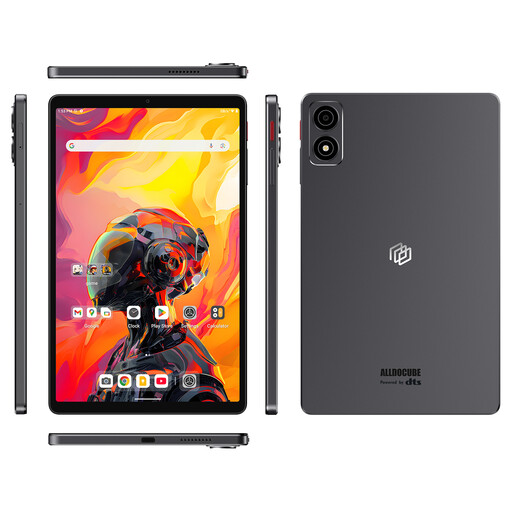
ALLDOCUBE iPlay 70 Mini Ultra, 8.8-inch, 12GB+256GB, Android 14
Consider this smaller Android tablet if you want colour guide pages and apps in a compact format.
The product title states that no charger is included. Check the device's weight, small-print legibility and compatibility with your guides before ordering.
View on Joybuy
 No image available
Samsung Galaxy Tab A11+, 11-inch, 128GB, Wi-Fi, grey
Consider this 11-inch colour tablet if seeing more of a guide page matters more than holding a compact device one-handed.
Try a representative guide and confirm that your preferred reading and annotation apps work as needed.
View on Joybuy
Frequently asked questions
What screen size works for language guides in bed?
A compact screen is worth considering if you hold the device while reclining; move towards a larger screen if your guide has fixed-layout pages that need more room. Apple UK lists the iPad mini Wi-Fi at 8.3 inches and 293 g, while Samsung UK and Lenovo UK list 10.9- and 11-inch tablet options. Preview your own guide and consider how you will support the device.
Can I send my PDF or EPUB language guide to a Kindle?
Amazon Customer Service lists PDF and EPUB as Send to Kindle formats. Check that you can send your particular document, then preview its text, diagrams and page layout on the screen size you intend to use.
Can I handwrite notes directly on a Kindle guide?
Check the exact Kindle model and document workflow before buying for handwriting. Amazon Customer Service lists highlights and text notes for other Kindle e-readers, while its Kindle Scribe information describes additional handwriting features.
Does blue-light reduction settle whether to read on a tablet just before sleep?
No: a display feature is not a substitute for a bedtime routine. Although Samsung UK lists blue-light reduction for the Galaxy Tab S10 Lite, Oxford Health NHS Foundation Trust advises avoiding screen time and blue light for at least an hour before bed.


