Dense-table and chart reviewers
If you mainly read dashboards, crosstabs, charts and PDFs at the table, consider how much screen space you need and how you will keep the display at a comfortable viewing angle.


Choose a Windows 2-in-1 if your survey service, exports or workplace tools require desktop Windows. If your work runs in compatible tablet apps or a browser, choose an iPad or Android tablet around the screen, viewing position and input methods you need. Check the actual workflow before relying on any device; a supported keyboard or pen is not necessarily included.
If you mainly read dashboards, crosstabs, charts and PDFs at the table, consider how much screen space you need and how you will keep the display at a comfortable viewing angle.
If you also type follow-up notes or mark up charts, check the input methods supported by your apps, then check the exact keyboard or pen compatible with the tablet.
If your review involves Windows applications, desktop browser behaviour or involved spreadsheet work, investigate a Windows 2-in-1 before choosing a tablet-only operating system.
Check your survey service and exported files on the intended operating system first. Then choose the viewing position and input setup that fit what you do at the table.
| Concern | What to check | Who this matters to |
|---|---|---|
| Readable workspace | Compare display sizes and check whether the tablet can stand securely at your usual viewing distance; size alone cannot establish how the survey site will display. | When I compare dense tables with charts or notes, I want to read labels without constantly adjusting the view. Around 31% of consumers put a readable workspace first. |
| Comments and annotations | Check the exact keyboard or pen compatibility and whether your survey, PDF and document apps support the intended input. | If I regularly write comments or mark up exported charts, the way I enter those changes what I need from the setup. Typed or annotated input comes first for around 31% of consumers. |
| Desktop workflow | Test sign-in, filtering, exports and required spreadsheet features on the operating system you plan to use. | My organisation's reporting tools or downloaded files may need desktop Windows, even if reading a dashboard works on a tablet. Around 23% of consumers prioritise desktop-workflow compatibility. |
| Table-ready setup | Check how the screen will be supported and which case, keyboard, pen or charging equipment your intended use requires. | I mostly read results in one place, so keeping the screen upright without adding unnecessary input equipment matters most. A practical table setup leads for around 15% of consumers. |
Reading a dashboard does not establish that desktop-only reporting controls, exported workbooks or workplace sign-in will work on the same device.
Try the actual survey service and files on the intended operating system. If a required step depends on Windows, investigate a Windows 2-in-1.
Repeated comments may call for a keyboard, while reviewing charts hands-free calls for a stable viewing position. Pen compatibility does not mean a pen is in the box.
Check the exact configuration and compatible accessories, including what is supplied, before settling on the setup.
A separate case or stand can add another item to carry and set up each time.
Electrical products need a separate disposal route. GOV.UK advises against putting them in household rubbish.
Use an appropriate electrical-waste collection point, or check whether a retailer offers a like-for-like take-back route.
Apple's iPad Air is an iPadOS route for touch-first survey review, with a choice of 11-inch or 13-inch models.
Samsung's 11-inch Galaxy Tab S11 offers an Android route with DeX for a more desktop-like layout.
Microsoft's 13-inch Surface Pro (12th Edition) is a Windows 2-in-1 to investigate when survey review depends on desktop software or a laptop-style workflow.
Lenovo's Tab Plus is an Android option to consider when the main task is viewing results hands-free at a fixed table position.
These tablets offer different screen sizes and input arrangements for reviewing results at a kitchen table. Choose between them only after checking your survey workflow and the equipment needed to keep the screen in position.
 No image available
Consider this compact tablet if your review includes light typing or annotation. The title lists a 10.1-inch display, 256GB storage, a keyboard, mouse and stylus; confirm the stand and Android version for the exact package before use.
 No image available
Consider the 12.7-inch display when charts and documents need more on-screen room. The title specifies 2K resolution, Android 15 and an included stylus; check how you will support the tablet at the table and whether your apps allow the annotation you need.
 No image available
Consider this Android tablet for viewing survey results, provided your reporting service works on it. The title identifies the Gray 12GB/512GB variant; confirm whether the Focus Pen is included, as the product information conflicts, and check your intended stand or case.
 No image available
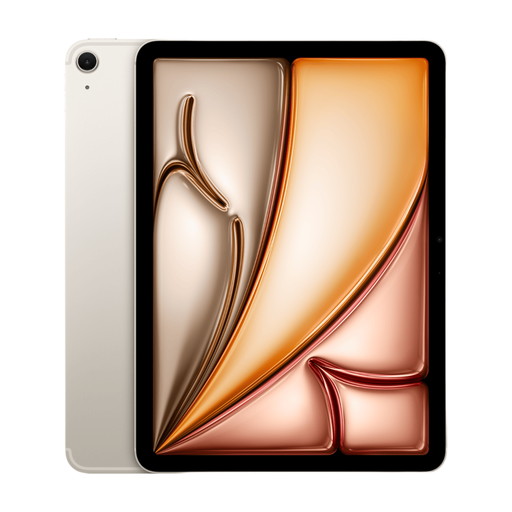
Consider this iPadOS route if your survey tools work on an iPad and you want the larger display identified in the title. The title says 13-inch, while other product wording says 14-inch, so confirm the exact display and configuration. Check keyboard or Pencil compatibility separately.
 No image available
Consider this Android tablet for reading results if an 11-inch screen suits the tables you use. Its title lists 256GB storage and a 90Hz IPS screen; assess the display with your own results and check what you will use to support it at the table.
Yes, if your dashboard, files and required editing tools work on that tablet's operating system. If a necessary step uses Windows software or desktop-only browser controls, investigate a Windows 2-in-1 and test the actual workplace workflow.
Choose a keyboard for regular comments and summaries; choose a stylus if your apps support the chart, PDF or handwritten annotation you plan to do. Check compatibility with the exact model and confirm what comes in its package.
No. DeX provides a more desktop-like layout on supported Samsung tablets, but it does not establish compatibility with Windows-only survey software. Test the reporting site and exported files on Android before relying on it.
For qualifying UK online orders, GOV.UK says customers can cancel up to 14 days after delivery. Check the seller's cancellation instructions and applicable exceptions; remedies for faulty, damaged or misdescribed goods are a separate matter.
Do not put an old tablet in household rubbish. GOV.UK advises taking electrical products to an appropriate collection point; you can also check whether the retailer offers a like-for-like take-back route.