Shortcut-heavy tactical players
If you regularly use unit groups, abilities, map controls or custom bindings, count the keys you need within direct reach. Remapping and saved configurations may matter more to you than switch sensitivity.


Choose the layout around the commands you use, not the size of the screen. Tenkeyless (TKL) leaves more desk width for mouse movement while retaining function and navigation keys; a full-size board keeps the numpad. Adjustable actuation and rapid trigger are worth considering for fast, movement-heavy play if you are prepared to configure them, rather than for tactical games as a whole.
If you regularly use unit groups, abilities, map controls or custom bindings, count the keys you need within direct reach. Remapping and saved configurations may matter more to you than switch sensitivity.
If mouse movement competes with keyboard width on your desk, TKL is a way to remove the numpad without making the omissions of a 60% layout. Check whether you use the keys that a smaller board removes.
If your tactical games involve rapid movement inputs, adjustable actuation and rapid trigger give you settings to tune. Their value depends on your game and configuration, not on the display being large.
Start with the physical keys your game needs, then check desk space and whether you would use configurable switch settings.
| Concern | What to check | Who this matters to |
|---|---|---|
| Command access | Check the function, navigation and numpad keys you use, then confirm remapping or profile support on the exact model. | If I issue group, map and ability commands repeatedly, I want those controls within easy reach rather than buried in key layers. Around 27% of consumers may put direct command access first. |
| Layout and mouse space | Measure your desk and mouse area; compare the keys retained by TKL, 75% and 96% layouts rather than relying on size labels alone. | With limited room beside my mouse, I need a narrower board without losing keys I regularly use. Layout balance may be the main concern for around 27% of consumers. |
| Tunable inputs | Confirm adjustable actuation and rapid trigger on the exact variant, plus its setup method and any applicable game or event rules. | For fast movement inputs, I would use per-key settings but need command keys to remain deliberate. Around 26% of consumers may prioritise tunable inputs. |
| Everyday use | Consider switch feel, sound-dampening features and hand position; for wireless models, consider charging as well. | I also type, chat or work at this keyboard, so its feel and daily practicality can decide the choice. Everyday comfort may come first for around 20% of consumers. |
A 60% layout omits the function row, arrow keys, navigation keys and numpad. Those omissions can make frequently used tactical commands awkward to reach.
List your map, camera, group and menu controls before choosing a layout. If key layers would slow down commands you use often, consider TKL or full size.
Adjustable switches offer different response settings, but a sensitive command key may register a press you did not intend. Rapid trigger is not a universal advantage across tactical games.
If you choose an adjustable model, begin with deliberate settings and test movement and command keys separately. Check how the exact model saves profiles.
Wireless positioning can reduce cable clutter, but the keyboard still needs charging. That trade-off matters if you mainly want a straightforward, always-connected desk setup.
Choose wireless when cable reduction or flexible positioning matters to you; choose wired if you do not need either.
Keyboards in the same broad category can have different physical layouts, including US QWERTY and German QWERTZ variants.
Before ordering, check the exact variant, key legends, seller and warranty information. Confirm which product-marking requirements apply where the keyboard will be supplied.
The PRO X TKL range includes distinct wired adjustable-switch and wireless TKL models; check which one supplies the controls and connection you want.
The UK-layout K70 CORE TKL is a conventional wired mechanical option for players who want shortcut configuration without adjustable actuation.
The UK-layout Apex Pro TKL Gen 3 is an adjustable-switch option for players willing to configure their inputs.
The Huntsman V3 Pro Tenkeyless offers optical-switch adjustment and rapid trigger for players focused on configurable inputs.
These keyboards span compact 75% layouts and 96% layouts that retain more physical keys. Compare each variant’s key arrangement and legends with your tactical-game bindings before choosing.
 No image available
Consider this compact wired option if a magnetic-switch keyboard appeals to you; check its exact physical keys against your command list.
The title specifies a 75% layout, magnetic switches and a multifunction knob. Confirm the configuration features and software compatibility you need on the specific listing.
 No image available
Consider this 96% layout if you want a compact arrangement but do not want to choose TKL; check the physical keys and desk width against your needs.
The title identifies a wireless keyboard in white with a UK layout. Confirm any command-remapping features you require before ordering.
 No image available
Consider this 96% mechanical layout if you prefer more physical keys than a smaller board offers, provided US QWERTY suits your use.
The title specifies HMX Cream Taro switches, tri-mode wireless connectivity, a motorised lift and an IPS screen. Check the exact key arrangement and any remapping features you need.
 No image available
Consider this compact layout only if its German QWERTZ key legends work for your typing and game bindings.
The title specifies Flying Fish switches, tri-mode connectivity, a volume knob and an 8000 mAh battery. Check the exact function, arrow and navigation keys you expect to use.
 No image available
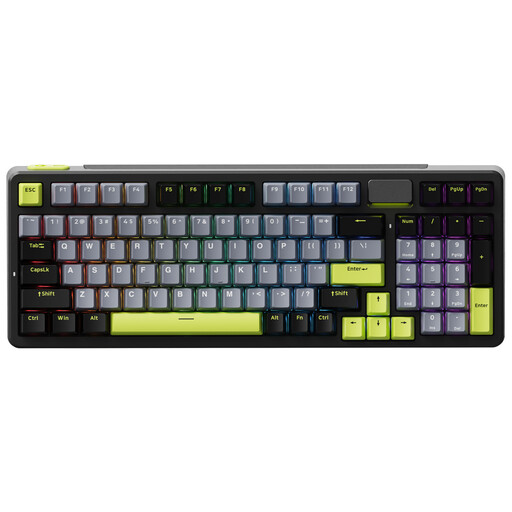
Consider this 96% board if you want a compact mechanical layout and US QWERTY suits your command and typing habits.
The title specifies tri-mode connectivity and a gasket mount. Confirm support for any particular remapping or macros your game requires.
Choose TKL when mouse room matters more than direct numpad access; choose full size if you regularly use the numpad or want more physical keys available without layers. A 60% board saves further space but omits keys that some tactical controls use.
Start with deliberate settings, then tune movement and command keys according to what your game requires. Check how the exact keyboard stores profiles and whether its configuration software supports your computer; SteelSeries notes that software features vary by platform on the Apex Pro TKL Gen 3.
Confirm the physical layout and key legends, connection method, included accessories, configuration-software compatibility and the seller’s warranty and return terms. Check the exact listing rather than assuming every variant in a product family has the same arrangement or bundle.
Ask the retailer about taking back your old keyboard. GOV.UK says retailers selling electrical equipment must offer take-back of waste equipment of the same type as an item a customer buys from them; check the retailer’s arrangement for handing it over.
No; check the marking information for the exact keyboard and where it will be supplied. GOV.UK’s Great Britain guidance covers England, Scotland and Wales, while Northern Ireland has a separate product-placement process.