Who each setup suits

Players short on sockets and desk space

If you want a self-contained device that can be charged and used away from a wall socket, consider a handheld PC or laptop before planning a tower and separate monitor. Check how often you would actually need to connect other equipment.

Players who need a larger tactical-game interface

Dense maps, dialogue and inventories may be easier for you to use on a laptop display than on an 8-inch handheld screen. Compare the exact games’ requirements with the configuration you intend to buy, and consider your preferred controls.

Players building a permanent desk setup

If you mainly play in one place and want to choose or change components separately, a desktop may justify the extra cables and powered equipment. Electrical Safety First advises checking an extension lead’s current rating and not connecting extension leads in series.

What matters when choosing

Handheld PC

Choose it when: You want an integrated screen and controls in a device you can use away from the socket after charging.

Trade-off: Small text and detailed maps may be uncomfortable; regularly adding a dock and monitor also reduces the simplicity of the setup.

Gaming laptop

Choose it when: You want a larger integrated screen and keyboard without committing to a separate tower and monitor.

Trade-off: Plan for the supplied charger during gaming, and count any external display or accessories you intend to connect.

Desktop PC

Choose it when: You play at one desk and place more value on selecting and changing separate components than on a compact setup.

Trade-off: The tower and monitor commonly need separate power connections, making socket access and cable planning more important.

Concern What to check Who this matters to
Socket use and clutter Count the powered devices in the setup you will actually use, including any monitor or dock. Check the rating of an extension lead if you need one. I have few accessible sockets and would rather play without a separately powered monitor or a tangle of cables. For around 40% of consumers, keeping the powered setup compact is the primary concern.
Readable interface and game requirements Compare each planned game’s published requirements with the exact PC configuration. Check whether its text, maps and controls suit the screen and input method. Long sessions with dense maps and menus make screen comfort important to me, but I also need the games I play to suit the device. Readability and game fit come first for roughly 30% of consumers.
Permanent setup and upgrades Decide which components you want to select or change separately. Count every powered item and keep the combined load within an extension lead’s marked limit. If I play at one desk, I may accept more cables to keep control over the display and other components. Around 30% of consumers would make that fixed-setup flexibility their main priority.

Buying pitfalls

  • Adding an extension lead without checking its load

    Overloading extension equipment can create a fire risk. Extra sockets do not increase the lead’s marked current limit.

    Electrical Safety First advises checking the lead’s rating against the connected appliances, using only one extension device per wall socket and never connecting extension leads in series.

  • Assuming a turn-based game needs little computing power

    Being a tactical RPG does not tell you whether a particular title will suit a particular PC configuration.

    List the games you intend to play and compare each game’s published minimum and recommended requirements with the exact model before buying.

  • Choosing a handheld without considering its interface

    An 8-inch screen and integrated controls may not be comfortable for everyone navigating detailed maps, text and inventories.

    Try a similarly sized screen if possible, and decide whether you would regularly want an external display or different controls.

    Using a monitor, dock, keyboard and mouse can add equipment to carry or accommodate at your desk.

  • Relying on a product family’s general specifications

    Configurations can differ within the same laptop or handheld range, so a family name alone does not identify the hardware or charger you will receive.

    Check the exact model number, processor, graphics, memory, storage, ports and included charger on the product detail page.

Brands to consider for these setups

Lenovo Legion

The Legion Go S is relevant if you are considering a handheld instead of a fixed desk setup.

  • Lenovo UK specifies a 55.5Wh battery and 65W adapter for the Legion Go S, supporting a compact charging setup.
  • Its 8-inch display may not suit players who want larger tactical maps and text; check the exact version and its game compatibility.

ASUS ROG

The ROG Ally X offers another handheld route for players comparing compact PC gaming devices.

  • ASUS ROG UK specifies an 80Wh battery for the ROG Ally X.
  • Battery capacity alone does not establish play time for your games; check the exact configuration and charging arrangements.

Valve Steam Deck

Steam Deck is relevant if your planned games are in your Steam library and you prefer handheld play.

  • Valve provides title-specific Steam Deck compatibility results that you can check for planned games.
  • Check each game’s current result rather than assuming that a handheld will suit every title in a genre.

HP OMEN

The OMEN 16 range is relevant if you want a laptop with a larger integrated display rather than a handheld.

  • HP UK presents OMEN 16 as a 16-inch gaming laptop range.
  • HP Support notes that components vary by configuration; compare the exact graphics, memory, storage and supplied adapter.

Joybuy product choices

These handheld and laptop choices suit players considering a self-contained alternative to a tower and separate monitor. Compare each exact configuration with your games, and check charging details if playing away from a socket matters to you.
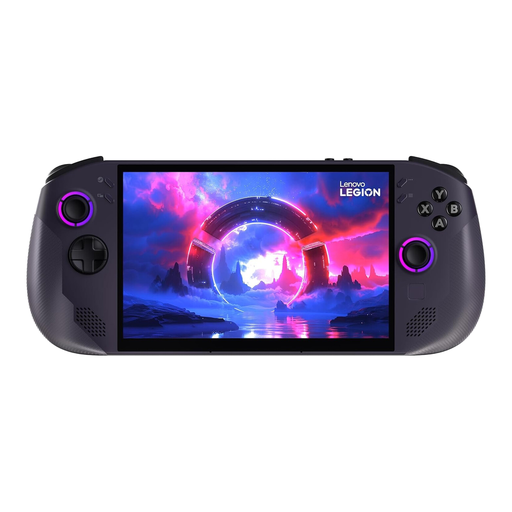
Lenovo Legion Go S handheld gaming PC

Lenovo Legion Go S, Ryzen Z2 Go, 1TB

Consider this handheld if reducing desk equipment matters more to you than having a large built-in screen. Check the requirements and handheld compatibility of your planned games, plus the included charger and likely unplugged play time.

Joybuy

Lenovo LOQ Essential 15ARP11 gaming laptop

Lenovo LOQ Essential 15ARP11, Ryzen 7 170, RTX 5050, 16GB RAM, 1TB SSD, 15.6-inch FHD 144Hz

Consider this laptop if you want a built-in screen and keyboard instead of a handheld’s controls or a separate desktop monitor. Compare its listed configuration with each planned game; check whether the included charger and unplugged gaming time suit your socket access.

Joybuy

Lenovo Legion Pro 7 16IAX10H gaming laptop

Lenovo Legion Pro 7 16IAX10H 83F5000UUK, Core Ultra 9, RTX 5090, 64GB RAM, 2TB SSD, 16-inch

The integrated 16-inch display may appeal if you want more room for maps and menus without powering a separate monitor. Check the exact game requirements, supplied adapter and expected gaming use away from mains power before choosing this configuration.

Joybuy

ASUS ROG Zephyrus G14 GA403WR-QS088W laptop

ASUS ROG Zephyrus G14 GA403WR-QS088W, 14-inch WQXGA+, 32GB, 2TB SSD, RTX 5070 Ti

Consider the 14-inch laptop format if you want an integrated display larger than a handheld’s while keeping a single-computer setup. Confirm the exact hardware configuration and colour on the product detail page, then check your games, included adapter and unplugged-use needs.

Joybuy

Stormforce Exobook 16-inch QHD+ laptop

Stormforce Exobook 16-inch QHD+, Ultra 9, 32GB, 4TB, 5080

The built-in 16-inch display may suit players who prefer a larger interface without a separate monitor. Confirm the exact graphics configuration—the description allows for an RTX 5080 or equivalent—and which of the stated 280W or 330W adapters comes with this variant. Check your games and expected use away from mains power as well.

Joybuy

Frequently asked questions

Is a handheld PC enough for tactical RPGs?

A handheld can suit tactical RPG play if the specific games meet its requirements and you are comfortable with its screen and controls. For Steam Deck, check Valve’s current compatibility result for each title; if detailed maps or small text concern you, consider a laptop display or whether you would use an external screen.

Can a gaming PC and monitor share one extension lead?

They can share a lead only when the combined connected load stays within its marked maximum current rating. Electrical Safety First advises against overloading extension equipment or connecting one extension lead to another; include every other connected device when checking the load.

Will a laptop or handheld eliminate the need for a monitor socket?

Its built-in display removes the need to power a separate monitor for basic play. If you expect to connect an external display, dock or other powered accessories regularly, count those items in the setup before deciding how many sockets you need.

How should I charge a portable gaming PC?

Use a charger suitable for the exact device and keep it on a hard, flat surface while charging. Electrical Safety First recommends the correct manufacturer-designed charger and advises against charging on soft furnishings; inspect plugs and cables for damage before use.