
24/7 Customer Support

Free returns

Same-day & Next-day Delivery

Quality Guaranteed

Unlock Your Welcome Offers: FREE Delivery | Up to 80% OFF | Free 30-day JoyPlus trial
Download the APP
A 75-inch television can transform a living room, but its size also makes buying mistakes more expensive. The TCL 75P7K 75-inch QLED 4K Smart TV combines QLED colour, HDR support, Google TV and gaming features in one large-screen format. Before ordering, however, it is worth checking whether the display technology, room layout and connectivity match the way your household watches and plays.
Some televisions advertise a 120Hz gaming feature without delivering native 4K 120Hz performance in every mode. On the TCL 75P7K, the supplied product information specifies DLG technology with a 120Hz Game Accelerator for Full HD resolution. It also lists HDMI 2.1, ALLM and VRR through its Game Master features.
That can still be useful for compatible consoles and PCs, particularly when smoother motion and reduced input delay matter. However, buyers should check the game console’s output settings and the TV’s supported resolution before assuming it operates at 4K 120Hz.
QLED uses a quantum-dot layer to produce a broad range of colours and bright, vivid images. It does not automatically mean the panel has the same black-level behaviour as an OLED display. The TCL 75P7K uses a Direct LED backlight and HVA panel, designed to provide contrast and more even brightness across the screen.
For films in a dim room, compare panel technology and local-dimming specifications rather than relying on the QLED label alone. In a bright UK lounge, vibrant colour and a large screen may be more important than cinema-style black levels.
A 75-inch screen is wide, heavy and difficult to manoeuvre through narrow corridors or up stairs. The product instructions recommend lifting it with two people and placing it on a stable, flat surface. If wall mounting, confirm the compatible mounting pattern, wall strength and cable access before delivery.
Leave at least 10cm of ventilation space around the set, as advised in the supplied safety information. Also measure the TV unit, viewing distance and doorways—not just the diagonal screen size.
The TCL 75P7K combines a 4K UHD resolution with QLED quantum-dot technology. Its listed HDR compatibility includes HDR10, HLG, HDR10+ and Dolby Vision, allowing it to handle content from a range of streaming services, consoles and disc players.
Dolby Vision can adjust HDR presentation scene by scene when supported by the source. The result still depends on the content, app, picture settings and room lighting. For UK households that switch between live television, films and streaming, broad format support reduces the likelihood of an incompatible HDR signal.
The built-in AiPQ processor is described as supporting real-time video processing, 4K upscaling and motion clarity. This is relevant because much live television and older content is not supplied in native 4K. Upscaling can make lower-resolution material appear cleaner, although it cannot recreate detail that was never present in the original broadcast.
The Motion Clarity feature is intended to improve the appearance of moving images. Sports viewers should still inspect settings carefully, as excessive motion processing can create an unnatural appearance.
This TCL Smart TV runs on Google TV, bringing supported streaming apps, content recommendations and Google Assistant integration into one interface. Hands-free voice control allows compatible commands to be spoken directly to the television, without picking up the remote.
It is also described as compatible with Alexa. Check account, language, region and privacy settings during setup, particularly if several household members use voice commands.
For sound, the television supports Dolby Atmos. This can provide a more spacious presentation from compatible content, but built-in speakers cannot always reproduce the depth of a separate soundbar or home cinema system. Buyers wanting stronger dialogue or bass should allow space and budget for an audio upgrade.
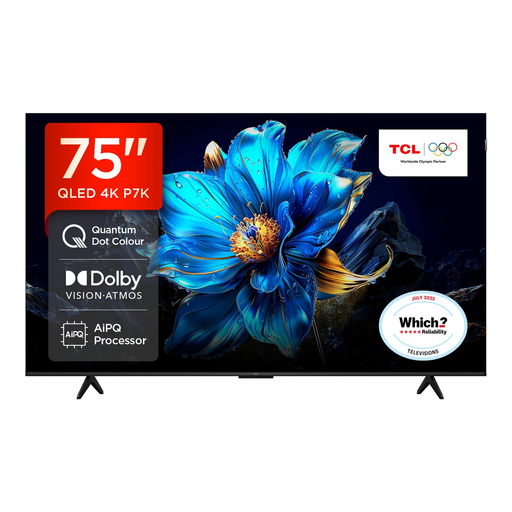
Why This Fits Their Persona: A single large-screen TV covers streaming, live television, films and console gaming without requiring separate smart devices.
It lists multiple HDR formats and Google TV rather than relying on a single headline feature. The 120Hz accelerator is clearly specified for Full HD gaming.
75-inch 4K QLED display, Dolby Vision and Dolby Atmos support, plus built-in voice control.
Why This Fits Their Persona: Viewers prioritising colour range, HDR compatibility and a clean bezel-less metal design get a cinema-oriented feature set in a large format.
It does not present QLED alone as a black-level guarantee; the Direct LED and HVA panel details are available for a more informed comparison.
QLED quantum-dot colour, support for HDR10+, Dolby Vision and HLG, and Dolby Atmos audio.
Why This Fits Their Persona: Households sharing the screen between films and gaming can use Game Master features, VRR and ALLM while retaining Google TV access.
The supplied specifications distinguish HDMI 2.1, VRR and ALLM from the Full HD 120Hz Game Accelerator, helping buyers set realistic expectations.
Game Bar controls, automatic low-latency mode and VRR support for compatible gaming equipment.
Use a High-Speed HDMI cable for 4K HDR sources and connect devices to the appropriate HDMI ports. During Google TV setup, connect to Wi-Fi, sign in if required and install available software updates. Review microphone and voice-assistant permissions if hands-free control is enabled.
Running cost depends on brightness, viewing hours, picture mode and standby behaviour. Check the product’s current UK energy label before purchase and avoid leaving connected devices powered unnecessarily. Actual electricity cost can be estimated from the TV’s kWh rating and your tariff.
We have compiled a complete, real-time list of products that fully satisfy these strict selection criteria and UK safety regulations.
It includes HDMI 2.1, ALLM and VRR features, which are relevant to compatible consoles. The listed 120Hz Game Accelerator applies to Full HD resolution, so check the console’s chosen resolution and refresh-rate settings before purchase.
Yes. The supplied specifications list Dolby Vision support for compatible HDR content and Dolby Atmos audio. The source device, app and programme must also support the relevant format.
Lifespan varies with usage, ventilation, software support and component wear. Keep the set dry, leave the recommended ventilation space, use a surge-protected supply where appropriate and install official software updates. Avoid switching it on and off repeatedly at the wall socket.