Families matching friends’ games
You are choosing the main device and need to check the specific games, friends’ platforms and online-play requirements before buying.


Start with the games your teenager wants to play and the platforms their friends use, then choose a compatible console or PC. A headset, controller or network accessory cannot fix a game or platform mismatch; check chat permissions, the play space and any game-specific online-service requirements separately.
You are choosing the main device and need to check the specific games, friends’ platforms and online-play requirements before buying.
You want to understand the chosen platform’s account, chat and spending settings before your teenager plays online.
You know where gaming will happen and want to decide whether a separate screen, headset or network change addresses a specific household need.
For a teenager’s online gaming setup, settle game and friends’ platform compatibility before choosing add-ons; account permissions, room layout and service terms need separate checks.
Choose when: the intended games and friends’ online arrangements fit the console platform.
Trade-off: check the exact console variant, game requirements, screen access and any online-service conditions.
Choose when: the required games or preferred PC controls call for this route, or a laptop’s built-in screen helps when the household television is in use.
Trade-off: check the exact configuration against each game’s requirements, and allow for desk space and power.
| Concern | What to check when buying | Who this matters to |
|---|---|---|
| Playing intended games with friends | Check the games’ supported platforms, cross-play rules, online requirements and whether physical discs are needed. | I want my teenager to join friends in the games they play, so I would confirm platform versions before buying. Around 28% of consumers put game-and-friend compatibility first. |
| Managing accounts and contact | Check the teenager’s account type, communication permissions and the game’s own chat and purchase settings. | I need to understand who my teenager can contact and how account settings work before choosing a platform. Around 28% of consumers prioritise account and contact management. |
| Voice chat in a shared room | Check where gaming will happen, the device’s audio and microphone connections, and whether a headset package includes a required splitter. | I want listening and voice chat to suit a shared room without assuming a headset changes account permissions. Roughly 17% of consumers prioritise shared-room communication. |
| Connection where gaming happens | Check the connection in the intended room, other household network use and whether an accessory suits the existing broadband setup. | I need to know whether the connection reaches my teenager’s play space before replacing otherwise suitable gaming equipment. About 16% of consumers focus on the home connection. |
| Ongoing costs and extras | Check the exact game’s online-service requirements, what the bundle includes and whether another controller or cable is needed. | I want to understand the required services and included accessories before adding extras to a compatible setup. Around 11% of consumers prioritise ongoing costs and missing accessories. |
A matching console category does not confirm that the specific game version supports playing together. Disc-free consoles also cannot use physical game discs.
Check the intended game’s platform versions and friend-play rules first, then choose the exact device variant and service arrangement.
Account permissions can govern communication independently of the microphone, and headset packages can differ in their included PC splitter.
Check the teenager’s account permissions and intended chat service, then confirm the headset connection and package contents.
An incompatible connection may mean needing an additional adapter.
Service requirements, games and the number of simultaneous players depend on the platform, game and bundle.
Check the requirements for the intended games, the exact bundle and whether another controller or accessory is needed before adding extras.
A setup may also require a membership, separately obtained games or an additional controller, depending on the game and bundle.
A router’s listed features do not establish how well a connection will work in a particular room or for a particular game.
Check the existing connection in the play location and concurrent household use before choosing a compatible network accessory.
PS5 disc and Digital Edition options may suit households whose games and friends fit the PlayStation platform.
Xbox Series S is a digital-console option alongside Xbox family privacy and communication settings.
Switch 2 may suit households considering a console that can move between play locations.
The LOQ laptop range is a PC route to consider when a built-in display suits the household’s play space.
Arctis Nova headsets are an accessory route for a suitable gaming device when listening and microphone use are needed.
A home router is a conditional option when the household has a specific coverage or concurrent-device issue.
These Joybuy choices cover console and PC main-device routes, plus a wired headset. Check the intended games and friends’ platforms before settling on a device.
 No image available
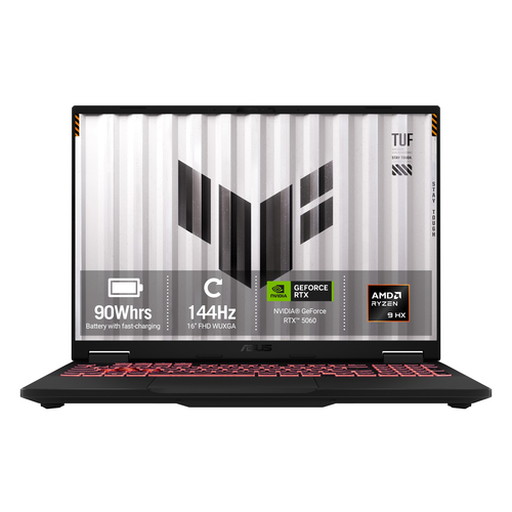
A laptop is a PC route with its own screen; check the exact games against this configuration.
Ryzen 9 8940HX; RTX 5060 Laptop GPU; 16 GB memory; 1 TB SSD; 16-inch WUXGA 144 Hz display; Windows 11 Home.
 No image available
Consider this console if you want a setup that can move between handheld and TV play; check GameChat requirements separately.
Nintendo says GameChat requires a Nintendo Switch Online membership; users under 16 need parental-controls app setup.
 No image available
A desktop is a PC route to consider when its listed configuration suits the intended games and household setup.
AMD Ryzen 7 5700X; RTX 5070; 32 GB RAM; 2 TB SSD; Windows 11 Home.
 No image available
Consider this digital-console route if the intended games and friends’ arrangements fit Xbox; disc-based games are not compatible.
512 GB SSD; HDMI 2.1 output; Xbox Wireless Controller included.
 No image available
Consider a headset when a compatible gaming device needs wired listening and a microphone; check account permissions separately.
32 mm drivers; flip-to-mute microphone; 3.5 mm connection.
Not necessarily. PlayStation child-account restrictions can disable text and voice communication, and Xbox family organisers can manage a member’s communication settings. Check the particular game as well as the platform account; a headset provides hardware, not permission.
Nintendo requires a Nintendo Switch Online membership, and an under-16 user needs parental setup through the linked Nintendo Switch Parental Controls app. Check the GameChat settings and friend approval arrangements before relying on the feature.
No. Nintendo says general parental restrictions are set for the console and apply to everyone who uses it. Check separate GameChat and Nintendo Account settings when planning a shared console.
It depends on the PC’s connection and the headset package. SteelSeries says the Arctis Nova 1 PC version includes a splitter for separate audio and microphone sockets, while console packages may not; check the exact package and device connections.
Check the requirements for the specific game and service. PlayStation specifies paid PlayStation Plus for online multiplayer on the cited PS5 models. Xbox distinguishes subscription multiplayer from free-to-play multiplayer, while Nintendo says Switch 2 GameChat requires Nintendo Switch Online membership. These conditions do not establish one rule for every game or service.