Who this guidance is for

Households with an existing line-connected alarm

If your alarm, pendant or sensors rely on a traditional phone line, ask whether your current equipment and response service will work after your household’s line changes. Ofcom advises customers to discuss care alarms and any equipment or installation needs with their provider.

Households that need calls during a power cut

Check separately what keeps the alarm connection powered and what allows you to make an emergency phone call. BT’s backup instructions, for example, distinguish its Smart Hub from the Openreach modem used with Full Fibre.

Carers coordinating a switchover

Ask the phone provider, telecare service and any installer to agree who supplies and connects the equipment, and how the alarm will be tested after the change. Westmorland and Furness Council advises households to follow their provider’s arrangements for phones and other important devices.

What to check before choosing

Ask your providers about the household’s migration plan first. Ofcom says some customers may need a router, adapter or handset, while the Telecommunications Equipment Council’s guidance highlights that analogue alarm signalling may be affected by digital networks.

Concern What to check when buying Who this matters to
Alarm reaches its response service Ask both providers to confirm the exact alarm, pendant, sensors and connection path, then agree a test with the monitoring service after installation. I need to know that the alarm will reach its intended response service after the change, not just that the phone works; around 36% of consumers put alarm continuity first.
Power-cut resilience Identify every powered part of the connection, including the alarm, router and any fibre modem. Ask which components have backup power and what the alarm service itself supports. If the mains supply or connection fails, I want to know what remains powered; around 29% of consumers prioritise outage resilience.
Equipment, installation and testing Confirm what the phone provider will supply or install, what the telecare service requires, and who will arrange an end-to-end alarm test. I need the phone and telecare providers to agree who supplies and tests the equipment before the appointment; around 21% of consumers put coordinated setup first.
Cost of a working service Once compatibility is confirmed, compare setup charges and any ongoing monitoring or connectivity charges. Check whether equipment is supplied as part of the service. I want to compare the cost of a workable monitored service, including continuing charges, rather than choose by upfront price alone; around 14% of consumers prioritise total cost.

Pitfalls to avoid

  • Assuming a working phone or an adapter proves alarm compatibility

    An ordinary call working over a new connection does not establish that an analogue alarm can signal its monitoring service reliably. The Telecommunications Equipment Council identifies potential issues for analogue alarm protocols on digital networks.

    Ask both providers to approve the exact alarm and connection, then arrange an end-to-end test with the response service.

    An unsupported alarm connection may mean arranging another migration or replacing equipment.

  • Backing up the router but overlooking other powered equipment

    For BT Full Fibre, BT’s instructions say the Openreach modem also needs backup power. The alarm’s own power and connection requirements are separate.

    Ask the providers to identify every powered component in both the phone and alarm paths and confirm what happens during an outage.

    A compatible backup supply may be needed for more than one piece of equipment.

  • Choosing an analogue-only alarm on upfront price alone

    An analogue-only unit may not suit a household’s migrated connection. Which? has warned about alarms offered during the switchover with unclear compatibility information.

    Confirm that the alarm and monitoring service will work after the change before comparing setup and ongoing service charges.

  • Assuming fall detection will alert someone after every fall

    Taking Care and Careline365 state that their fall-detection services may not detect every fall.

    Check the feature’s stated limits and ask how an alert can be activated manually and what response arrangements apply.

Telecare brands to consider

Tunstall

Lifeline Digital is a home hub to discuss with a telecare provider when an IP-connected alarm and compatible sensors are needed.

  • Tunstall lists Ethernet, Wi-Fi and cellular connectivity for Lifeline Digital.
  • These are manufacturer specifications, not confirmation that a particular monitoring centre or existing sensor is compatible.

Appello

SmartLife is a digital dispersed-alarm option presented for telecare and housing services coordinating alarm hubs and peripherals.

  • Appello describes Ethernet, Wi-Fi and 4G connection options.
  • Confirm the exact service configuration and peripheral compatibility; the brand’s comparative reliability claims are not independent evidence.

Taking Care

Its Digital Personal Alarm and Digital Fall Alarm are monitored service options to discuss when replacing a landline-connected alarm.

  • Taking Care describes the Digital Personal Alarm as connecting without a landline and lists a hard-fall detection feature for the Digital Fall Alarm.
  • The fall feature does not detect every fall. Check compatibility with an existing service, setup arrangements and ongoing subscription charges.

Careline365

A monitored home-alarm plan to discuss if the household is considering a new response service rather than only a telephone adapter.

  • Careline365 describes a care-team connection and a fall-detection feature.
  • The provider says no fall detector catches every fall and that SIM-dependent devices need mobile signal. Confirm the supplied hub and connection before choosing a plan.

BT

A phone-service-provider route for BT Digital Voice customers who need provider-arranged connection equipment and an outage plan, rather than a telecare monitoring service.

  • BT’s backup guidance covers powering a compatible Smart Hub and, for Full Fibre, the Openreach modem.
  • This does not establish that a particular telecare alarm can communicate with its monitoring service; ask BT and the telecare provider about the household’s setup.

Related Joybuy products

These listings are mobile Wi-Fi routers that may be relevant only if both providers approve a mobile-data connection for the alarm. They are not established replacements for a telecare alarm or monitoring service.
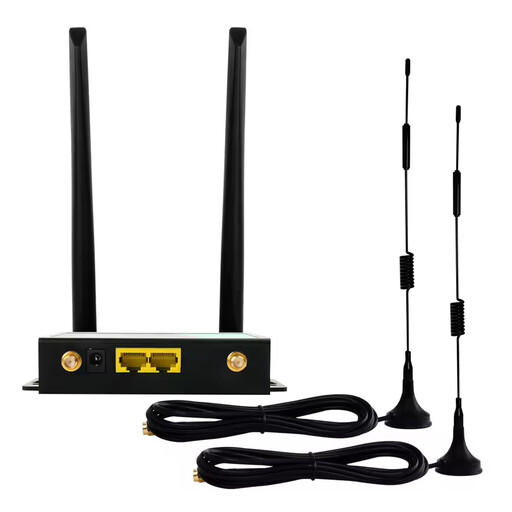
Unlocked 4G LTE Wi-Fi router

Unlocked 4G LTE Wi-Fi Router

The listing describes an unlocked 4G LTE Wi-Fi router; consider it only if both providers approve this connection for the household’s alarm.

4G LTE connectivity. A Wi-Fi connection alone does not confirm that an alarm will reach its response service, so agree an alarm-path test with the providers.

View on Joybuy
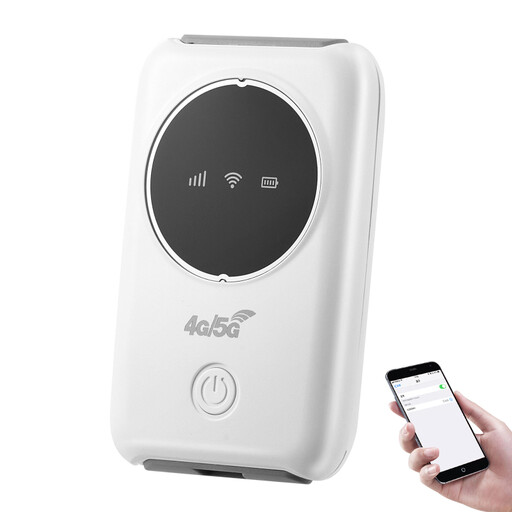
Portable 4G 5G mobile Wi-Fi hotspot with 3200mAh battery and Type-C charging

Portable 4G 5G Mobile Wi-Fi Hotspot, 3200mAh, Type-C

This portable hotspot may be relevant only if both providers approve a mobile internet connection for the household’s alarm.

The listing states a 3200mAh rechargeable battery, Type-C charging and support for 10 devices. Its battery does not establish that a connected alarm stays powered or reaches its response service; confirm the full setup with the providers.

View on Joybuy

Frequently asked questions

Does 31 January 2027 tell me when my own landline will change?

No. Ofcom identifies 31 January 2027 as BT’s planned retirement date for its old network and says dates for other operators’ own networks have not yet been set. Ask your phone provider for your household’s migration date and arrangements.

Can I test only the handset after the installer leaves?

No; agree with the telecare service how to test that the actual alarm reaches its intended monitoring or response service after installation. A successful ordinary phone call checks something different.

Does battery backup for a digital home phone also protect my alarm?

Not necessarily. BT’s guidance distinguishes powering its hub and, with Full Fibre, the modem; the alarm’s own requirements need a separate check. Ask both providers about the power and communication path used by your particular alarm.

Should I buy an alarm or adapter before speaking to my providers?

Ask first what equipment and installation the phone provider will arrange and whether the telecare provider supports the exact alarm connection. An analogue-only alarm or an unapproved adapter may not solve the monitoring problem.

What ongoing charges should I ask about?

Ask whether setup, monitoring, connectivity and any optional detection feature are included in the proposed service. Taking Care lists setup and subscription charges for its Digital Personal Alarm and Digital Fall Alarm; check the terms for the specific service you are considering.