Switch Sports motion-tennis players
If Nintendo Switch Sports is your tennis game, Nintendo identifies Joy-Con controls for racket-like swings and says the Nintendo Switch Pro Controller is not compatible.


Choose for the tennis game and platform before considering grip or battery life. Nintendo Switch Sports tennis uses supported Joy-Con controls, not a Nintendo Switch Pro Controller; for a conventional tennis game such as TopSpin 2K25, start with a controller supported by the version you play. For a long session, then check how you will keep that controller powered and whether local play calls for another one.
If Nintendo Switch Sports is your tennis game, Nintendo identifies Joy-Con controls for racket-like swings and says the Nintendo Switch Pro Controller is not compatible.
If you play a conventional tennis simulation, match the controller to your game version and platform. According to 2K, TopSpin 2K25 is available on PS5, PS4, Xbox Series X|S, Xbox One and PC via Steam.
If an interruption would matter, consider the controller’s power arrangement alongside game compatibility. Nintendo quotes approximately 40 hours for a fully charged Switch Pro Controller, depending on software and functions; Microsoft lists AA batteries and a rechargeable pack as Xbox Wireless Controller options.
For a long tennis-game session, establish the game’s controller requirements first. Power, hand fit and extra players matter only after you have a compatible setup.
| Concern | What to check | Who this matters to |
|---|---|---|
| Game compatibility | Check the exact game, platform and supported input method. Nintendo says Nintendo Switch Sports does not support Switch Pro Controllers. | If I want to swing a controller in Nintendo Switch Sports, a conventional pad cannot replace the supported Joy-Con setup. Around 36% of consumers would put game and platform compatibility first. |
| Session power | Check the charging arrangement and whether play can continue while charging; for an Xbox Wireless Controller, distinguish AA batteries from a rechargeable pack. | During a long match session, I would want a workable plan before a controller runs low. Keeping play uninterrupted would come first for around 29% of consumers. |
| Hand fit and controls | Assess grip and layout for your hands, and confirm any button-mapping options for the game you use. | If I use a conventional pad for hours, its shape and controls need to feel manageable to me. Around 21% of consumers would make hand fit and layout their primary concern. |
| Local play | Confirm the game mode’s controller requirements and how you would charge any additional compatible controllers. | If someone else will join me locally, I need the right number and type of controllers ready. That flexibility would be the main priority for around 14% of consumers. |
Nintendo says Nintendo Switch Pro Controllers are not compatible with Nintendo Switch Sports, regardless of their suitability for other supported Switch games.
Check the game name before buying: for Nintendo Switch Sports tennis, choose a supported Joy-Con controller setup.
Nintendo’s approximately 40-hour Switch Pro Controller figure depends on software and functions, and that controller cannot be used for Nintendo Switch Sports. An Xbox Wireless Controller has a different choice of AA batteries or a rechargeable pack.
Confirm compatibility first, then check charging time, the power equipment you need and whether your chosen arrangement allows play while charging.
Nintendo describes racket-like Joy-Con swings for Nintendo Switch Sports, while 2K lists TopSpin 2K25 on PlayStation, Xbox and PC. One game’s control approach does not establish what another supports.
Look up the supported controllers for your exact game and platform rather than choosing by the tennis theme alone.
Relevant to the distinction between motion-controlled Nintendo Switch Sports tennis and other Switch games that support a conventional controller.
Relevant to conventional tennis games on a supported Xbox console or Windows PC.
Relevant to PS5 tennis-simulation players considering a DualSense controller and a two-controller charging arrangement.
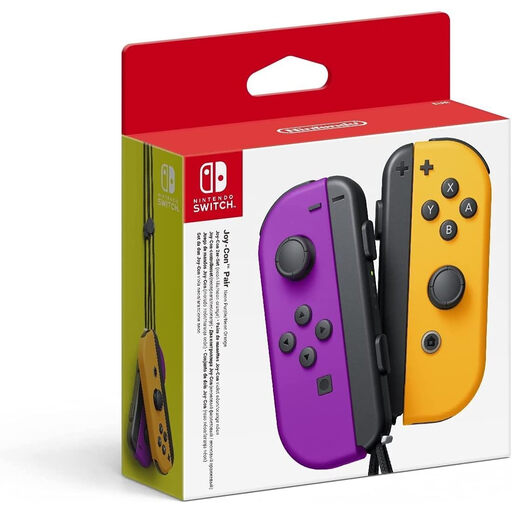
This Joy-Con pair is a choice for the supported Joy-Con control route in Nintendo Switch Sports tennis. For a long session, check that its charging arrangement suits when and how you play.
 No image available
For Nintendo Switch Sports tennis, this pair follows the Joy-Con controller route described by Nintendo. Check how you will recharge the controllers around longer sessions.
No. Nintendo says Nintendo Switch Pro Controllers and Nintendo Switch 2 Pro Controllers are not compatible with Nintendo Switch Sports; use a supported Joy-Con control setup for tennis in that game.
It may suit a Switch tennis game that supports it, but not Nintendo Switch Sports. Nintendo quotes approximately 40 hours from a full charge and approximately six hours to charge; runtime can be shorter depending on software and functions.
An Xbox Wireless Controller can use AA batteries or a rechargeable battery pack, according to Microsoft. Rechargeable AA batteries need charging outside the controller; Microsoft says its rechargeable battery with USB-C cable can charge before, during and after gameplay.
Sony says its DualSense Charging Station can charge up to two DualSense or DualSense Edge controllers at once without connecting them to the PS5. The controllers are sold separately.