Choose a controller for your console, tennis game and play mode before deciding how to power it. Nintendo Switch Sports does not support Switch Pro Controllers, while Mario Tennis Aces offers Joy-Con motion control in Swing Mode; for compatible games on other consoles, a PS5 DualSense can charge through the console and a standard Xbox Wireless Controller can use AA batteries or a rechargeable pack. Check the available charging connections and the number of controllers your game requires.
Who is this for?
Switch motion-tennis players
If you want to swing a controller like a racket, the game mode determines what to buy. Nintendo documents Joy-Con and Joy-Con 2 play styles for Nintendo Switch Sports, while Mario Tennis Aces offers Joy-Con motion controls in Swing Mode.
Console owners short on wall sockets
If another mains charger would be awkward, consider how your existing console powers controllers. PlayStation documents PS5 USB charging, Nintendo documents charging Joy-Con while attached to a powered Switch, and Xbox offers AA-battery or rechargeable-pack options for its standard Wireless Controller.
Households adding local players
Check both the player count and the controller arrangement before buying extras. Nintendo lists 1–4 players for Mario Tennis Aces and describes sharing a Joy-Con with a friend; PlayStation lists 1–4 players for TopSpin 2K25 on PS5 and PS4. The controller each person needs still depends on the selected game and mode.
What matters when choosing?
Start with the exact console and tennis mode, then choose a power arrangement that works with your available sockets and ports. For motion play, controller compatibility matters more than whether a gamepad can be charged conveniently.
| Concern |
What to check |
Who this matters to |
| Game and motion compatibility |
Check the exact game and mode against its supported controllers. Nintendo excludes Switch Pro Controllers from Nintendo Switch Sports; Mario Tennis Aces offers Joy-Con motion play in Swing Mode. |
If I want racket-like swings, I need a controller that works in that mode, not merely with my console. Around 42% of consumers put game and motion compatibility first. |
| Controller power |
Check for a usable console charging connection or choose a supported battery option. Confirm rest-mode USB settings and whether a Joy-Con grip actually charges. |
When wall sockets are scarce, I want a way to keep playing without adding a dedicated controller charger. For around 33% of consumers, the power arrangement comes first. |
| Additional players and handling |
Check how many local players the game supports and what each needs. For detached wireless Joy-Con play, Nintendo says to attach the straps. |
If family or friends join in, I need enough suitable controllers and a practical way for everyone to use them. Around 25% of consumers place the extra-player setup first. |
Mistakes to avoid
-
Assuming every Switch controller works for motion tennis
A conventional controller cannot be assumed to replace Joy-Con motion input. Nintendo says Nintendo Switch Sports does not support Switch Pro Controllers, and Mario Tennis Aces uses Joy-Con motion controls in Swing Mode.
Check the controller requirements for your exact tennis game and mode before choosing between motion and conventional controls.
-
Confusing a Joy-Con Grip with a charging grip
According to Nintendo, the standard HAC-011 Joy-Con Grip does not charge the controllers; the separate HAC-012 Charging Grip does.
Check the grip model and package contents if you plan to charge Joy-Con while using a grip. Joy-Con can also charge while attached to a Switch that is connected to power and on or in sleep mode.
A separate charging grip or another supported charging arrangement may be needed if attached-console charging does not suit your setup.
-
Assuming AA batteries need no further planning
The standard Xbox Wireless Controller accepts AA batteries or a rechargeable battery pack, but rechargeable AA cells do not charge inside the controller, according to Xbox Support.
Decide whether you prefer replacing AA cells, charging rechargeable AAs externally, or using a compatible rechargeable pack with USB charging.
Replacement cells or an external AA charger add an ongoing supply or equipment requirement.
Relevant brands for these controller routes
Nintendo
Relevant to Switch tennis games with Joy-Con motion play, including Nintendo Switch Sports and Mario Tennis Aces Swing Mode.
- Nintendo documents Joy-Con and Joy-Con 2 play styles for Nintendo Switch Sports and Joy-Con motion controls for Mario Tennis Aces Swing Mode.
- Nintendo Switch Sports does not support Switch Pro Controllers. The standard HAC-011 Joy-Con Grip does not charge Joy-Con.
PlayStation
Relevant if you already use a PS5 for a compatible tennis game and can charge a DualSense through the console.
- PlayStation describes the DualSense as having a built-in battery and USB-C port, and documents controller charging through a PS5.
- Charging needs an available USB connection; rest-mode charging depends on the console’s USB power settings. Game compatibility must be checked separately.
Xbox
Relevant to compatible Xbox or PC tennis play where replaceable batteries or console-based USB charging suit the setup.
- Xbox Support says the standard Xbox Wireless Controller accepts AA (LR6) batteries or a rechargeable battery pack.
- Rechargeable AA cells need an external charger; a rechargeable battery pack still needs a charging connection.
PowerA
A wired Switch-controller option to consider only for a tennis game and mode that support conventional wired controls.
- The PowerA Enhanced Wired Controller example uses a USB connection, avoiding controller battery charging.
- A cable restricts player position and uses a console USB connection. Do not assume a wired controller supports motion-focused tennis modes.
Joybuy controller choices
These controllers cover three different setups: Joy-Con for supported Switch motion play, DualSense for compatible PS5 tennis games, and a wired Switch controller for games that accept conventional controls. Choose by your game’s controller requirements before comparing charging arrangements.
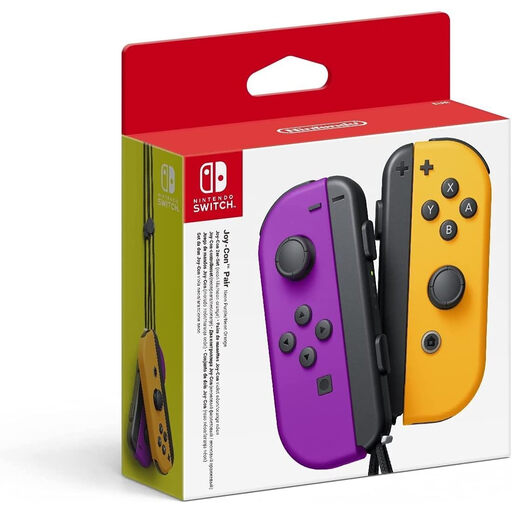 Image unavailable
Nintendo Joy-Con Pair – Neon Purple/Neon Orange
Consider this pair for a Switch tennis mode that supports Joy-Con motion input, such as Mario Tennis Aces Swing Mode. Check compatibility with your Switch model and selected game; Nintendo says detached wireless Joy-Con should be used with straps. Confirm the included accessories if you need a particular charging arrangement.
View on Joybuy
 Image unavailable
Sony PlayStation 5 DualSense V3 – Starlight Blue
Consider this controller if you have a PS5 and your tennis game supports DualSense. PlayStation documents charging a compatible controller through the console’s USB connection, subject to the relevant power settings. Check whether the package includes the cable you need.
View on Joybuy
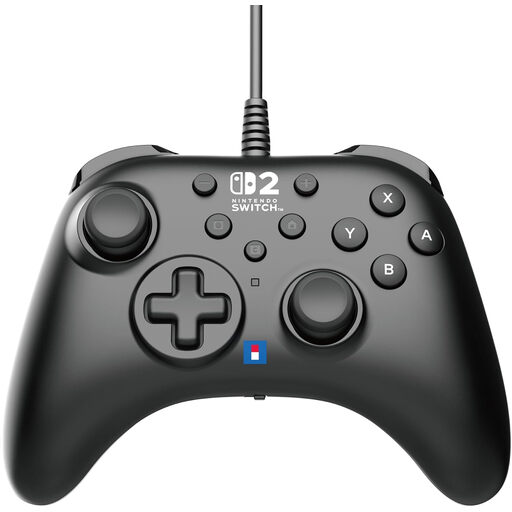 Image unavailable
HORI HORIPAD Turbo Wired Controller – Black (Nintendo Switch)
Consider this wired controller only if your Switch tennis game supports conventional wired controls and a console USB connection is available. Its cable limits where you can play, and this model has no motion controls; it is not a substitute for Joy-Con in a mode that requires motion input.
View on Joybuy
Common questions
Can I use a Switch Pro Controller for Nintendo Switch Sports tennis?
No. Nintendo’s Nintendo Switch Sports FAQ says Switch Pro Controllers are not compatible with the game. Check its supported Joy-Con or Joy-Con 2 configuration for the sport and console you intend to use.
Can I charge a tennis-game controller without another wall socket?
You can use an existing console charging path where the controller and setup support it. PlayStation documents charging compatible controllers through a PS5, while Nintendo documents charging Joy-Con attached to a Switch connected to power. The standard Xbox Wireless Controller can instead use AA batteries; check USB connections and power settings before relying on console charging.
Does the Joy-Con Grip included with a Switch charge Joy-Con?
No. Nintendo says the included HAC-011 Joy-Con Grip does not charge Joy-Con; the separate HAC-012 Joy-Con Charging Grip does. Check which model you have before planning to charge while using a grip.
What should I do before swinging a detached Joy-Con?
Attach and wear the Joy-Con strap. Nintendo instructs players to use the straps when Joy-Con are detached for wireless play; check that you have the accessories needed for everyone playing.


