Active Switch Sports players
If you want to swing a controller like a racket while playing tennis with others, Nintendo describes Joy-Con motion play for Switch Sports. Plan for a screen-based setup: the game does not support handheld mode.


Choose Joy-Con controllers for racket-swing tennis in Nintendo Switch Sports; Nintendo says Switch Pro Controllers are not compatible with that game. For a conventional tennis game such as TopSpin 2K25, choose a controller for your game platform instead. Room brightness chiefly changes the decision for PS VR2 tracked play: Sony advises sufficient room light for tracking but closed curtains to avoid direct sunlight.
If you want to swing a controller like a racket while playing tennis with others, Nintendo describes Joy-Con motion play for Switch Sports. Plan for a screen-based setup: the game does not support handheld mode.
If you prefer conventional controls for a game such as TopSpin 2K25, start with the version you play. 2K lists PlayStation, Xbox and Steam for PC versions; controller compatibility still needs to match your particular setup.
If you already have the required VR hardware and a compatible tennis game, tracked controllers may suit you when you can manage sunlight. Sony advises keeping curtains closed against direct sunlight during PS VR2 setup.
Choose for the tennis game and platform first; assess direct sunlight separately if you intend to use PS VR2 tracking.
| Concern | What to check | Who this matters to |
|---|---|---|
| Racket-swing play | For Nintendo Switch Sports, choose compatible Joy-Con or Joy-Con 2 controllers, not a Switch Pro Controller. Check that your play setup allows detached controllers and wrist straps. | If I want tennis to involve physical swings with other players, conventional buttons will not give me the Switch Sports motion-control experience. Around 50% of consumers would put racket-swing play first. |
| Game-platform fit | Match the controller to your exact TopSpin 2K25 version and console or PC setup. PlayStation lists DualSense vibration support specifically for the PS5 version. | When I already play a tennis simulation on a particular platform, I need a controller that works with that setup rather than one chosen for motion play. Platform fit would come first for around 30% of consumers. |
| VR tracking in daylight | For PS VR2, check whether you can keep direct sunlight out while maintaining enough room light for tracking and clearing the play area. | If I want tracked VR tennis in a sunny room, I need to be able to control the light before committing to that setup. Around 20% of consumers would make VR tracking their primary concern. |
Nintendo says Nintendo Switch Pro Controllers and Nintendo Switch 2 Pro Controllers are not compatible with Nintendo Switch Sports.
Check the game’s controller requirements and choose compatible Joy-Con or Joy-Con 2 controllers for its tennis mode.
Sony advises room lighting for PS VR2 tracking while keeping curtains closed to avoid direct sunlight.
Assess the play area at the time you normally play. Make sure you can block direct sunlight and clear the surrounding space before choosing tracked VR play.
A product page does not establish that the exact controller variant is currently available.
Check the variant, availability, seller details and compatibility again before placing an order.
Nintendo instructs players to attach Joy-Con straps when using the controllers detached.
Check that you have compatible straps for the controllers you will use, attach them and leave space for swings.
Nintendo’s Joy-Con route is relevant to racket-style tennis in Nintendo Switch Sports.
DualSense is relevant to conventional PS5 tennis play; PS VR2 Sense controllers serve a separate tracked-VR setup.
Xbox controllers are relevant to conventional tennis play on an Xbox platform supported by the chosen game.
These choices cover a Joy-Con pair for Switch Sports motion play and conventional controllers for PlayStation or Xbox-based tennis setups. Choose by your game and platform rather than treating them as interchangeable.
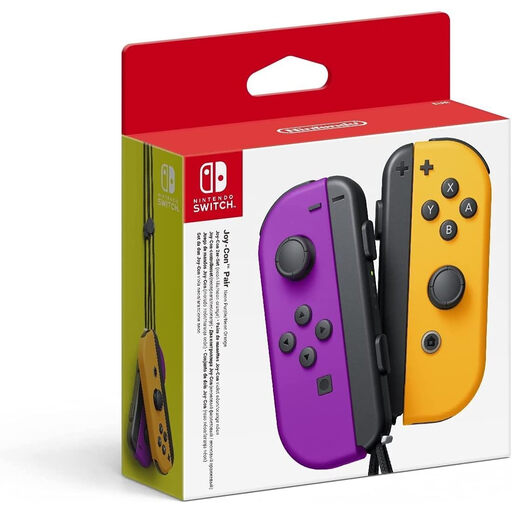 No image available
A Joy-Con pair is the controller type to consider for racket-swing tennis in Nintendo Switch Sports.
Check whether compatible wrist straps are included before detached motion play; Nintendo instructs players to use them.
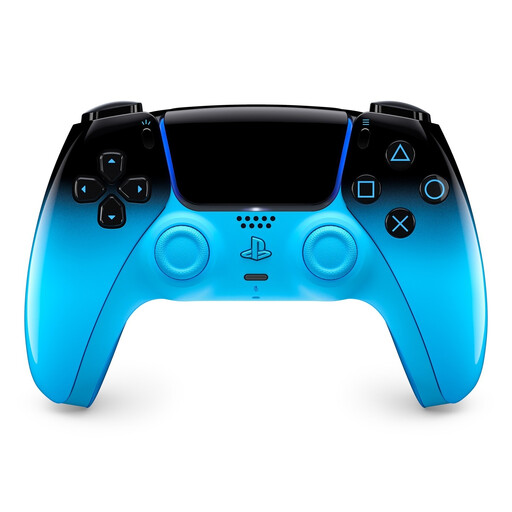 No image available
Consider this PS5 controller for conventional tennis play; PlayStation lists DualSense vibration support for the PS5 version of TopSpin 2K25.
The product title also names PC, Mac and mobile use. If playing on one of those devices, check support for your exact game and controller features.
 No image available
Consider this conventional controller for an Xbox tennis-game setup rather than Switch Sports motion play.
The title names Xbox One, Xbox Series X|S and PC. Confirm compatibility with your exact console or PC setup before buying.
 No image available
Consider this standard-control option if you play a tennis game on a compatible Xbox setup.
If you intend to use it on a PC, check the game and connection requirements for your setup.
 No image available
Consider this conventional controller if your tennis game and setup support an Xbox or Windows PC controller.
The title names Xbox Series X|S, Xbox One and Windows 10/11 PC. Check compatibility with the exact game and device before buying.
Choose a standard controller for your game platform, not for the room’s brightness. The specific lighting instructions here concern PS VR2 tracking: Sony advises enough room light for tracking while closing curtains against direct sunlight.
No. Nintendo says both Nintendo Switch Pro Controllers and Nintendo Switch 2 Pro Controllers are incompatible with Nintendo Switch Sports; choose compatible Joy-Con or Joy-Con 2 controllers for that game.
Use a supported screen-based play setup, leave room to swing and attach the straps to detached Joy-Con controllers. Nintendo says Switch Sports does not support handheld mode and instructs players to wear Joy-Con straps during detached use.
Nintendo gives approximately 3.5 hours for a full Joy-Con charge and up to 20 hours of continuous use. Actual battery life varies with the software and actions used.
Take an unwanted controller to an appropriate electrical-waste collection point rather than placing it in general household waste. GOV.UK says waste electrical products can be taken to a local household waste recycling centre.