What to check before choosing
Start with the laptop connection and charging requirement if freeing a socket is essential. Then choose the screen shape and resolution around the map layout you use most often.
| Concern |
What to check |
Who this matters to |
| One-cable laptop setup |
Confirm USB-C video support on the laptop and monitor, then compare the monitor’s Power Delivery output with the laptop’s charging requirement. |
If I have only one free socket, I need the monitor to show my work and charge my laptop without its separate charger. Around 36% of consumers put that single-cable need first. |
| Fine map detail |
Compare native resolutions and check that the laptop and mapping software can use the intended resolution at a readable scale. |
When I edit dense contours and labels, I want room for the map and its tools without constantly hiding panels. For around 29% of consumers, usable detail is the primary concern. |
| Horizontal workspace |
Compare screen width, vertical pixel count and the space available on the desk. |
I need to see a map beside reference material without adding another monitor. A wider single-screen layout comes first for around 21% of consumers. |
| A future second display |
Check the computer’s external-display support and the monitor’s specific downstream display connection. |
If I may add a second screen later, I do not want to assume that a USB-C socket guarantees daisy-chaining. Around 14% of consumers prioritise a compatible expansion path. |
Joybuy monitors for this setup
These monitors offer different screen formats and USB-C options for terrain-map work. If freeing a plug socket is the goal, check each model’s video connection and charging output against your laptop before choosing by screen size alone.
 No image available
Acer X Predator X49X 49-inch curved QD-OLED monitor
Consider its 32:9 format if you want a map beside reference windows and have room for a 49-inch display.
The name specifies Double Quad HD, USB-C and DisplayPort connections. Confirm your laptop’s USB-C video and charging compatibility before planning a one-cable setup.
View on Joybuy
 No image available
ASUS ProArt PA278CV IPS WQHD monitor
Consider this WQHD option if your mapping work calls for a conventional desk display rather than a very wide screen.
Check the laptop’s USB-C video support and the monitor’s Power Delivery output before depending on it for laptop charging.
View on Joybuy
 No image available
Dahua 32-inch curved 4K OLED monitor, Type-C 65W
If native pixel detail matters for terrain imagery and labels, this model is specified at 3840 × 2160.
Its name lists a USB hub and Type-C 65W. Confirm that the Type-C connection accepts laptop video and that 65W meets your laptop’s charging requirement.
View on Joybuy
 No image available
ASUS ZenScreen MB249C IPS USB-C monitor
Consider this USB-C model if your mapping desk needs a flexible display arrangement rather than the greatest available map detail.
Check its mounting arrangement and your laptop’s video and charging requirements; confirm the product weight if you expect to move it regularly.
View on Joybuy
 No image available
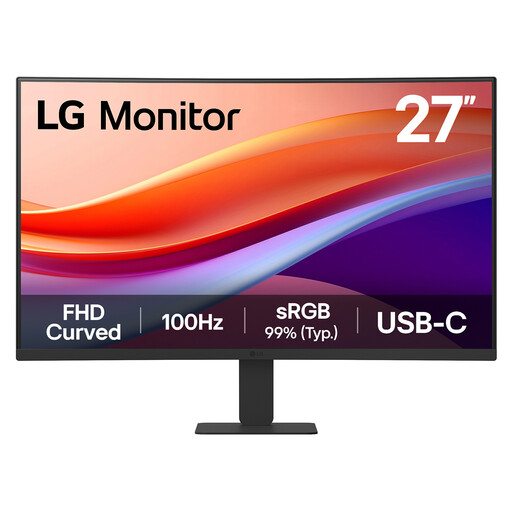
LG 27U421A 27-inch curved FHD VA monitor
Consider this model for a less detail-heavy map layout where a curved FHD screen meets your workspace needs.
The name lists 1080p resolution, USB-C and HDMI. Confirm the USB-C charging output against your laptop’s requirement before expecting to leave its charger unplugged.
View on Joybuy
Frequently asked questions
Can one USB-C cable replace my laptop charger and display cable?
Yes, if the laptop can send video through that port and the monitor supplies enough Power Delivery for its charging requirement. RTINGS advises checking for Thunderbolt or DisplayPort Alt Mode for video; compare the monitor’s stated wattage with your laptop’s requirements rather than relying on the USB-C connector alone.
Should I choose 27-inch 4K or a 34-inch ultrawide for terrain maps?
Choose by the layout you need: a 27-inch 4K screen suits work that prioritises native pixel detail and vertical workspace, while a 34-inch ultrawide suits a map beside other windows. LG specifies 3840 × 2160 for its 27U730A-B; Dell specifies 3440 × 1440 for its P3425WE, which is wider in pixels but has fewer vertical pixels.
Will any USB-C monitor let me daisy-chain a second screen?
No. The computer, monitor connections and cable path must support the intended multi-display arrangement. Dell also cautions that some M-series chips may not support certain features, so check the exact laptop and monitor before making daisy-chaining part of your purchase decision.
Do I need to check the USB-C cable in the box?
Yes. Confirm both whether a cable is included with the exact monitor and whether it supports the video and charging connection you intend to use. A USB-C cable’s presence alone does not establish that it suits every one-cable laptop setup.
What should I do with an old monitor when replacing it?
Ask the retailer about its current take-back or recycling arrangements for your old monitor. GOV.UK provides UK waste electrical and electronic equipment guidance for manufacturers, importers and distributors; that guidance does not, by itself, identify a collection arrangement for your particular purchase.


